Request a Callback

+971 4380 1666
 Aug 18, 2026

This guide breaks down what Primavera P6 actually is, how Critical Path Method (CPM) scheduling works inside it, what current pricing looks like, and how to learn Primavera P6 software effectively in 2026.
Along the way, you'll find the most common beginner mistakes, practical guidance on building and maintaining schedules, resource and cost management, reporting, comparisons with competing tools, integrations, the DCMA 14-Point Assessment, troubleshooting, interview prep, career advice, and more.
What Is Primavera P6 Software, and Who Actually Uses It?
How Does CPM Scheduling Work in Primavera P6?
What Are the Most Common Primavera P6 Beginner Mistakes?
How Do You Build Your First Primavera P6 Schedule?
How Does Resource & Cost Management Work in Primavera P6?
How Do Reporting, Dashboards & Data Security Work in P6?
What Are the Different Primavera P6 Editions and Cloud Options?
Primavera P6 vs. Microsoft Project vs. Asta vs. Oracle Primavera Cloud
What Does Primavera P6 Integrate With?
How Much Does Primavera P6 Cost? (Pricing, Pros & Cons)
What Is the DCMA 14-Point Schedule Quality Assessment?
How Do You Fix Common Primavera P6 Errors?
What's New in Primavera P6 Version 25.12?
Is Primavera P6 Worth Learning?
Primavera P6 Career Path
Final Thoughts: Is Primavera P6 Training Worth It?
Primavera P6 Glossary
Primavera P6 FAQs
Primavera P6 is purpose-built for large, complex, multi-project environments where thousands of activities, resources, costs, and dependencies must be planned, tracked, and controlled with precision. Unlike simpler task-management or Gantt-chart tools, P6 is a full Critical Path Method (CPM) scheduling engine. It supports detailed resource loading, cost control, baseline comparisons, what-if analysis, and multi-user collaboration across an organisation.
A comprehensive Primavera P6 Training program therefore goes beyond simply creating Gantt charts. It teaches participants how to build project schedules, develop WBS structures, define activities and relationships, assign calendars and resources, calculate critical paths, analyse float, establish baselines, update progress, and evaluate schedule performance.
This depth makes Primavera P6 particularly valuable for professionals working on construction, engineering, infrastructure, oil and gas, and major industrial projects, where accurate planning, scheduling, monitoring, and project control are essential.
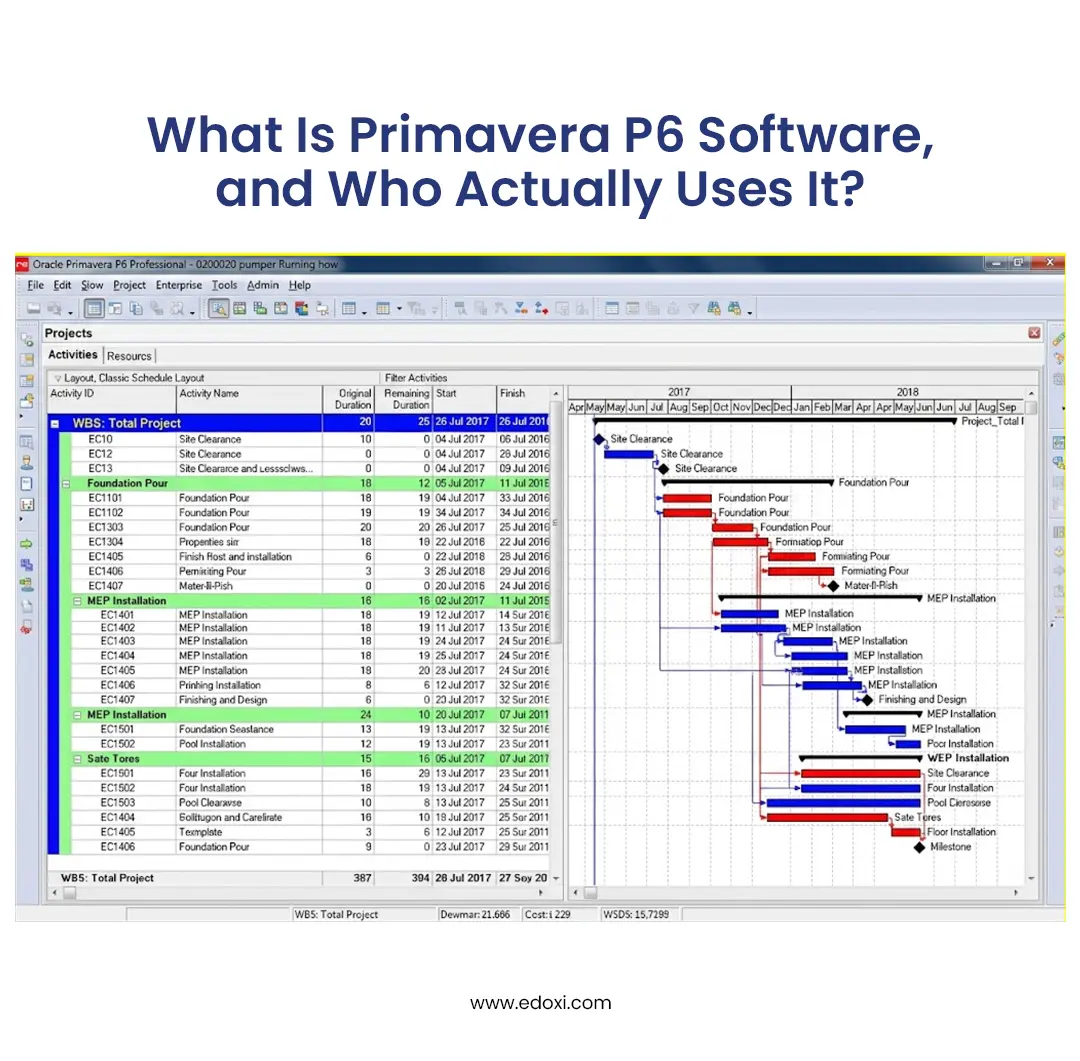
Primavera P6's roots go back to the late 1990s and a company called Eagle Ray Software Systems. Eagle Ray developed an enterprise project management platform that competed with tools such as Artemis and Open Plan. Primavera Systems acquired Eagle Ray in 1999 and rebranded the product (initially as P3e / TeamPlay).
The native file format still carries the original identity: XER stands for "eXport Eagle Ray."
In 2008, Oracle acquired Primavera Systems and integrated the software into its enterprise portfolio. The product has carried the "P6" name since version 6 (released in 2007) and continues to evolve under Oracle's Construction & Engineering business unit. It has remained the dominant tool for project controls ever since.
P6 simply stuck as the product name starting with version 6. Later major releases kept the P6 branding even as the underlying version numbers advanced.
XER is the classic proprietary export/import format. The letters stand for eXport Eagle Ray — a living reminder of the software's original developer.
P6 dominates in sectors where projects are large, long, and expensive to get wrong:
Typical users include project schedulers, planners, and project controls managers and, increasingly, project managers and site engineers who need to read a schedule even if they'll never build one from scratch.
Related reading:What are the Top Industries Hiring Primavera P6 Professionals in Dubai
Primavera P6 is used for;
Related reading:What are the Essential Primavera P6 Skills Every Project Professional Needs?
Here’s a quick-reference guide to the core concepts used in Oracle Primavera P6;
| Term | What It Means |
| EPS (Enterprise Project Structure) |
Top-level hierarchy organising every project in the database
|
| OBS (Organisational Breakdown Structure) |
Management hierarchy that controls who can see/edit what
|
| WBS (Work Breakdown Structure) |
Breaks one project into phases/deliverables with activities nested underneath
|
| CPM (Critical Path Method) |
Scheduling logic identifying the zero-float sequence that sets project duration
|
| Baseline |
A saved snapshot of the schedule, used to measure progress and delay
|
Critical Path Method (CPM) scheduling forms the analytical foundation of Primavera P6. It calculates the earliest and latest possible dates for every activity, identifies the longest sequence of dependent work (the critical path), and quantifies the amount of schedule flexibility available.
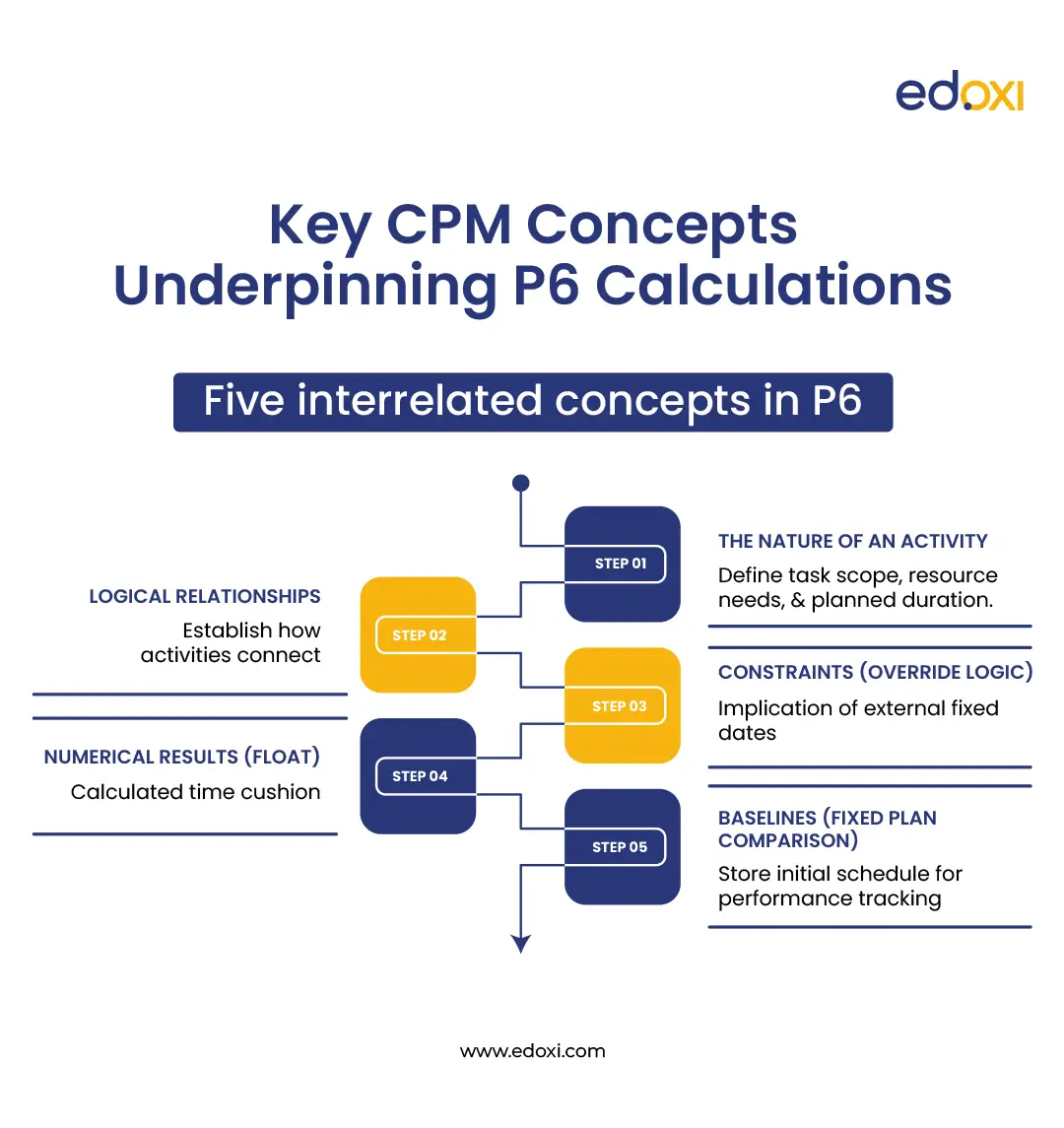
Five interrelated concepts underpin virtually all CPM calculations in P6:
The nature of an activity
The logical relationships that connect activities
Factors that can override pure logic (constraints)
The numerical results of the calculation (float)
The comparison of actual progress against a fixed plan (baselines)
Each concept builds directly on the preceding one. Once these are understood, the standard ten-step scheduling workflow becomes immediately coherent.
Every discrete task in a P6 schedule is represented as an activity.
User-Defined Fields (UDFs) store activity-specific data (drawing references, contractor names, purchase-order numbers, etc.).
A frequent structural error is the interchange of these two elements: activity codes serve grouping and analysis across many activities; UDFs attach discrete facts to individual activities.
Logical relationships define the sequence and dependency between activities. Primavera P6 supports four relationship types:
| Relationship Type | Definition | Typical Usage |
| Finish-to-Start (FS) | The successor may not start until the predecessor has finished | Most common |
| Start-to-Start (SS) | The successor may start once the predecessor has started | Parallel work |
| Finish-to-Finish (FF) | The successor may not finish until the predecessor has finished | Concurrent completion |
| Start-to-Finish (SF) | The successor may not finish until the predecessor has started | Rare |
A lag may be applied to any relationship to introduce a deliberate time offset (positive lag for delays such as concrete curing or mobilisation; negative lag for overlap).
In addition, an activity may be suspended and resumed. P6 records the suspend and resume dates independently so that the interruption remains visible in reports rather than being absorbed into an extended original duration.
Constraints impose external date restrictions that override the dates produced by pure network logic. Common examples include "Start On or After" a permit-issuance date or "Must Finish By" a contractual milestone.
While constraints are essential for modelling real-world immovable dates, excessive use of hard constraints obscures the underlying logic, distorts float calculations, and reduces the schedule's predictive value. Best practice is to apply the minimum number of constraints necessary and to prefer soft or "on or after/on or before" constraints wherever possible.
Schedule calculation in P6 consists of a forward pass (earliest start and finish dates) followed by a backward pass (latest start and finish dates). The difference between these dates yields float.
Activities possessing zero total float constitute the critical path; the longest continuous chain of dependent activities that determines the minimum project duration.
Large or complex schedules frequently contain multiple near-critical paths (sometimes termed multiple float paths). A schedule that appears healthy when only the primary critical path is examined may still carry significant risk if secondary chains retain only a few days of float.
Once the initial schedule has been reviewed and formally approved, it is stored as a baseline. Subsequent updates of the live schedule are compared against this fixed reference to quantify variance (ahead of, on, or behind plan) in both time and cost. Baseline comparison underpins the majority of formal progress reporting and performance analysis performed in P6.
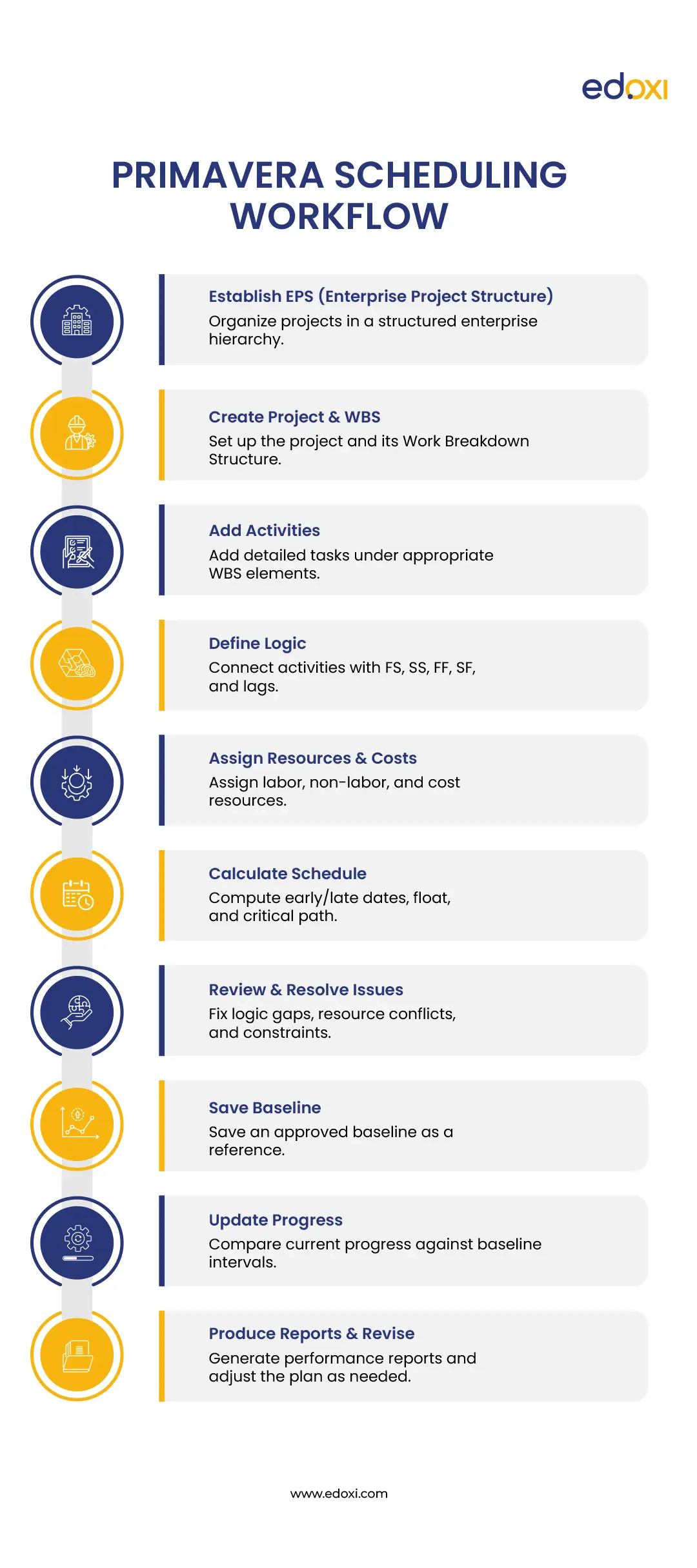
The following are the ten stps primavera p6 scheduling workflow;
Establish the Enterprise Project Structure (EPS).
Create the project and define its Work Breakdown Structure (WBS).
Add activities beneath the appropriate WBS elements.
Define logical relationships (FS, SS, FF, SF) and any required lags.
Assign resources and associated costs.
Calculate the schedule to determine early/late dates, float, and the critical path.
Review and resolve logic gaps, resource over-allocations, and unnecessary constraints.
Save an approved baseline.
Update progress at regular intervals and compare the current schedule against the baseline.
Produce reports and revise the plan as required.
Even experienced project professionals make the same handful of mistakes when they first start using Primavera P6. These errors rarely come from lack of effort; they come from treating P6 like a simple Gantt-chart tool instead of a CPM engine. The good news is that every one of them is easy to avoid once you know what to watch for.
| Mistake | Why It Hurts | The Fix |
| Over-using constraints instead of logic links | Hides the true critical path and distorts float calculations |
Model reality with proper relationships first. Reserve hard constraints only for genuine external immovable dates (permits, contractual milestones, etc.)
|
| Skipping the WBS and dumping activities into one flat list | Makes filtering, reporting, progress updates, and project handover painful |
Build a clear Work Breakdown Structure before adding a single activity
|
| Wrong calendar assignments | Produces inaccurate durations and silent overruns through holidays or non-working periods |
Confirm that project, resource, and activity calendars are correctly assigned and aligned before calculating the schedule
|
| Ignoring float | The team wastes energy chasing non-critical work while the real critical path slips |
Make float review a standard part of every weekly schedule update
|
| Ignoring baseline management | Progress tracking and variance analysis become meaningless |
Set a formal baseline the moment the schedule is approved. Use additional baseline slots for major re-plans
|
| Over-detailing the schedule too early | Weak or incomplete logic becomes much harder to fix once hundreds of activities exist |
Nail the high-level structure and logic first, then progressively add detail
|
| Using the wrong "% Complete" type | Physical, Duration, and Units % Complete calculate progress differently and can produce conflicting results |
Choose one consistent % Complete type for the project and document the convention clearly
|
| Confusing Activity Codes with User-Defined Fields (UDFs) | Reporting and filtering structures fail to work the way the team needs |
Use Activity Codes for grouping and analysis across many activities. Use UDFs for one-off factual data attached to individual activities
|
| Recording progress out of sequence without review | Breaks the logical integrity of the schedule and produces misleading dates and float |
Enable the out-of-sequence progress warning and actually review every instance before accepting the update
|
These patterns appear so consistently that they form the bulk of what instructors focus on in structuredPrimavera P6 certification preparation. They are far easier to correct early than after months of muscle memory have set in.
Reading about CPM logic only gets you so far. The fastest way to actually learn Primavera P6 is to build a small, real schedule end to end, using everything from Sections 2 and 3 above. Treat this section as a workbench, not a straight read: expect to flip back to Section 2 for a relationship type or activity type as you go.
Build a schedule for fitting out an empty warehouse shell into an operational storage facility, from design to handover.
Suggested WBS
Design & Permitting
Site Preparation
Structural & Racking Installation
Finishes & Fire Safety
Testing, Commissioning & Handover
Suggested Activities (~25–30 total)
A 30-activity project like this surfaces nearly every core P6 concept: WBS structuring, relationship types, constraints, resources, baselines, and progress tracking, without the complexity of a real multi-thousand-activity program. It's also close to the kind of practice-file exercise most Primavera P6 training courses build their early modules around, since it's small enough to finish in a day but rich enough to hit every mechanic.
Primavera P6 is not only a scheduling engine — it is also a capable resource management and cost-control tool. When used properly, it links time, resources, and money into a single integrated plan.
Resources (labour, equipment, or materials) are assigned to activities with defined units, typically in hours or units per day. Once loaded, P6 can display resource histograms and profiles that show demand over time. This is the foundation for understanding whether the plan is realistically resourced.
When resource demand exceeds availability, the schedule must be adjusted. P6 offers automated resource levelling that delays non-critical activities to resolve over-allocations. In practice, most experienced schedulers run the automatic leveller as a starting point, then review and fine-tune the results manually to preserve logical intent and contractual commitments.
Costs can be assigned at the activity or resource level and organised through cost accounts. This allows budgeted cost to be tracked against actual spend and makes it possible to reconcile the schedule with financial reporting systems. Proper cost loading turns the schedule into a time-phased budget.
P6 calculates standard Earned Value metrics, including:
These single numbers give an objective view of whether the project is performing efficiently, rather than relying on subjective "it feels on track" assessments. EVM is especially powerful when baselines, resources, and costs are all properly maintained.
Once a schedule is built and maintained, the next challenge is the communication of this schedule clearly and controlling who can see or change it. P6 provides a layered set of tools for presentation, analysis, and security.
The Activities window (Gantt view) is highly customisable.
Mastering layouts early is one of the highest-leverage skills in P6; it dramatically reduces the time spent preparing weekly updates and client reports.
Related reading:Why Primavera P6 Skills Are In High Demand In Dubai
P6 Professional includes a library of standard reports (schedule narratives, look-aheads, resource reports, etc.). In EPPM, browser-based portfolio dashboards provide executive-level visibility across multiple projects.
For high-quality graphical presentations, most professional schedulers use P6 Visualizer. It is particularly strong at producing Timescaled Logic Diagrams (TSLDs). Visualizer can colour-code activities, apply sophisticated filters, and arrange networks in ways the standard Gantt chart cannot match, making it the preferred tool for client-facing schedule presentations.
The Organisational Breakdown Structure (OBS) serves a dual purpose. In addition to defining the management hierarchy, it acts as the primary security framework. It controls which users or user groups can view or edit specific projects and data. This becomes especially important in EPPM environments where many stakeholders share a single enterprise database.
Three under-used but valuable features deserve attention:
Oracle sells Primavera P6 in several related but distinct forms. Beginners frequently confuse them because they share the same brand name. Understanding the differences early prevents choosing the wrong product or expecting features that do not exist in the version you have.
The classic desktop client installed on Windows (Mac users normally require a virtual machine or remote desktop workaround).
It is purpose-built for detailed, hands-on schedule development. Schedulers use it for building complex logic, resource loading, cost loading, and day-to-day schedule maintenance. It can run in standalone mode (using a local SQLite database) or connect to a shared enterprise database (Oracle or Microsoft SQL Server).
The web-based, browser-accessed version designed for organisation-wide visibility.
EPPM adds portfolio-level dashboards, cross-project resource analysis, and broader stakeholder access. It is the preferred choice when many people across different departments or locations need to view or interact with project data without installing desktop software.
A lightweight web and mobile module that allows field staff and team members to update their own task progress without needing a full P6 Professional or EPPM licence. A companion mobile app extends this capability to phones and tablets, making it practical for site-based progress capture.
This is the distinction that causes the most confusion:
Shoppers and new users often mix the two up. Always confirm which product is actually being discussed or purchased.
| Setup | Best For | Main Trade-Off |
| Standalone P6 Professional | Solo schedulers, very small firms |
No multi-user collaboration
|
| P6 Professional + shared database | Mid-size scheduling teams | Requires some IT support |
| P6 EPPM (on-premise) | Large enterprises with in-house IT |
Higher setup and ongoing maintenance
|
| P6 Cloud Service / Oracle Primavera Cloud | Teams wanting minimal IT burden | Ongoing subscription cost |
Related reading:Why Do Companies in Dubai Invest in Primavera P6 Training for Project Teams?
Choosing the right scheduling tool depends on project scale, industry expectations, contractual requirements, and team size. Below is a clear comparison of the main contenders against Primavera P6.
Related reading:Microsoft Project vs. Primavera:
| Factor | Primavera P6 | Microsoft Project |
| Best for | Large, complex, multi-project portfolios | Small to mid-size projects |
| Scheduling engine | Advanced CPM, handles tens of thousands of activities |
CPM-capable, less robust at high scale
|
| Resource management | Deep, multi-project levelling |
Simpler, primarily single-project focus
|
| Learning curve | Steep | Gentler |
| Typical industries | Construction, EPC, oil & gas, government, infrastructure |
IT, marketing, internal business projects
|
| Cost | Higher |
Lower entry cost (especially via Microsoft 365)
|
Bottom line: Microsoft Project is often "good enough" for simpler internal projects. Primavera P6 is built for high-stakes, contractually governed megaprojects where delay carries real financial and legal consequences.
Related reading:Primavera P6 vs Microsoft Project: Which Tool Fits Your Project Better?
Asta Powerproject is a strong regional competitor, particularly in the UK and European construction, where it is frequently specified for tender and construction-stage programmes. It is generally more visually intuitive than P6 and has a gentler learning curve.
However, it has a much smaller footprint outside the UK/Europe and offers lighter multi-project portfolio capabilities. Internationally and on most large capital projects, Primavera P6 remains the default contractual and industry expectation.
Related reading:Which Project Management Tool is Right for You? ·
This distinction confuses more beginners than the P6 vs Microsoft Project comparison.
Oracle Primavera Cloud (OPC) is not simply "P6 hosted online." It is Oracle's newer, cloud-native platform with its own interface, data model, and feature set. Project data does not move freely between classic P6 and OPC without conversion or mapping.
Oracle has signalled that OPC represents the direction of future investment, yet P6 remains deeply embedded in existing contracts, standards, and organisational processes. For the next several years, both tools remain relevant, and many professionals benefit from knowing both.
Related reading:Primavera P6 vs Oracle Primavera Cloud (OPC)
Free viewer tools such as ScheduleReader allow non-licensed stakeholders to open and review.XER files without editing capability.
There is no universal "best" tool. Choose based on project complexity, industry norms, contractual requirements, and whether you need multi-project enterprise control. For large, high-risk capital projects, Primavera P6 remains the global standard.
For smaller or less complex work, Microsoft Project or Asta Powerproject may be more practical. Oracle Primavera Cloud is a separate product line that is growing in importance but is not a direct replacement for classic P6.
Primavera P6 rarely operates in isolation on large programmes. Its real power emerges when it is connected to the wider project controls, financial, design, and analytics ecosystem. Below are the most common and valuable integrations.
Primavera Risk Analysis links directly to P6 schedules to run Monte Carlo simulations. It models thousands of possible outcomes based on duration uncertainty, risk events, and probabilistic branching. This quantitative schedule risk analysis is standard practice on EPC, infrastructure, and other high-value megaprojects where understanding confidence levels in the completion date is contractually or commercially essential.
P6 commonly integrates with:
These connections allow the schedule to stay aligned with money, contractual obligations, and design information rather than existing as a standalone document.
For portfolio-level insight, organisations use Primavera Analytics or connect P6 data to Microsoft Power BI (and similar BI tools). This produces executive dashboards, cross-project performance views, and custom reports that go far beyond the standard P6 reporting tools.
Project controls teams increasingly automate work against P6 using:
Common uses include automated schedule-quality checks, bulk updates of activity codes, validation of incoming contractor schedules, and triggering workflows when a new schedule is submitted. While still specialised, these skills are becoming a noticeable differentiator for advanced practitioners.
P6 delivers the greatest value when it is not treated as an isolated scheduling tool. Linking it to risk analysis, financial systems, Building Information Modelling, and business-intelligence platforms turns the schedule into a living control centre for the entire project or portfolio.
Pros: handles massive, complex schedules; industry-standard on construction and EPC contracts; strong resource, cost, and portfolio capabilities; deep reporting and risk-analysis integration.
Cons: steep learning curve; opaque, quote-based pricing; high implementation cost for EPPM rollouts; dated interface versus newer cloud-native competitors; heavily setup-dependent ("garbage in, garbage out").
P6 Professional runs on Windows (Mac users typically need a VM or remote-desktop workaround). EPPM requires a server environment with a supported database (Oracle Database or SQL Server) and an application server, a heavier IT lift than the desktop client. Check current minimum requirements before installing, since Oracle updates them with each release.
Oracle does not publish fixed public list prices for Primavera P6. Final costs depend on deployment model (on-premise vs cloud), region, number of users, modules included, and the specific reseller or Oracle sales agreement.
The figures below are approximate 2025–2026 benchmarks drawn from reseller listings and industry sources. Treat them as indicative only.
| Licence / Subscription Type | Typical Cost Range (per user) | Notes |
| P6 Professional (perpetual) | $2,500 – $3,880+ |
One-time licence. Annual support/maintenance usually adds ~20–22% ($500 – $850+)
|
| P6 EPPM (perpetual) | $3,850 – $5,000+ |
Higher than Professional; often includes web access and additional enterprise features. Annual support extra
|
| P6 Cloud / EPPM Cloud subscriptions | $80 – $350+ per user per month |
Varies widely by user tier (Full, Project Manager, Team Member, Viewer) and modules. Some offerings have minimum user counts
|
| Enterprise implementation & services | $10,000 – $30,000+ (SMB); often higher for large enterprises |
Covers setup, configuration, data migration, training, and integration work
|
Important points to remember:
Training is one of the most important and frequently underestimated parts of adopting Primavera P6. Licence costs alone do not make a user productive; structured training does. Prices vary by delivery method, Primavera course depth, location, and whether the program is public, private or corporate Training.
| Training Type | USD (approx.) | UAE (AED) | Qatar (QAR) | London (GBP) |
Duration / Format
|
| Self-paced online courses | $30 – $900 | 110 – 3,300 | 110 – 3,280 | £22 – £670 |
On-demand video + practice files
|
| Live virtual instructor-led | $1,200 – $1,950 | 4,400 – 7,160 | 4,370 – 7,100 | £890 – £1,450 | 3–5 days |
| In-person classroom | $1,500 – $2,500+ | 5,500 – 9,180+ | 5,460 – 9,100+ | £1,110 – £1,850+ | 3–5 days |
| Advanced/specialised modules | $700 – $1,500 | 2,570 – 5,500 | 2,550 – 5,460 | £520 – £1,110 | 1–2 days |
| Corporate/on-site private | $1,000 – $3,000+ | 3,670 – 11,020+ | 3,640 – 10,920+ | £740 – £2,220+ | Custom length |
| Oracle certification exam (optional) | ~$245 | ~900 | ~890 | ~£180 | Exam only |
Exchange rates used for conversion (approximate mid-2026): 1 USD ≈ 3.67 AED · 1 USD ≈ 3.64 QAR · 1 USD ≈ 0.74 GBP. Actual local prices and taxes may vary.
Related reading:How to Choose a Corporate Primavera P6 Training Provider in Dubai
Additional cost considerations:
Practical advice: For most individual schedulers, a solid 3-day live virtual fundamentals course in the $1,200–$1,800 / 4,400–6,600 AED / 4,370–6,550 QAR / £890–£1,330 range delivers the best balance of cost and quality.
Organisations rolling out P6 across a team usually achieve better results (and lower per-person cost) with private group training tailored to their project types and standards.
Related reading:What is the Primavera P6 Certification Cost in Dubai?
If there's one framework that separates schedulers who can build a schedule from schedulers who can prove it's trustworthy, it's this one.
The Defence Contract Management Agency (DCMA) developed the 14-Point Assessment to standardise how CPM schedules are evaluated on U.S. government contracts. It's since spread well beyond defence work; construction, energy, and infrastructure programs use it as a practical health check for any CPM schedule.
| # | Check | What It Flags |
Typical Threshold
|
| 1 | Logic | Missing predecessors/successors ("open ends") |
< 5% of activities
|
| 2 | Leads | Negative lags between activities | 0 allowed |
| 3 | Lags | Excessive positive lags faking logic |
< 5% of relationships
|
| 4 | Relationship types | Over-reliance on SS/FF instead of FS | ≥ 90% FS |
| 5 | Hard constraints | Dates overriding logic |
< 5% of activities
|
| 6 | High float | Unusually large total float |
< 5% over 44 days
|
| 7 | Negative float | Activities already behind required dates | 0 allowed |
| 8 | High duration | Unrealistically long activities |
< 5% over 44 working days
|
| 9 | Invalid dates | Actual dates after the data date | 0 allowed |
| 10 | Resources | Activities with no resources/costs |
Contract-dependent
|
| 11 | Missed tasks | Finished later than baseline |
Contract-dependent
|
| 12 | Critical path test | Inserted delay pushes finish date as expected | Must pass |
| 13 | CPLI | Critical path length vs. remaining float | ≥ 0.95–1.0 |
| 14 | BEI | Completed vs. planned activities | ≥ 0.95 |
Trap to avoid: Passing all 14 checks proves a schedule is structurally sound, not that the logic is correct. A schedule can pass every check while activities are still linked in the wrong sequence, resources are overloaded, or entire scope packages are missing.
Most day-to-day P6 problems have a small number of recurring causes. The table below covers the issues that appear most frequently and the first practical step to resolve them.
| Problem | Likely Cause | First Step |
| "Database connection failed" | App server/DB service not running, bad connection alias, firewall block |
Confirm DB and app services are running before touching the client
|
| XER import fails partway | Newer-version XER into an older database, corrupted export, missing reference data |
Re-export from source; check the import log for the specific failed object
|
| Schedule won't calculate / dates look wrong | Open-ended activity, bad calendar assignment, constraint fighting logic |
Run Schedule (F9) and check the log for open-end warnings first
|
| Out-of-sequence progress warnings | Activity progressed before its logical predecessor finished |
Decide deliberately: keep the logic or revise it — don't just dismiss the warning
|
| Global Change applies unexpectedly | Poorly scoped criteria |
Test against a filtered set or project copy; review the results log before committing
|
| Slow performance on large projects | Too many open projects, heavy layouts/filters, DB performance settings |
Reduce simultaneously open projects; tighten layouts; review DB config
|
Oracle typically releases a major on-premise update every December ("25.12" = 2025, December), reaching general availability in early 2026. It's not a redesign, but several changes matter day-to-day:
None of this changes how CPM scheduling fundamentally works, but the out-of-sequence warning and selective Global Change are the two most likely to change your daily habits if you're moving up from an older version.
Primavera P6 remains one of the most valuable technical skills in project controls. For professionals working on large, complex, or contractually governed projects, the ability to build, analyse, and defend a high-quality CPM schedule opens clear career paths and often commands a premium.
This section examines the learning curve, the main job roles that use P6, the certifications that add the most credibility, and the overall career return on investment.
Yes, relatively. Primavera P6 has a genuine learning curve compared with simpler tools such as Microsoft Project or Smartsheet. The interface is dense, and concepts such as CPM logic, resource levelling, and Earned Value Management require real practice to apply well.
Most beginners who already have basic project-management exposure reach working proficiency within a few weeks of consistent hands-on use and become genuinely competent within a few months on live projects. Structured Primavera P6 training with guided practice files and instructor feedback typically shortens this timeline noticeably compared with pure trial-and-error.
Related roles that frequently require or benefit from P6 skills include Project Controls Analyst, Delay Analyst, Forensic Scheduler, and Planning Engineer.
Related reading: Primavera Job Roles: A Comprehensive Guide
Most people pursuing these pair self-study with a structured Primavera P6 certification prep course, largely because the practice-file requirements and exam-style questions are hard to replicate from documentation alone.
| Certification | Focus | Best For |
| Oracle Primavera P6 certifications | Hands-on product proficiency |
Demonstrating tool competence
|
| PMI-SP (Scheduling Professional) | Scheduling theory and practice |
Broader scheduling credibility
|
| PMP (Project Management Professional) | Overall project management |
Career progression into PM roles
|
| AACE PSP (Planning & Scheduling Professional) | Planning & scheduling in capital projects |
Construction, EPC, and heavy industry
|
Most successful candidates combine self-study with a structured Primavera P6 course that includes realistic practice files and exam-style questions. Documentation alone rarely prepares people adequately for the practical demands of these credentials.
Primavera P6 is a specialist skill that sits at the heart of project controls on large capital projects. Unlike general project-management tools, strong P6 capability opens a clear technical career ladder that can lead into senior project-controls, planning management, or consultancy roles.
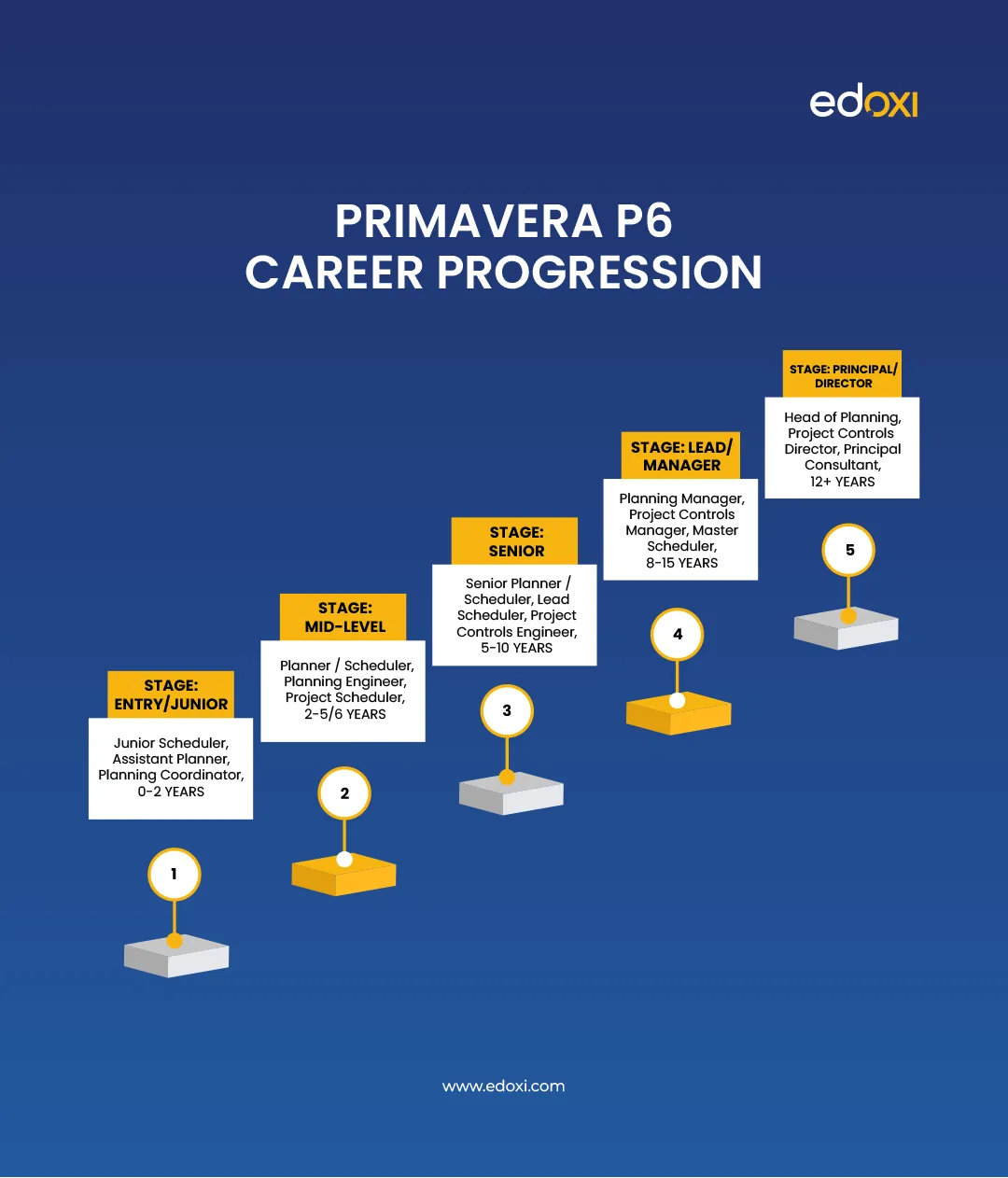
| Stage | Typical Role Titles | Experience |
| Entry / Junior | Junior Scheduler, Assistant Planner, Planning Coordinator | 0–2 years |
| Mid-Level | Planner / Scheduler, Planning Engineer, Project Scheduler | 2–5/6 years |
| Senior | Senior Planner / Scheduler, Lead Scheduler, Project Controls Engineer | 5–10 years |
| Lead / Manager | Planning Manager, Project Controls Manager, Master Scheduler | 8–15 years |
| Principal / Director | Head of Planning, Project Controls Director, Principal Consultant | 12+ years |
Related reading:How to Become a Primavera P6 Professional in Dubai?
Salary data for P6 roles is patchy outside the U.S.; sample sizes on aggregator sites are often small, so treat the following as directional, and check current local postings for the most reliable read.
| Region | Typical Range | Notes |
| United States | Planner: $54,000–$81,000/yr · Scheduler: $96,000–$130,000/yr · Scheduling Manager: $143,000–$180,000/yr |
Top earners can exceed $150,000–$172,000
|
| UAE / Dubai | AED 10,000–30,000+/month |
Junior planners ~AED 10,000–13,000; senior planning managers AED 20,000–30,000+
|
| Saudi Arabia | SAR 12,000–470,000+/yr (very wide band) |
Reflects gap between junior site schedulers and senior planning managers on giga-projects
|
| United Kingdom | £35,000–£51,500/yr, up to ~£61,000 for top earners |
Asta Powerproject familiarity often expected alongside P6
|
| India | Roughly ₹6–12 lakh/yr for mid-level roles |
Public aggregator data is inconsistent — check current local postings
|
(US figures cross-checked against current ZipRecruiter data as of 2026.)
Related reading: What Is the Salary for Primavera P6 Professionals in Dubai?Primavera P6 is the backbone of project controls for large, complex, high-stakes projects, and while it has a real learning curve, it's a highly transferable skill across construction, energy, engineering, and government sectors.
The recommended path forward as a beginner:Get comfortable with core concepts (EPS/OBS/WBS, CPM, baselines) before touching the software
Build a small practice schedule (Section 4), focusing on logic over decoration
Learn to read float and the critical path before worrying about advanced resource levelling
Run a basic DCMA-style quality check on your own practice schedule
Consider a recognised certification (Oracle, PMI-SP, or AACE PSP) once you have hands-on experience
Self-study covers a lot of ground, but the gap most beginners hit is feedback: knowing why a schedule technically calculates but doesn't reflect reality. That's the piece structured Primavera P6 training is generally best at closing, whether through Oracle's official courses, AACE and PMI-aligned programs, or practice-based platforms like Plan Academy and Udemy.
Related reading:Is Primavera P6 Worth Learning in 2026?Related reading:Importance of Primavera P6 Training in Career Growth
.webp)