Leave your message to get our quick response
edoxi automated message icon

Microsoft Power Platform Fundamentals Course in Dubai

Professional woman analyzing digital data dashboards on a laptop in a modern workspace
Edoxi’s 8-hour Microsoft Power Platform Fundamentals Course in Dubai develops skills to analyse data, automate processes, and build solutions using Microsoft Power Platform. Expert-led training to prepare for the Microsoft Certified: Power Platform Fundamentals (PL-900) exam. The course covers essential Power Platform fundamentals, including Power BI, Power Apps, Power Automate, and Power Virtual Agents. Enrol now and develop valuable low-code development skills through structured learning activities. 
Course Duration
8 Hours
Corporate Days
1 Day
Learners Enrolled
50+
Modules
11
star-rating-icon1
star-rating-icon2
star-rating-icon3
Course Rating
4.9
star-rating-4.9
Mode of Delivery
Online
Classroom
Certification by

What Do You Learn from Edoxi's Microsoft Power Platform Fundamentals Training

Power Platform Overview
Understand the complete Power Platform ecosystem and its business value proposition. Discover how components work together to create comprehensive business solutions.
Introduction to Power BI
Learn data visualisation fundamentals using Power BI Desktop and service. Create insightful reports and dashboards that transform raw data into actionable insights.
Introduction to Power Apps
Build functional canvas and model-driven applications without extensive coding knowledge. Develop user interfaces that connect to various data sources efficiently.
Introduction to Power Automate
Design automated workflows that streamline business processes and eliminate repetitive tasks. Configure triggers and actions that respond to business events automatically.
Introduction to Power Virtual Agents
Create conversational chatbots that engage users through natural language interactions. Deploy virtual agents that handle common queries and automate customer service scenarios.
Understanding Microsoft Dataverse
Master the cloud-based storage solution that securely manages business application data. Implement data models with relationships, business rules, and security configurations.
Power Platform Administration & Governance
Learn essential management principles for maintaining Power Platform environments securely. Implement governance policies that balance innovation with organisational compliance requirements.
AI Builder Capabilities
Incorporate artificial intelligence into your business applications without data science expertise. Leverage pre-built AI models for text recognition.

About Our Microsoft Power Platform Fundamentals Course in Dubai

Edoxi’s 8-hour Microsoft Power Platform Fundamentals Course in Dubai is designed for beginners who want to master Microsoft’s low-code tools and create practical business solutions. This course is ideal for business professionals, data analysts, IT support teams, and aspiring citizen developers looking to improve workflows, build custom apps, and work with data more effectively.

Our Microsoft Power Platform Fundamentals Course in Dubai features hands-on training using real-world projects. Participants work directly with Power BI, Power Apps, Power Automate, Power Virtual Agents, and Microsoft Dataverse. You will learn how to build applications, automate business processes, analyse data, and create intelligent chatbots, all within Microsoft’s official training environment.

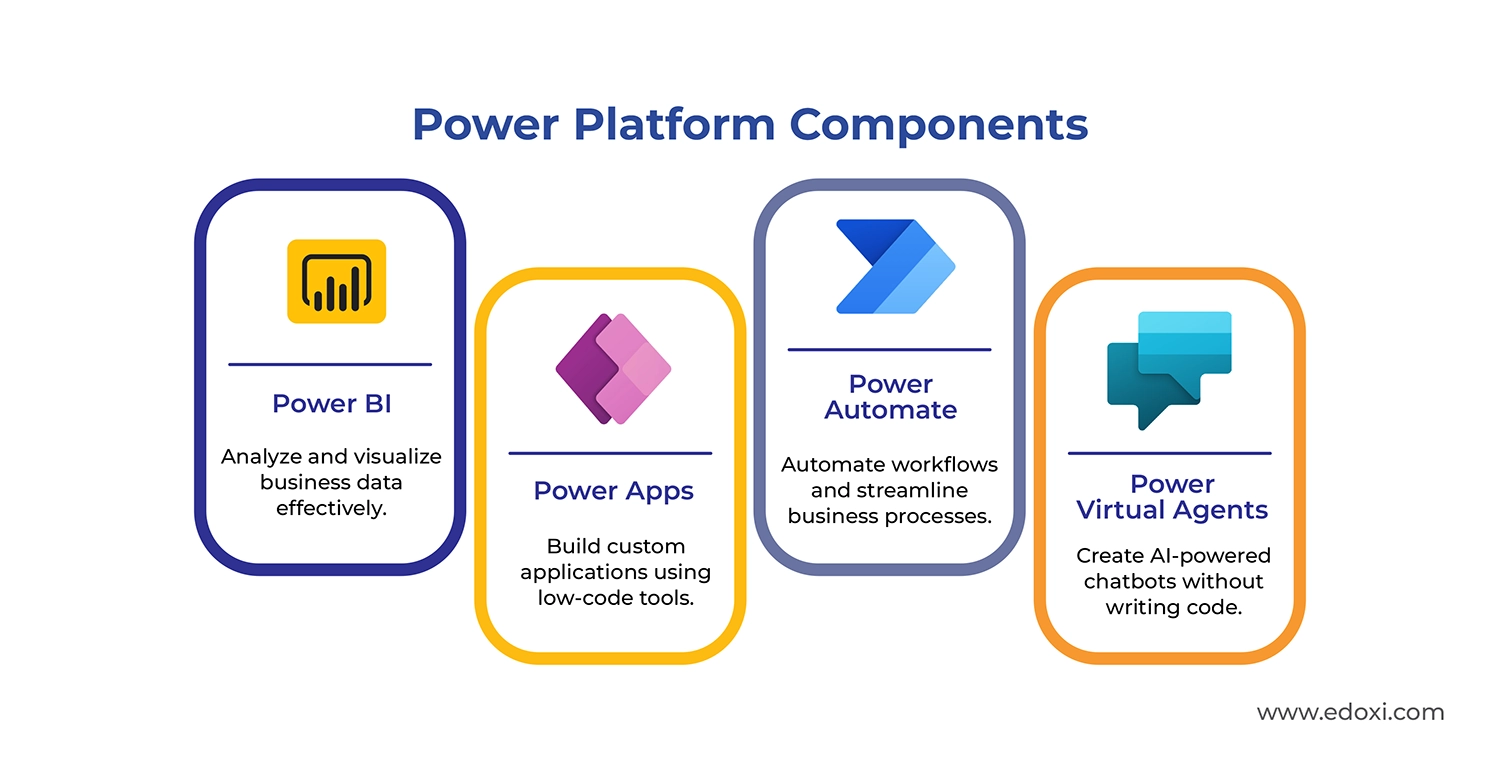
During the course, students explore each component of the Microsoft Power Platform and understand how they work together to support smarter decision-making and automation. Participants will learn how to analyse and visualise data using Power BI, develop simple, custom applications with Power Apps, automate repetitive tasks with Power Automate, and build AI-powered chatbots using Power Virtual Agents. By the end of the course, you will have the skills to apply these tools to real business challenges.
power-platform-components

This Microsoft Power Platform training in Dubai is also excellent for organisations seeking to improve internal processes, reduce manual tasks, and support digital transformation through low-code technologies.

Upon completion, learners gain practical skills in app development, workflow automation, and data integration. These skills are valuable across industries, including finance, retail, logistics, healthcare, government, and public services.

Microsoft Power Platform Fundamentals Certification Exam Details

Edoxi’s Microsoft Power Platform Fundamentals course content is aligned with the PL-900 certification exam objectives. Learners receive practice questions, exam guidance, and training that directly support exam readiness for the Microsoft Certified: Power Platform Fundamentals credential.  Here are the exam details

Exam Criteria Details
Exam Code PL-900
Exam Name Microsoft Certified: Power Platform Fundamentals
Duration 90 minutes
Number of Questions 40-60, Multiple Choice
Passing Score 700/1000
Fees USD 50
Certification Validity 1 Year
Recertification No Cost
Exam Administration Authority Pearson VUE
 

Key Features of Edoxi's Microsoft Power Platform Fundamentals Training

Microsoft Official Courseware

Get access to comprehensive learning materials developed by Microsoft, featuring structured content and best practices.

Hands-on Lab Environment

Practice in a dedicated Microsoft environment with guided exercises to reinforce theoretical concepts.

Solution-Based Learning Approach

Work through complete solutions from data modelling to application development and process automation.

Power Platform Integration Experience

Learn how Power BI, Power Apps, Power Automate, and Power Virtual Agents work together in business solutions.

Microsoft 365 Connection Scenarios

Explore how Power Platform connects with Microsoft 365 applications to extend functionality and data access.

Certification Exam Preparation

Receive guidance and practice questions aligned with the PL-900 Microsoft certification exam requirements.

Who Can Join Our Microsoft Power Platform Fundamentals Course in Dubai?

Business Analysts and Process Owners

Professionals who analyse business requirements and manage processes, looking to implement low-code solutions.

IT Support Staff and Junior Developers

Technical team members seeking to expand their skillset with Microsoft's business application platform.

CRM Administrators

Customer relationship management specialists interested in extending CRM functionality through Power Platform.

Citizen Developers

Business users with minimal coding experience who want to create applications and automate workflows.

Digital Transformation Consultants

Consultants helping organisations modernise business processes using Microsoft cloud technologies.

Entry-Level App Makers

Individuals starting their journey in application development, looking for accessible low-code tools.

Microsoft Power Platform Fundamentals Course Modules

Module 1: Describe the Business Value of Microsoft Power Platform
  • Chapter 1.1: Overview of Power Platform

    • Lesson 1.1.1 Introduction to Microsoft Power Platform
    • Lesson 1.1.2 Exploring Microsoft Power Platform
  • Chapter 1.2: Understanding Power Platform Value

    • Lesson 1.2.1 Business value of Microsoft Power Platform
    • Lesson 1.2.2 Value of connectors for service and data integration
    • Lesson 1.2.3 Role of Microsoft Dataverse in business data organisation
    • Lesson 1.2.4 Power Fx as a low-code solution
  • Chapter 1.3: Integrated Capabilities and AI Features

    • Lesson 1.3.1 How Power Platform services work together
    • Lesson 1.3.2 Value of Copilots and generative AI in Power Platform
    • Lesson 1.3.3 Writing effective prompts for Copilot
  • Chapter 1.4: Module Wrap-Up

    • Lesson 1.4.1 Module assessment
    • Lesson 1.4.2 Summary and resources
Module 2: Describe the Business Value of Extending Business Solutions Using Microsoft Power Platform
  • Chapter 2.1: Integration with Microsoft Services

    • Lesson 2.1.1 Introduction
    • Lesson 2.1.2 Integration with Microsoft 365 apps and services
  • Chapter 2.2: Extending Capabilities

    • Lesson 2.2.1 Value of Microsoft Copilot Studio
    • Lesson 2.2.2 Working with on-premises solutions
    • Lesson 2.2.3 Capabilities of the Plan Designer
  • Chapter 2.3: Module Wrap-Up

    • Lesson 2.3.1 Module assessment
    • Lesson 2.3.2 Summary and resources
Module 3: Manage the Microsoft Power Platform Environment
  • Chapter 3.1: Introduction to Microsoft Dataverse

    • Lesson 3.1.1 Introduction
    • Lesson 3.1.2 Comparing traditional databases and Dataverse
    • Lesson 3.1.3 Tables, columns, and relationships in Dataverse
    • Lesson 3.1.4 Business logic options in Dataverse
    • Lesson 3.1.5 Exercise – Create and modify tables and columns by using conversations
    • Lesson 3.1.6 Importing and exporting data options
  • Chapter 3.2: Module Wrap-Up

    • Lesson 3.2.1 Module assessment
    • Lesson 3.2.2 Summary and resources
Module 4: Describe Microsoft Power Platform Administration and Governance
  • Chapter 4.1: Platform Administration

    • Lesson 4.1.1 Introduction
    • Lesson 4.1.2 Power Platform security model
    • Lesson 4.1.3 Understanding Power Platform environments
    • Lesson 4.1.4 Admin centers and portals
    • Lesson 4.1.5 Supporting data privacy and accessibility guidelines
    • Lesson 4.1.6 Application Lifecycle Management (ALM)
  • Chapter 4.2: Module Wrap-Up

    • Lesson 4.2.1 Module assessment
    • Lesson 4.2.2 Summary and resources
Module 5: Demonstrate the Capabilities of Microsoft Power Pages
  • Chapter 5.1: Introduction to Power Pages

    • Lesson 5.1.1 Introduction
    • Lesson 5.1.2 Use cases for Power Pages
    • Lesson 5.1.3 Methods for creating sites
    • Lesson 5.1.4 Power Pages security concepts
  • Chapter 5.2: Module Wrap-Up

    • Lesson 5.2.1 Module assessment
    • Lesson 5.2.2 Summary and resources
Module 6: Create a Microsoft Power Pages Site
  • Chapter 6.1: Power Pages Site Development

    • Lesson 6.1.1 Introduction
    • Lesson 6.1.2 Create and modify sites using Copilot
    • Lesson 6.1.3 Design studio site modification
    • Lesson 6.1.4 Creating tables with Design Studio
    • Lesson 6.1.5 Creating and modifying pages
    • Lesson 6.1.6 Configuring site components
    • Lesson 6.1.7 Modifying themes
    • Lesson 6.1.8 Exercise – Create a Power Pages site
    • Lesson 6.1.9 Applying Power Pages security
  • Chapter 6.2: Module Wrap-Up

    • Lesson 6.2.1 Module assessment
    • Lesson 6.2.2 Summary and resources
Module 7: Demonstrate the Capabilities of Microsoft Power Apps
  • Chapter 7.1: Basic Power Apps Capabilities

    • Lesson 7.1.1 Introduction
    • Lesson 7.1.2 Understanding Power Apps
    • Lesson 7.1.3 Canvas apps use cases
    • Lesson 7.1.4 Model-driven apps use cases
    • Lesson 7.1.5 Exploring model-driven app features
    • Lesson 7.1.6 Differences between canvas and model-driven apps
  • Chapter 7.2: Module Wrap-Up

    • Lesson 7.2.1 Module assessment
    • Lesson 7.2.2 Summary and resources
Module 8: Build a Canvas App
  • Chapter 8.1: Canvas App Development

    • Lesson 8.1.1 Introduction
    • Lesson 8.1.2 Connecting to data sources with connectors
    • Lesson 8.1.3 Creating an app from data
    • Lesson 8.1.4 Common controls in canvas apps
    • Lesson 8.1.5 Building responsive pages using containers
    • Lesson 8.1.6 App creation and modification through conversation
    • Lesson 8.1.7 Exercise – Create a canvas app
    • Lesson 8.1.8 Copilot control capabilities
    • Lesson 8.1.9 Use cases for Agent Builder
    • Lesson 8.1.10 Previewing, testing, and publishing an app
    • Lesson 8.1.11 Sharing a canvas app
  • Chapter 8.2: Module Wrap-Up

    • Lesson 8.2.1 Module assessment
    • Lesson 8.2.2 Summary and resources
Module 9: Build a Model-Driven App
  • Chapter 9.1: Model-Driven App Development

    • Lesson 9.1.1 Introduction
    • Lesson 9.1.2 Components of model-driven apps
    • Lesson 9.1.3 Creating model-driven apps from tables
    • Lesson 9.1.4 Modifying forms
    • Lesson 9.1.5 Creating and modifying views
    • Lesson 9.1.6 Exercise – Create a model-driven app
    • Lesson 9.1.7 Sharing a model-driven app
  • Chapter 9.2: Module Wrap-Up

    • Lesson 9.2.1 Module assessment
    • Lesson 9.2.2 Summary and resources
Module 10: Demonstrate the Capabilities of Microsoft Power Automate
  • Chapter 10.1: Power Automate Overview

    • Lesson 10.1.1 Introduction
    • Lesson 10.1.2 Understanding process mining
    • Lesson 10.1.3 Use cases for cloud and desktop flows
    • Lesson 10.1.4 Use cases for cloud flow templates
    • Lesson 10.1.5 Cloud flows and connector triggers/actions
    • Lesson 10.1.6 Loops and branching in cloud flows
    • Lesson 10.1.7 Approval use cases in Power Automate
    • Lesson 10.1.8 Power Automate apps overview
    • Lesson 10.1.9 Desktop flow actions
  • Chapter 10.2: Module Wrap-Up

    • Lesson 10.2.1 Module assessment
    • Lesson 10.2.2 Summary and resources
Module 11: Build a Microsoft Power Automate Flow
  • Chapter 11.1: Flow Development

    • Lesson 11.1.1 Introduction
    • Lesson 11.1.2 Creating flows with instant, automated, or scheduled triggers
    • Lesson 11.1.3 Creating and modifying flows using Copilot
    • Lesson 11.1.4 Exercise – Create a cloud flow using Copilot
    • Lesson 11.1.5 Testing a cloud flow
    • Lesson 11.1.6 Running and monitoring cloud flows
    • Lesson 11.1.7 Sharing a cloud flow
    • Lesson 11.1.8 Describing flows using Copilot
    • Lesson 11.1.9 Building a basic desktop flow using Record with Copilot
  • Chapter 11.2: Module Wrap-Up

    • Lesson 11.2.1 Module assessment
    • Lesson 11.2.2 Summary and resources

Download Microsoft Power Platform Fundamentals Course Brochure

Real-World Projects in Microsoft Power Platform Fundamentals Certification Course

This foundational course includes hands-on labs in Microsoft’s official environment. Participants use Power BI for data analysis. They create functional Power Apps and build automated workflows with Power Automate.

Projects

  • Creating a Business Solution

    Build a complete Power Platform solution with Dataverse data modelling, app development, and workflow automation.

  • Developing a Canvas App

    Design a functional Canvas app with customised interfaces, data connections, and Power Fx expressions.

  • Building a Model-driven App

    Create a data-centric application using Dataverse tables with configured forms, views, and business rules.

  • Automating Business Processes

    Develop a Power Automate flow that responds to business events, processes data, and sends notifications.

  • Constructing a Power Pages Site

    Build an external-facing website using Power Pages with secure forms for Dataverse data interaction.

Microsoft Power Platform Fundamentals Course Outcomes and Career Opportunities in Dubai

Completing Edoxi’s Microsoft Power Platform Fundamentals Certification Course builds a strong foundation for career growth. It prepares learners for roles in business application development and process automation. These roles are in high demand as more organisations adopt low-code solutions for digital transformation. Implementing Power Platform skills across your organisation delivers significant operational advantages and business value

Course Outcome Image
Automate workflows quickly and reduce manual tasks across business operations.
Enable non-developers to build apps for specific business needs.
Improve decisions with accessible insights using Power BI visualisations.
Standardised tools reduce shadow IT and promote controlled innovation.
Free IT staff to focus on complex, high-priority technical tasks.
Bridge gaps between business and IT through shared platform knowledge.

Job Roles After Microsoft Power Platform Fundamentals Course in Dubai

  • Power Apps Developer
  • Power BI Analyst
  • Automation Architect
  • Power Platform Functional Consultant
  • Solution Architect (Power Platform)

Companies Hiring Microsoft Power Platform Professionals in Dubai

  • Gargash Group
  • China Mobile International MENA Region
  • RiDiK
  • Dar
  • VAM system
  • The First Group
  • GSSTech Group
  • Virtusa
  • Annet Technologies ME FZE
  • Naffco

Microsoft Power Platform Fundamentals Training Options

Classroom Training

  • 8-hour Microsoft Power Platform Fundamentals course in Dubai

  • Instructor-Led Practical Sessions

  • Direct Feedback on Exercises

  • Peer Learning Opportunities

  • Dedicated Lab Environment

Live Online Training

  • 8-hour Online Microsoft Power Platform Fundamentals Training

  • Remote Access to Lab Environment

  • Real-time Instructor Interaction

  • Session Recordings for Review

  • Flexible Schedule Options

Corporate Training

  • 1-day Comprehensive Corporate Training

  • Customised Content for Business Needs

  • Flexible Delivery Options (On-Site / Edoxi Office / Hotel)

  • Fly-Me-a-Trainer Option

  • Food and refreshments provided for corporate teams

Do You Want a Customised Training for Microsoft Power Platform Fundamentals

Get expert assistance in getting you Microsoft Power Platform Fundamentals Course customised!

How to Get the Microsoft Power Platform Fundamentals Certification in Dubai?

Here’s a four-step guide to becoming a Microsoft Power Platform Fundamentals professional.

Do You Want to be a Certified Professional in Microsoft Power Platform Fundamentals?

Join Edoxi’s Microsoft Power Platform Fundamentals Course

Why Choose Edoxi for Microsoft Power Platform Fundamentals Training in Dubai?

Edoxi is a premier training centre offering the best Microsoft Courses in Dubai. Here are a few reasons why you should choose us for your training needs

Authorised Microsoft Learning Partner

Edoxi delivers the official Microsoft curriculum with regularly updated content that perfectly aligns with certification requirements.

Practical Learning Environment

Our training incorporates extensive hands-on labs where participants work directly with Power Platform tools.

Industry-Experienced Instructors

Our trainers possess both Microsoft certifications and practical implementation experience across diverse UAE business environments.

Small Interactive Class Sizes

We maintain limited participant numbers to ensure personalised attention and address individual learning requirements effectively.

Comprehensive Certification Preparation

Course content thoroughly covers all PL-900 exam objectives with practice questions and certification success strategies.

Flexible Corporate Training Options

We deliver customised Power Platform training programs tailored to specific organisational requirements and business objectives.

students-image

Edoxi is Recommended by 95% of our Students

Meet Our Mentor

Our mentors are leaders and experts in their fields. They can challenge and guide you on your road to success!

mentor-image

Manish Rajpal

Manish is a passionate Corporate Trainer, AI Consultant, and Cloud Solutions Architect. He empowers clients across the globe to build and maintain highly available, resilient, scalable, and secure solutions, now with a growing emphasis on AI-powered architectures. With over 15,000 professionals trained, Manish specialises in technologies including Amazon Web Services, Microsoft Azure, Microsoft Copilot and GitHub Copilot and increasingly, AI and Machine Learning.

Manish has led research and workshops focused on integrating AI into cloud environments, exploring use cases like intelligent automation, natural language processing, and responsible AI practices.

FAQ

What will I learn in this one-day Microsoft Power Platform Fundamentals course in Dubai?
During Edoxi’s Microsoft Power Platform Fundamentals course in Dubai, participants gain practical experience with all core Power Platform components—Power BI, Power Apps, Power Automate, Power Pages, and Power Virtual Agents, along with Microsoft Dataverse fundamentals.
What are the prerequisites needed to join Edoxi’s Microsoft Power Platform Fundamentals course in Dubai?
This course is suitable for beginners and professionals from any background who are new to Power Platform. While prior experience is not required, the following knowledge is mandatory or beneficial
 
  • Microsoft 365 Basics: Understanding of core Microsoft 365 applications and their usage
  • Data Concepts: Familiarity with basic data structures such as tables, fields, and relationships
  • Low-Code Readiness: Willingness to explore low-code tools and build simple business solutions. 
How does this Microsoft Power Platform Fundamentals course in Dubai help my career?
The skills learned prepare you for in-demand roles like Power Apps Developer, Power BI Analyst, and Automation Specialist. Organisations across industries are seeking professionals with Power Platform expertise.
Is the Microsoft certification included in the Microsoft Power Platform Fundamentals course in Dubai course fee?
The Microsoft Power Platform Fundamentals course in Dubai prepares you for the PL-900 exam, but the certification exam fee (USD 50) is not included in the training cost. The exam can be scheduled separately through Pearson VUE.
Can I develop apps without coding experience?
Absolutely! Power Platform is designed for low-code development, making it accessible to business users with minimal technical background. The course teaches you how to build functional applications without extensive coding.
Do you offer customised Power Platform training for companies?
Yes, we provide tailored corporate training programs that can focus on specific aspects of Power Platform relevant to your organization's needs. We can deliver training on-site or remotely.
What practical exercises are included in the Microsoft Power Platform Fundamentals course in Dubai?
The Microsoft Power Platform Fundamentals course in Dubai includes hands-on labs for creating data models, building canvas and model-driven apps, automating workflows, and developing Power Pages sites, all using real-world business scenarios.
How does Power Platform integrate with Microsoft 365?
The course covers how Power Platform connects with Microsoft 365 applications like SharePoint, Teams, and Outlook using built-in connectors, allowing you to extend functionality and automate processes across the Microsoft ecosystem.
Will I be able to build professional applications after this Microsoft Power Platform Fundamentals course in Dubai?
Yes, you will learn to create functional business applications using both canvas and model-driven approaches. While complex enterprise solutions require advanced skills, this course provides the foundation for building professional apps for common business scenarios.
Is the Microsoft Power Platform Fundamentals course in Dubai suitable for complete beginners?
Yes. The Microsoft Power Platform Fundamentals course in Dubai is specifically designed for individuals with no prior coding or development experience. It introduces all core components of the Power Platform through guided, hands-on sessions in a simplified and beginner-friendly manner.