Request a Callback

+971 4380 1666
 Nov 12, 2026
How to use AI at work comes down to three steps. Pick repetitive tasks such as emails, summaries, and reports. Give the AI clear instructions. Then check every result yourself. Done this way, AI saves time on drafts and sorting, while you keep every decision.
It is 8:45 on a Sunday morning in Kuwait City. Sixty-three emails are waiting. A meeting starts in fifteen minutes. A report is due by noon.
Most of us know that morning. AI will not clear it by magic. But it can take the slow parts: first drafts, long summaries, messy lists. That leaves you free for work that needs a real person.
This blog shows how to use AI at work in plain steps. Each task comes with an example, a sample prompt, and a safety check.
Table of Contents
| Nos | Contents |
|---|---|
| 1 | Why Is AI at Work Growing So Fast in Kuwait? |
| 2 | How Can AI Improve Productivity at Work? a) Can AI Help You Write Better Emails? b) Can AI Summarise Meetings? c) Can AI Speed Up Research? d) Can AI Analyse Data? e) Can AI Help With Presentations and Content? f) Can AI Support Customer Support Teams? g) Can AI Plan Tasks, Read Documents and Draft Reports? i) What Does the Task-to-Benefit Picture Look Like? |
| 3 | How Do You Write Better AI Prompts for Work? |
| 4 | Where Should AI Assist, and Where Should You Decide? |
| 5 | Is It Safe to Use AI at Work? a) What Information Should Never Go Into AI Tools? b) How Do You Fact-Check AI Answers? |
| 6 | Key Takeaways |
| 7 | FAQs: How to Use AI at Work: Practical Ways to Boost Productivity |
Workloads are rising, and AI cuts time on routine tasks. Kuwait is also backing it with national training programmes.
Microsoft's 2025 Work Trend Indexfound that about 80% of workers say they lack the time or energy to do their work. That is a lot of tired people. Many firms now wantAI-ready teamsso staff can share the load with smart tools.
Kuwait is moving too. The"Kuwait Skills" programme, built with Microsoft and the Central Agency for Information Technology, aims to train over 30,000 employees, 4,000 technical experts and 350 leaders. It also plans to enable more than 100,000 users on Copilot tools.
"Essential for positioning Kuwait as a leader in the digital and knowledge economy."
-Omar Al-Omar, Minister of State for Communications Affairs
AI improves productivity at work by producing first drafts, summaries, and patterns in seconds. You then edit, check, and decide. Think of it as a fast assistant, not a replacement.
Each use case below follows one pattern: the task, a sample prompt, and a human check.
Yes. AI can draft, shorten, or soften an email in seconds. You add the facts and check the tone.
Imagine a procurement officer chasing a late supplier. She types: "Write a polite but firm email to a supplier whose delivery is five days late. Keep it under 100 words." She gets a draft in seconds. Then she adds the order number and the new deadline.
Human check: Names, dates, and amounts. Writing strong prompts is one of the firstAI skillsmost teams learn.
Yes, if you give it a transcript or clear notes. It can list decisions, owners, and deadlines.
Al Ahli Bank of Kuwait rolled out Microsoft Copilot in July 2026 to speed up documents and summarise information.
Its Head of IT,Salem Al-Sarraf, said the Microsoft cloud base gives "the highest levels of security, reliability and performance efficiency" (translated from Arabic, Al Jarida).
A simple prompt works: "Summarise these notes in five bullets. List each action with an owner and a date."
Human check:Confirm every owner and deadline with the team.
Yes, for a first overview. AI is a starting point. It is not a final source.
An HR manager drafting a remote-work policy might ask: "List the main points a staff remote-work policy should cover. Mark anything that depends on local labour law."
That saves an hour of blank-page time. HR teams also use AI to spotskills gaps, which is another research-heavy job.
Human check:AI can invent facts and sources. Open the original source before you use any claim.
Yes. AI can clean tables, explain formulas, and point out trends. It cannot tell if your data is wrong.
A sales analyst pastes anonymised monthly figures and asks: "Which branch dropped most? What questions should I ask next?" The answer shapes the meeting. It does not replace the analyst.
Strong data habits can also lead to acareer in artificial intelligence.
Human check:Recalculate the key numbers by hand.
Yes. It can build outlines, slide text, and post ideas. You bring the voice and the facts.
A marketing executive asks for a seven-slide outline on a new product, then rewrites each slide in the brand's tone. The same idea works for newsletters and social posts.
Every sector is feeling this shift, and thefuture of workwill reward people who edit well.
Human check:Brand voice, claims, and image rights.
Yes. It can draft replies, sort tickets, and suggest answers. People should handle upset or complex cases.
Bader Sultan, a Kuwait healthcare provider, used Copilot to answer customer requests faster.
CEOEmad Al Zabensaid Copilot is "a great tool to increase the productivity of all our employees."
Some people ask if support sits among thejobs at risk of AI. Routine replies may shrink, but care and judgement matter more.
Human check: Read every reply before it goes to an angry customer.
Yes. It can turn notes into a weekly plan, summarise long files and draft a first report.
Try these three:
Planning: "Turn these notes into a Monday-to-Thursday plan. Put urgent items first."
Documents: "Summarise this contract in plain English. List five questions for our lawyer."
Reporting: "Turn these bullets into a one-page monthly report."
Human check: Never treat an AI contract summary as legal advice. A structured Artificial Intelligence Course in Kuwait can help your team practise steps like these on real work.
AI can support everyday work tasks by reducing repetitive effort, speeding up routine processes, and helping employees focus on higher-value work.
AI Use Cases at Work: Tasks, Applications and Productivity Benefits
| Task | AI use | Expected benefit |
|---|---|---|
| Emails | Draft and shorten replies | Faster inbox |
| Meetings | Summarise notes, list actions | Clear follow-ups |
| Research | Outline topics, list questions | Quicker start |
| Data analysis | Spot trends, explain formulas | Faster insight |
| Presentations | Outline slides, draft text | Less blank-page time |
| Customer support | Draft replies, sort tickets | Quicker responses |
| Task planning | Build weekly plans | Better focus |
| Documents and reports | Summarise files, draft reports | Less reading time |
Tools and features change quickly. Check what your company's approved tools can do today, and treat any "AI can do X" claim with care.
The 5 steps to use AI in work and 8 tasks AI can help with are presented in the infographics below:
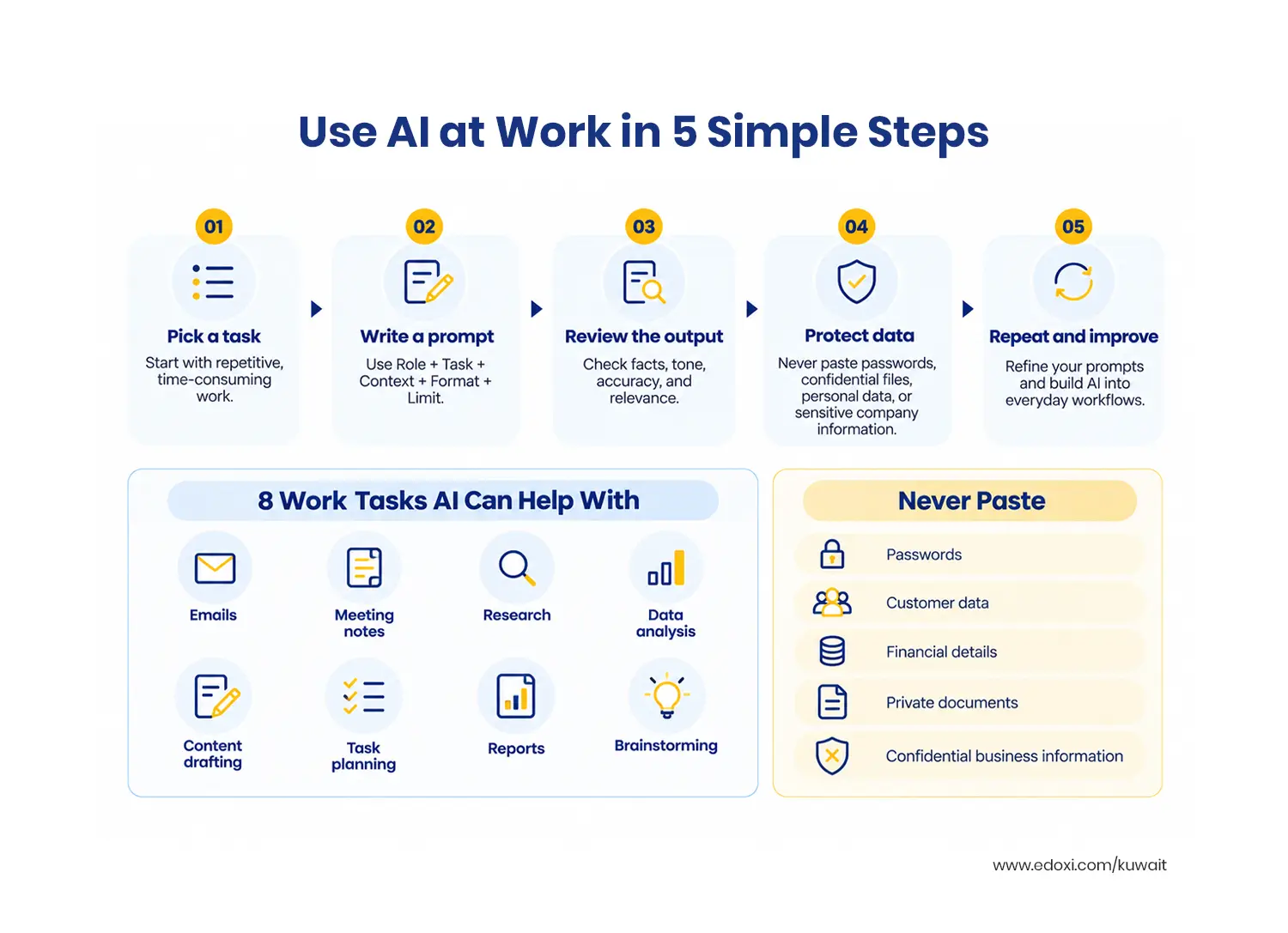
Tell the AI its role, the task, the context, the format, and the limit. Clear prompts give clear answers.
Use this simple formula: Role + Task + Context + Format + Limit.
Weak prompt: "Write a report."
Better prompt: "You are a finance assistant. Write a one-page summary of this quarter's expenses for our manager. Use five bullets and one short paragraph. Keep it under 200 words."
Three habits help. Give an example of the style you want. Ask the AI to ask you questions first. And improve the answer step by step, instead of starting over.
Let AI assist with drafts, sorting, and summaries. Keep people in charge of decisions about hiring, money, law, safety, and client trust.
A good test: if a mistake could hurt a person, a budget, or a reputation, a human decides.
Let AI assist with:
Keep for humans:
Even in coding, the debate over whether AI will replacesoftware engineersends in the same place. AI speeds up the work. Skilled people still review it.
Yes, when you protect private data, follow company rules, and check every output. Never paste confidential information into a public tool.
Banking and healthcare sit among theindustries affected by AIfirst, and they handle very sensitive data. That is why rules matter.
Anything private, secret, or personal, unless your company approves the tool for it.
Remove names and numbers first. Then use the tool.
Treat every answer as a draft. Verify names, numbers, dates, and sources before you share anything.
Highlight each fact in the answer.
Find the original source.
Recalculate any numbers.
Ask a colleague to review high-risk work.
Knowing how to use AI at work is now a basic skill in Kuwait and everywhere else. Start small. Pick one task this week, write a clear prompt, and review the result with care. The habit grows from there.