

 Get Ready to Learn, Certify, and Grow



Edoxi's 8-Hour Microsoft Power Platform Fundamentals (PL-900) Certification Course is a globally relevant, instructor-led online training programme designed for corporate organisations seeking to accelerate digital transformation through Microsoft's low-code technology platform.
Delivered at Edoxi, a leading professional training institute for Microsoft Power Platform Fundamentals course, we help your teams develop the skills needed to build business applications, automate workflows, analyse data, and create intelligent solutions without extensive programming expertise.
Whether your employees work in operations, finance, HR, customer service, IT, sales, or project management, this Microsoft Power Platform Fundamentals training enables them to solve business challenges faster and contribute more effectively to organisational innovation.
Through live online sessions, hands-on labs, interactive demonstrations, and real-world business use cases, your teams gain practical experience with Power BI, Power Apps, Power Automate, Power Virtual Agents, AI Builder, and Microsoft Dataverse.
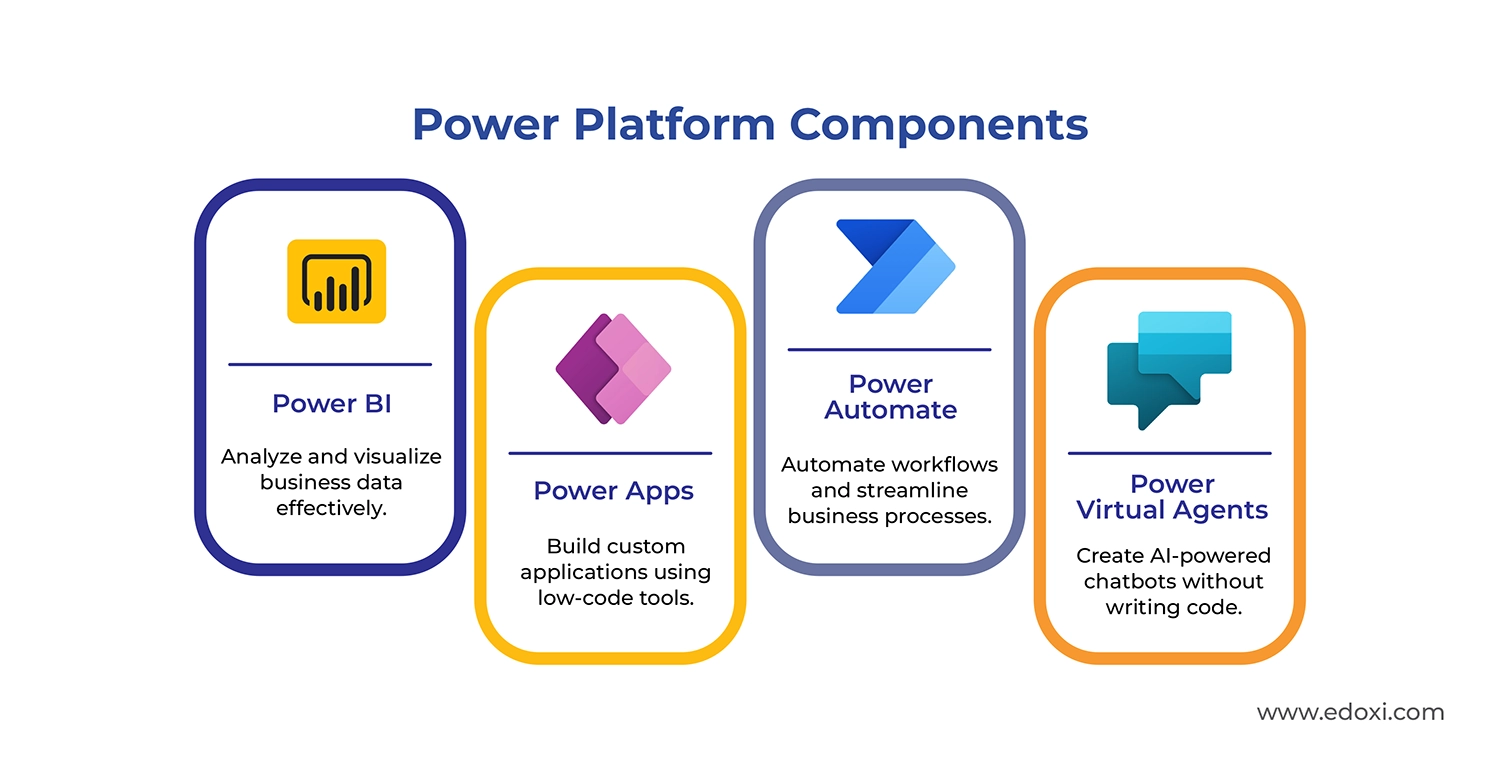
Participants learn how to automate repetitive processes, create custom business applications, generate actionable insights from data, and connect systems across departments using Microsoft's integrated business platform.
The training is designed to support organisations of all sizes, from growing businesses to multinational enterprises, helping teams improve productivity, reduce operational inefficiencies, and drive measurable business outcomes through low-code development.
Aligned with the Microsoft Certified: Power Platform Fundamentals (PL-900) certification exam objectives, this Microsoft Power Platform Fundamentals certification training combines foundational knowledge with practical application. The detailed Microsoft Certified: Power Platform Fundamentals examination structure is given below. Please check.
Microsoft Certified: Power Platform Fundamentals (PL-900) – Exam Details
| Exam Criteria | Details |
| Exam Code | PL-900 |
| Exam Name | Microsoft Certified: Power Platform Fundamentals |
| Duration | 90 minutes |
| Number of Questions | 40–60 (Multiple Choice) |
| Passing Score | 700/1000 |
| Fees | USD 50 |
| Certification Validity | 1 Year |
| Recertification | No Cost |
| Exam Administration Authority | Pearson VUE |
Employees gain skills that can be applied immediately within their roles while organisations benefit from stronger process automation, enhanced collaboration, improved data visibility, and faster digital adoption.
The fully online delivery model makes it easy for geographically distributed teams to participate from anywhere in the world while maintaining consistent learning outcomes.
For Microsoft Power Platform Fundamentals Course corporate training solutions, customised team training programmes, group enrolment options, course fee details, and certification guidance, contact our team for more details.
Access our Microsoft-approved learning materials that provide structured knowledge, industry best practices, and a clear learning pathway. This helps your team build a strong foundation in Microsoft Power Platform technologies.
Learn directly from our experienced trainers through interactive virtual sessions. This enables your team to engage in discussions, ask questions, and gain expert guidance from anywhere in the world.
Practice in a dedicated online Microsoft environment using guided exercises and real-world scenarios. This helps your team apply concepts immediately and strengthen practical workplace skills.
Work on business use cases that reflect common organisational challenges. This helps your team understand how Microsoft Power Platform supports process improvement, productivity, and digital transformation initiatives.
Explore how Power BI, Power Apps, Power Automate, Power Virtual Agents, AI Builder, and Dataverse work together to create connected business solutions. This gives your team a complete understanding of the Microsoft Power Platform ecosystem.
Learn how to connect Power Platform solutions with Microsoft 365 applications and services. This helps your team improve collaboration, automate tasks, and maximise the value of your existing Microsoft investments.
Professionals who analyse business requirements and manage processes, looking to implement low-code solutions.
Technical team members seeking to expand their skillset with Microsoft's business application platform.
Customer relationship management specialists interested in extending CRM functionality through Power Platform.
Business users with minimal coding experience who want to create applications and automate workflows.
Consultants helping organisations modernise business processes using Microsoft cloud technologies.
Individuals starting their journey in application development, looking for accessible low-code tools.
Our Online Microsoft Power Platform Fundamentals Course build practical Microsoft Power Platform skills through guided online labs and business-focused projects. Each activity helps your team apply concepts in real workplace scenarios and gain experience with Microsoft's low-code platform.
Create a complete Power Platform solution using Dataverse, Power Apps, and Power Automate. This helps your team understand how integrated business solutions support organizational efficiency and digital transformation.
Design a user-friendly canvas application with customized interfaces, business logic, and data connections. This helps your professionals build applications tailored to specific business requirements.
Develop a data-centric application using Dataverse tables, forms, views, and business rules. This helps your team manage business data more effectively and improve operational processes.
Build a Power Automate solution that responds to business events, processes information, and generates notifications. This helps your organization improve workflow efficiency and reduce repetitive tasks.
Create a secure external-facing website using Power Pages and Dataverse integration. This helps your team extend business services to customers, partners, and stakeholders through a modern digital experience.
Connect Power BI, Power Apps, Power Automate, and Dataverse into a unified solution. This helps your professionals understand how Microsoft Power Platform supports enterprise-wide automation, reporting, and business process optimization.
Use Power BI to connect, analyze, and visualize business data. This helps your team transform raw information into meaningful insights that support faster and smarter decision-making.
Create functional business applications using Power Apps. This enables your professionals to digitize processes, improve productivity, and solve operational challenges with minimal coding.
Design automated workflows that streamline routine business activities. This helps your team reduce manual work, improve efficiency, and maintain process consistency across departments.
Work with Dataverse to organize, manage, and secure business data. This gives your professionals practical experience in building scalable and connected business solutions.
This online Microsoft Power Platform Fundamentals course empowers your team to create business solutions, improve operational efficiency, and strengthen your professional value within your organization.

Get expert assistance in getting you Microsoft Power Platform Fundamentals Course customised!
Here’s a four-step guide to becoming a Microsoft Power Platform Fundamentals professional.


Join Edoxi’s Microsoft Power Platform Fundamentals Course
Edoxi delivers industry-recognised Microsoft certification training programs designed to meet global standards and evolving business technology demands. Here are the key reasons to choose Edoxi for Microsoft Power Platform Fundamentals Training:
Edoxi delivers official Microsoft curriculum with regularly updated content that aligns precisely with PL-900 certification requirements.
Our training includes extensive hands-on labs, ensuring participants spend most of their course time actively working with Power Platform tools in real scenarios.
Learn from our certified Microsoft professionals with practical implementation experience across diverse global business environments.
We maintain limited batch sizes to provide personalised attention and effectively address individual learning needs.
The course thoroughly covers all PL-900 exam objectives, supported by practice questions and proven certification success strategies.
We offer customised Power Platform training programs tailored to specific organisational goals and business requirements.

Our mentors are leaders and experts in their fields. They can challenge and guide you on your road to success!

Manish Rajpal
Manish is a passionate Corporate Trainer, AI Consultant, and Cloud Solutions Architect. He empowers clients across the globe to build and maintain highly available, resilient, scalable, and secure solutions, now with a growing emphasis on AI-powered architectures. With over 15,000 professionals trained, Manish specialises in technologies including Amazon Web Services, Microsoft Azure, Microsoft Copilot and GitHub Copilot and increasingly, AI and Machine Learning.
Manish has led research and workshops focused on integrating AI into cloud environments, exploring use cases like intelligent automation, natural language processing, and responsible AI practices.
Here are the major international locations where Edoxi offers Microsoft Power Platform Fundamentals Course
Edoxi's Microsoft Power Platform Fundamentals course is a one-day online training program that introduces you to Microsoft Power BI, Power Apps, Power Automate, Power Virtual Agents, AI Builder, Power Pages, and Microsoft Dataverse. Through practical learning activities, you gain foundational low-code skills that support business automation, data analysis, and digital transformation initiatives within your organization.
Edoxi's Microsoft Power Platform Fundamentals training is ideal for business professionals, operations teams, IT support staff, business analysts, project managers, department leaders, aspiring citizen developers, and corporate teams seeking to improve productivity through low-code technologies. If your organization aims to automate processes and enhance operational efficiency, this course provides an excellent starting point.
No prior coding experience is required to join Edoxi's Microsoft Power Platform Fundamentals certification course. Basic familiarity with Microsoft 365 applications, business processes, and simple data concepts such as tables and fields helps you learn more effectively. A willingness to explore low-code technologies and digital transformation practices is highly beneficial.
Edoxi's Microsoft Power Platform Fundamentals training helps your organization build internal low-code capabilities, automate repetitive processes, reduce manual workloads, improve data visibility, and accelerate digital transformation. Your teams gain practical skills that support innovation and operational excellence across departments.
Yes. Edoxi's online Microsoft Power Platform Fundamentals course is delivered through live instructor-led virtual sessions. This flexible format enables your employees and teams to participate from anywhere in the world while receiving the same interactive learning experience, practical exercises, and expert guidance.
Throughout Edoxi's Microsoft Power Platform Fundamentals training, you work on hands-on labs that include creating Dataverse data models, developing canvas and model-driven applications, automating business workflows, creating Power BI dashboards, and building Power Pages websites. These exercises reflect real business use cases and workplace scenarios.
Yes. Edoxi's Microsoft Power Platform Fundamentals course introduces you to Microsoft's low-code development environment. By the end of the training, you gain the confidence to create basic business applications, automate processes, and develop practical solutions without extensive programming knowledge.
During Edoxi's Microsoft Power Platform Fundamentals training, you learn how Power Platform integrates with Microsoft Teams, SharePoint, Outlook, Excel, and other Microsoft 365 services. These integrations help your organization streamline workflows, improve collaboration, and connect business data across multiple systems.
Yes. Edoxi's Microsoft Power Platform Fundamentals certification course aligns with the official PL-900 exam objectives. We provide exam-focused guidance, practical exercises, and certification preparation resources that help you strengthen your understanding of Microsoft Power Platform concepts and exam requirements.
No. The official Microsoft Power Platform Fundamentals certification (PL-900) exam fee is separate from Edoxi's training fee. The exam is administered through Pearson VUE, and the current Microsoft exam fee is typically USD 50, subject to regional pricing and Microsoft updates.
After successfully completing Edoxi's Microsoft Power Platform Fundamentals training, you receive an Edoxi Course Completion Certificate. You can also take the PL-900 certification exam to earn the globally recognized Microsoft Certified: Power Platform Fundamentals credential.
Edoxi's Microsoft Power Platform Fundamentals course combines live online instruction, hands-on labs, real-world business scenarios, certification preparation, and practical application. Our training focuses on helping you apply your skills directly within your organization rather than learning theory alone.
After completing Edoxi's Microsoft Power Platform Fundamentals certification course, you can pursue opportunities such as Power Apps Developer, Power BI Analyst, Power Platform Functional Consultant, Business Process Automation Specialist, Low-Code Application Developer, Power Platform Administrator, Automation Specialist, Digital Transformation Associate, and Dynamics 365 Support Specialist.
Professionals with Microsoft Power Platform Fundamentals certification commonly earn between USD 55,000 and USD 85,000 annually in entry-level and junior roles. Experienced professionals working as Power Platform Consultants, Automation Specialists, Solution Architects, and Digital Transformation Professionals often earn between USD 100,000 and USD 135,000+ annually, depending on industry, location, experience, and certification portfolio.
Yes. Edoxi's Microsoft Power Platform Fundamentals corporate training can be customized to align with your organization's goals, business processes, and technology environment. We support global organizations with tailored online training programs designed for teams, departments, and enterprise-wide learning initiatives.
Edoxi's Microsoft Power Platform Fundamentals course equips your teams with the skills to automate workflows, build internal applications, improve reporting, manage business data, and create connected business solutions. These capabilities help organizations modernize operations, improve efficiency, and accelerate digital transformation strategies.
The Microsoft Power Platform Fundamentals certification serves as a strong foundation for advanced Microsoft certifications such as PL-300 (Power BI Data Analyst), PL-100 (Power Platform App Maker), PL-200 (Power Platform Functional Consultant), MS-900 (Microsoft 365 Fundamentals), and AZ-900 (Microsoft Azure Fundamentals). Together, these certifications help you build a comprehensive Microsoft technology skill set and expand your career opportunities.


