
Leave your message to get our quick response
edoxi automated message icon

CompTIA Tech+ Course

A professional cybersecurity concept image showing a business professional holding a digital tablet with a glowing padlock and security icons, representing data protection, network security, and advanced cyber defense technologies.
Edoxi’s 24-hour CompTIA Tech+ Course helps beginners build practical IT support and infrastructure skills through hands-on labs, real-world troubleshooting exercises, and expert-led training. Learn hardware, networking, operating systems, cloud computing, cybersecurity, and virtualisation aligned with the latest CompTIA Tech+ Certification objectives. Gain in-demand technical skills, prepare confidently for the CompTIA Tech+ Certification exam, and start your IT career with globally recognised training. Enrol now! 
Course Duration
24 Hours
Corporate Days
3 Days
Learners Enrolled
50+
Modules
6
star-rating-icon1
star-rating-icon2
star-rating-icon3
Course Rating
4.9
star-rating-4.9
Mode of Delivery
Online
Certification by

What Do You Learn from Edoxi's CompTIA Tech+ Training

Computing Basics and Notational Systems
Understand input-process-output models and binary or hexadecimal systems. Learn storage units and processing speeds for everyday IT use.
Infrastructure Components and Virtualisation
Study CPU, RAM, and storage types to understand device functionality. Explore SaaS, PaaS, and IaaS models for cloud computing.
Operating Systems and Application Software
Gain familiarity with desktop, mobile, and server operating systems and work with productivity, collaboration, and AI tools for efficiency.
Software Development Fundamentals
Understand programming languages, data types, and flowchart design and apply variables, functions, and object-oriented principles to build logic.
Database Structures and Data Management
Learn relational and non-relational database concepts and queries. Understand backups and data-driven decisions for business applications.
Security Practices and Encryption
Application of device protection through anti-malware, firewalls, and passwords. Usage of encryption for data safety in storage and network transmission.

About Our CompTIA Tech+ Certification Course

Edoxi’s 24-hour CompTIA Tech+ certification training is designed for beginners and career changers entering the IT field. Tech+ is the new entry-level certification introduced by CompTIA to replace the retiring IT Fundamentals (ITF+) credential. CompTIA Tech+ corporate training is also available for organisations to upskill their teams. 

Learners gain essential skills through guided instruction and practical, hands-on lab activities such as hardware assembly, network setup, and security configuration. These activities help develop confidence and technical competence. Each session focuses on real-world applications relevant to today’s digital workplace. 

The course follows the latest CompTIA Tech+ (FC0-U71) objectives, ensuring complete coverage of key exam domains. It prepares you to pass the CompTIA Tech+ certification exam successfully.

CompTIA Tech+ Certification Exam Details

Exam Criteria Details
Exam Code FC0-U71
Exam Name CompTIA Tech+
Version V6
Launch Date July 16, 2024
Duration 60 minutes
Number of Questions Maximum 70 questions
Question Type Multiple-choice
Passing Score 650 (on a scale of 900)
Language English
Recommended Experience No prior experience necessary
Exam Administration Authority Pearson VUE

By the end of the CompTIA Tech+ course, you can confidently transition into roles such as IT support technician, helpdesk professional, or junior system administrator. Here is the CompTIA Tech+ Certification career pathway
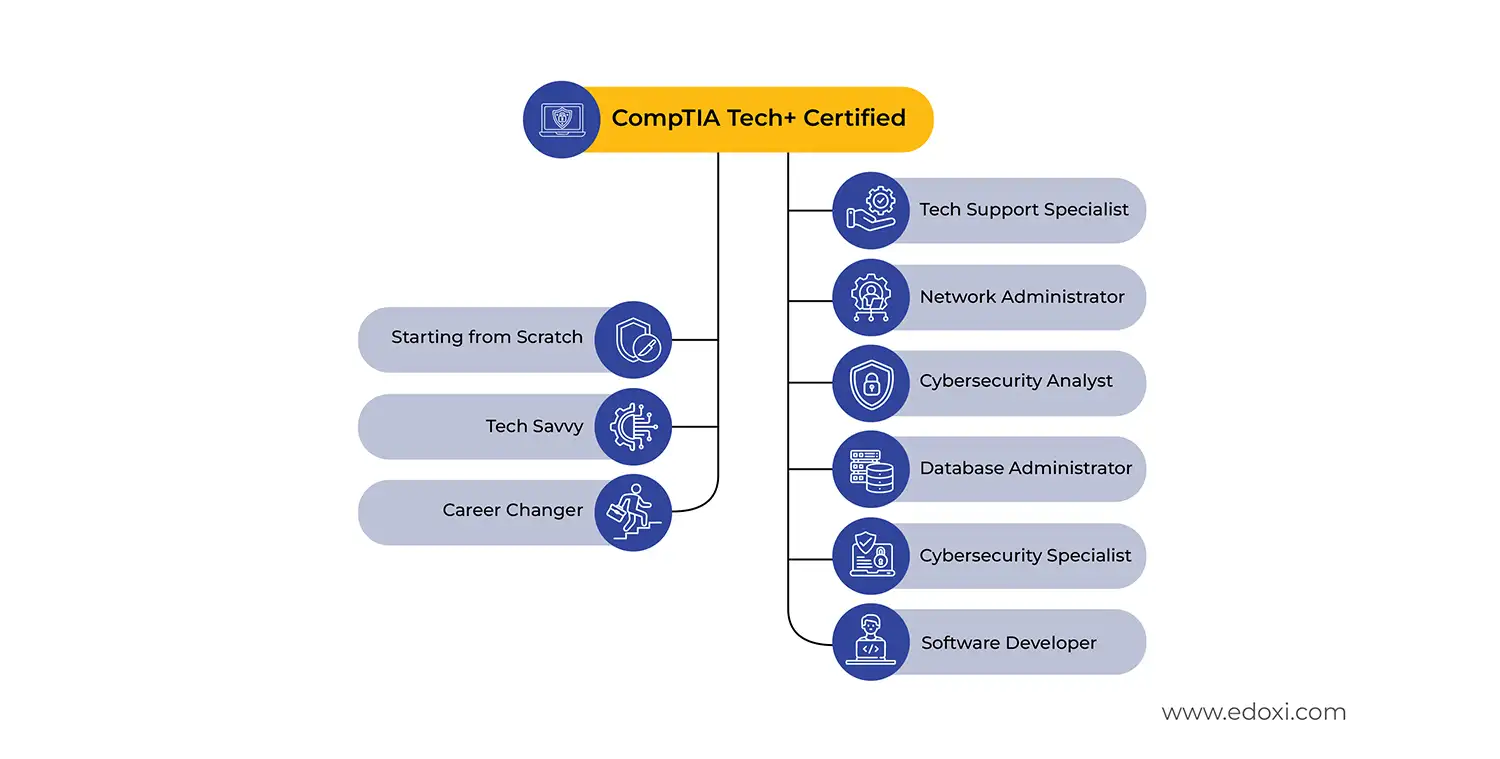
Career pathway infographic showing CompTIA Tech+ certification suitable for beginners, tech-savvy individuals, and career changers, leading to roles such as Tech Support Specialist, Network Administrator, Cybersecurity Analyst, Database Administrator, Cybersecurity Specialist, and Software Developer.

If you want to know more about the CompTIA Tech+ course fees and customised training options, contact Edoxi. 

Key Features of Edoxi's CompTIA Tech+ Training

Hardware Assembly Laboratories

Hands-on experience assembling PC components, including motherboards, processors, and storage devices, for practical understanding.

Official CompTIA Guidebooks and Resources

Comprehensive study materials including video lessons, downloadable notes, quizzes, and flashcards aligned with exam objectives.

Device Setup and Configuration Exercises

Interactive classroom activities involving peripheral installation, driver configuration, and troubleshooting challenges for applied learning.

Network Configuration Simulations

Practical sessions covering wireless network setup, IP addressing, router configuration, and firewall implementation using real equipment.

Cloud Storage Implementation Projects

Real-world exercises involving SaaS, PaaS, and IaaS deployment scenarios for understanding modern infrastructure solutions.

Security and Encryption Practicals

Hands-on implementation of anti-malware tools, VPN configuration, password management systems, and encryption protocols for devices.

Who Can Join Our CompTIA Tech+ Certification Course?

Aspiring IT Support Professionals

Individuals seeking entry into technology support roles and helpdesk positions.

Career Transition Candidates

Professionals from non-technical backgrounds wanting to enter the IT industry.

Recent Graduates and Students

Fresh graduates seeking foundational IT credentials for employment opportunities.

Service Desk Technicians

Current technical support staff are looking to formalise their skills and knowledge.

Junior System Administrators

Entry-level administrators seeking to strengthen their technical foundation and credentials.

Educators and Trainers

Teaching professionals want to enhance their technology literacy for instruction.

CompTIA Tech+ Course Modules

Module 1: Tech Concepts and Terminology (3 hours)
  • Chapter 1.1: Computing Fundamentals

    • Lesson 1.1.1: Input–Process–Output model
    • Lesson 1.1.2: Storage fundamentals and memory hierarchy
    • Lesson 1.1.3: Processing components and architecture
  • Chapter 1.2: Notational Systems

    • Lesson 1.2.1: Binary number system
    • Lesson 1.2.2: Hexadecimal, decimal, and octal systems
    • Lesson 1.2.3: Conversion between number systems
  • Chapter 1.3: Units of Measure

    • Lesson 1.3.1: Storage units (bits, bytes, KB, GB, TB)
    • Lesson 1.3.2: Speed measurements (MHz, GHz)
    • Lesson 1.3.3: Throughput metrics (bps, Mbps, Gbps)
  • Chapter 1.4: Troubleshooting Methodology

    • Lesson 1.4.1: Problem identification techniques
    • Lesson 1.4.2: Testing theories and implementing solutions
    • Lesson 1.4.3: Documentation and follow-up procedures
Module 2: Infrastructure (6 hours)
  • Chapter 2.1: Computing Devices

    • Lesson 2.1.1: Smartphones, tablets, and laptops
    • Lesson 2.1.2: Servers, IoT devices, and gaming consoles
    • Lesson 2.1.3: Device selection and use cases
  • Chapter 2.2: Internal Components

    • Lesson 2.2.1: Motherboard, CPU, and RAM
    • Lesson 2.2.2: Storage technologies (HDD, SSD, NVMe)
    • Lesson 2.2.3: Network interface cards and graphics processing units
  • Chapter 2.3: Storage Systems

    • Lesson 2.3.1: Volatile vs non-volatile storage
    • Lesson 2.3.2: Local, network, and cloud storage
    • Lesson 2.3.3: Storage configuration and management
  • Chapter 2.4: Peripheral Devices and Interfaces

    • Lesson 2.4.1: Printers, scanners, and monitors
    • Lesson 2.4.2: Device interfaces (USB, HDMI, Ethernet)
    • Lesson 2.4.3: Bluetooth, NFC, and driver installation
  • Chapter 2.5: Virtualisation and Cloud Computing

    • Lesson 2.5.1: Hypervisors and virtual machines
    • Lesson 2.5.2: Cloud service models (SaaS, PaaS, IaaS)
    • Lesson 2.5.3: Hybrid and on-premises implementations
  • Chapter 2.6: Networking Fundamentals

    • Lesson 2.6.1: LAN vs WAN architectures
    • Lesson 2.6.2: IP addressing and MAC addresses
    • Lesson 2.6.3: Routers, switches, and firewalls
  • Chapter 2.7: Wireless Networks

    • Lesson 2.7.1: IEEE 802.11 standards and speed
    • Lesson 2.7.2: Wireless configuration and security
    • Lesson 2.7.3: Interference management and troubleshooting
Module 3: Applications and Software (4 hours)
  • Chapter 3.1: Operating Systems

    • Lesson 3.1.1: Mobile, desktop, and server operating systems
    • Lesson 3.1.2: Embedded operating systems
    • Lesson 3.1.3: OS selection and deployment
  • Chapter 3.2: OS Components

    • Lesson 3.2.1: File systems (NTFS, FAT32)
    • Lesson 3.2.2: User interfaces (GUI and command line)
    • Lesson 3.2.3: System utilities and drivers
  • Chapter 3.3: Software Types

    • Lesson 3.3.1: Productivity tools and collaboration applications
    • Lesson 3.3.2: Web browsers and remote support software
    • Lesson 3.3.3: Software installation and management
  • Chapter 3.4: Web Browser Features

    • Lesson 3.4.1: Private browsing and security settings
    • Lesson 3.4.2: Add-ons and extensions
    • Lesson 3.4.3: Password management and cache clearing
  • Chapter 3.5: Artificial Intelligence Applications

    • Lesson 3.5.1: Chatbots and virtual assistants
    • Lesson 3.5.2: Generative AI for content creation
    • Lesson 3.5.3: AI for predictions and decision support
Module 4: Software Development Concepts (3 hours)
  • Chapter 4.1: Programming Languages

    • Lesson 4.1.1: Interpreted and compiled languages
    • Lesson 4.1.2: Scripting, markup, and assembly languages
    • Lesson 4.1.3: Language selection for applications
  • Chapter 4.2: Data Types

    • Lesson 4.2.1: Characters and strings
    • Lesson 4.2.2: Numbers (integers and floats)
    • Lesson 4.2.3: Boolean values and data type conversion
  • Chapter 4.3: Programming Concepts

    • Lesson 4.3.1: Variables and constants
    • Lesson 4.3.2: Arrays and data structures
    • Lesson 4.3.3: Functions and objects
  • Chapter 4.4: Organisational Techniques

    • Lesson 4.4.1: Pseudocode and flowcharts
    • Lesson 4.4.2: Object-oriented programming methods
    • Lesson 4.4.3: Branching and looping structures
Module 5: Data and Database Fundamentals (3 hours)
  • Chapter 5.1: Value of Data

    • Lesson 5.1.1: Data-driven decision making
    • Lesson 5.1.2: Reporting and analytics
    • Lesson 5.1.3: Data monetisation strategies
  • Chapter 5.2: Database Concepts

    • Lesson 5.2.1: Relational vs non-relational databases
    • Lesson 5.2.2: Tables, rows, and fields
    • Lesson 5.2.3: Primary keys and foreign keys
  • Chapter 5.3: Database Operations

    • Lesson 5.3.1: Query construction and execution
    • Lesson 5.3.2: Report generation
    • Lesson 5.3.3: Database scalability considerations
  • Chapter 5.4: Backup Concepts

    • Lesson 5.4.1: File and system backup methods
    • Lesson 5.4.2: Local vs cloud storage solutions
    • Lesson 5.4.3: Recovery procedures and testing
Module 6: Security (5 hours)
  • Chapter 6.1: Security Fundamentals

    • Lesson 6.1.1: Confidentiality, integrity, and availability
    • Lesson 6.1.2: Authentication and authorisation mechanisms
    • Lesson 6.1.3: Security principles and best practices
  • Chapter 6.2: Device Security

    • Lesson 6.2.1: Anti-malware and firewall configuration
    • Lesson 6.2.2: System patching and updates
    • Lesson 6.2.3: Physical security and safe browsing
  • Chapter 6.3: Password Management

    • Lesson 6.3.1: Password length and complexity requirements
    • Lesson 6.3.2: Privacy, reuse, and storage considerations
    • Lesson 6.3.3: Password managers and authentication methods
  • Chapter 6.4: Encryption Technologies

    • Lesson 6.4.1: Data-at-rest encryption
    • Lesson 6.4.2: Data-in-transit protection (HTTPS)
    • Lesson 6.4.3: Virtual private networks and mobile device encryption

Download CompTIA Tech+ Course Brochure

Real-World Exercises in the CompTIA Tech+ Course Certification

Edoxi’s Online CompTIA Tech+ training features practical activities that enable you to apply essential IT support and infrastructure concepts in technical environments. Here are the key practical exercises included in the CompTIA Tech+ course

PC Assembly and Configuration

Assemble and configure a complete computer system with a motherboard, CPU, memory, and storage components for operational readiness.

Basic Network Connectivity Setup

Connect and configure routers, switches, and wireless access points to establish secure network communication between multiple devices.

Cloud Storage Simulation

Explore SaaS, PaaS, and IaaS platforms by configuring basic cloud storage access, backups, and user permissions.

Device Security and Data Protection

Apply anti-malware tools, firewalls, password policies, and encryption methods to secure devices and safeguard sensitive data.

Operating System Configuration Basics

Install and configure a desktop operating system, manage user accounts, update drivers, and adjust essential settings for system performance and usability.

Troubleshooting Methodology Practice

Apply problem identification, testing, and solution documentation using sample IT issues in hardware or network simulations.

CompTIA Tech+ Course Outcomes and Career Opportunities

Completing our Online CompTIA Tech+ training builds a strong foundation for a successful career in IT support and infrastructure roles. Here are the major course outcomes

Course Outcome Image
Gain standardised foundational IT knowledge that aligns teams with industry best practices and supports consistent technical operations.
Learn to reduce basic technical errors and system downtime through improved understanding of hardware, operating systems, and networking fundamentals.
Develop practical skills to support internal hardware, device, and network maintenance across organisational environments.
Become capable of diagnosing and troubleshooting common IT issues more quickly and effectively using structured methodologies.
Enhance your readiness to work with modern digital systems, including cloud platforms and virtualisation tools used across industries.
Build confidence in applying cloud and virtualisation concepts to support scalable and flexible IT infrastructure.

Job Roles After Our CompTIA Tech+ Certification

  • IT Support Technician
  • Helpdesk Support Officer
  • Systems Administrator
  • Network Technician
  • Desktop Support Engineer
  • IT Operations Specialist
  • IT Support Analyst
  • Technical Support Engineer
  • Junior Network Administrator
  • Field Support Engineer

CompTIA Tech+ Certification Training Options

Live Online Training

  • 24 Hours of Online CompTIA Tech+ Training

  • Flexible Scheduling for Working Professionals

  • Interactive Demonstrations with Screen Sharing

  • Virtual Lab Access for Remote Practice

  • Small Group Sessions with Personalised Attention

Corporate Training

  • 3 Days of CompTIA Tech+ Corporate Training

  • Flexible Pricing Models for Enterprise Teams

  • Progress Tracking Through Enterprise Dashboards

  • Tailored Learning Paths for Organisational Requirements

  • Flexible Delivery Options (On-Site / Edoxi Office / Hotel)

  • Fly-Me-a-Trainer Option

Do You Want a Customised Training for CompTIA Tech+?

Get expert assistance in getting your CompTIA Tech+ Course customised!

How to Get a CompTIA Tech+ Course Certification?

ere’s a four-step guide to becoming a certified CompTIA Tech+ professional.

Do You Want to be a Certified Professional in CompTIA Tech+?

Join Edoxi’s CompTIA Tech+ Course

Why Choose Edoxi for CompTIA Tech+ Certification Training?

Edoxi, a leading CompTIA Tech+ Training Institute, delivers hands-on industry-aligned training programs. Here are the key reasons why learners and organisations choose Edoxi’s CompTIA Tech+ training

CompTIA Authorised Training Partner

As an official CompTIA partner, Edoxi ensures globally recognised quality standards and authentic learning resources.

Expert IT Fundamentals Instructors

Our trainers bring years of experience in IT support, networking, and hardware configuration, ensuring a clear understanding of foundational technology concepts.

Complete Preparation for CompTIA Tech+ Certification

The course follows a structured path that builds the core skills and confidence needed to successfully pass the CompTIA Tech+ exam.

Career-Focused Training

Designed for newcomers and career changers, our sessions simplify technical concepts and connect learning directly to entry-level IT roles.

Trusted Provider of Corporate IT Training

Edoxi delivers customised IT fundamentals and technology literacy training for enterprises worldwide to strengthen workforce technical capability.

Global Learning Network

With training centres in Dubai, Doha, and London, Edoxi provides globally recognised, high-quality learning experiences trusted by professionals worldwide.

students-image

Edoxi is Recommended by 95% of our Students

Meet Our Mentor

Our mentors are leaders and experts in their fields. They can challenge and guide you on your road to success!

mentor-image

Maria Mehwish

Maria Mehwish is a forward-thinking and knowledgeable information security leader with a strong background in building, updating, and maintaining digital protections for various organisations. As a certified CEH, CCSP, CCT, and CISSP Trainer, Maria has a proven track record of delivering innovative and immersive coursework, enhancing learning experiences for cyber threats, ethical hacking, security policy, DevSecOps, and cloud security. With excellent verbal and written communication skills, she is also adept at troubleshooting problems and building successful solutions.

Maria is a self-motivated individual with a strong sense of personal responsibility, capable of managing projects from start to finish. Her expertise in Amazon Web Services, Java/Go/Python/C++, DevSecOps, computer security, Linux, penetration testing, and risk analysis, among others, makes her a valuable asset to any organisation. Maria, a British national, is a native English speaker and has intermediate proficiency in Urdu.

Locations Where Edoxi Offers CompTIA Tech+ Course

Here are the major international locations where Edoxi offers CompTIA Tech+ Course

FAQ

What are the prerequisites for joining Edoxi’s CompTIA Tech+ Course?
Edoxi’s CompTIA Tech+ Course has no strict prerequisites. Beginners, students, and career changers can start learning without prior IT experience. The course starts with basic IT concepts and gradually builds practical technical skills.
Who should enrol in Edoxi’s CompTIA Tech+ Training?

Edoxi’s CompTIA Tech+ Training is suitable for students, fresh graduates, non-technical professionals, career switchers, and anyone planning to begin a career in IT support, helpdesk, networking, or technical infrastructure roles.

What skills do I learn in Edoxi’s CompTIA Tech+ Certification Course?

Edoxi’s CompTIA Tech+ Certification Course covers hardware fundamentals, operating systems, networking basics, cybersecurity concepts, cloud computing, virtualisation, troubleshooting methods, and IT support best practices.

How practical is Edoxi’s CompTIA Tech+ Course Certification?

Edoxi’s CompTIA Tech+ Course Certification includes practical labs and real-world exercises such as PC assembly, operating system setup, networking configuration, cloud storage simulations, and device security implementation.

What tools are used during Edoxi’s CompTIA Tech+ Certification Training?

During Edoxi’s CompTIA Tech+ certification training, learners work with computer hardware, operating systems, networking devices, cloud platforms, troubleshooting tools, and cybersecurity environments commonly used in IT support jobs.

Does Edoxi’s CompTIA Tech+ Course prepare me for the CompTIA certification exam?

Yes. Edoxi’s CompTIA Tech+ Certification aligns with the latest CompTIA Tech+ (FC0-U71) exam objectives and includes structured lessons, practical activities, and exam-focused preparation sessions.

Can Edoxi’s CompTIA Tech+ Training help me start an IT career?

Yes. Edoxi’s CompTIA Tech+ Training helps beginners build the technical knowledge and confidence required for entry-level IT roles such as IT support technician, helpdesk analyst, desktop support executive, and junior network support staff.

How quickly can I apply the skills learned in Edoxi’s CompTIA Tech+ Course?

Learners can apply the practical skills immediately in real IT environments. The course focuses on troubleshooting, device management, networking, cloud usage, and technical support tasks commonly used in workplaces.

Does Edoxi provide corporate CompTIA Tech+ Certification Training?
Yes. Edoxi offers customised CompTIA Tech+ certification training for organisations worldwide. The training can be tailored to company systems, employee skill levels, and business IT requirements.
What is the average salary after completing the CompTIA Tech+ Certification Course?
 Professionals completing Edoxi’s CompTIA Tech+ Certification Course often qualify for entry-level IT support roles. Global salaries generally range between USD 35,000 and USD 55,000 per year, depending on country, industry, and experience level. 
Is Edoxi’s CompTIA Tech+ Course suitable for complete beginners?
Yes. Edoxi’s CompTIA Tech+ Course is designed specifically for beginners with little or no technical background. The training explains core concepts in a simple and structured manner.
What job roles can I apply for after completing Edoxi’s CompTIA Tech+ Certification?
After completing Edoxi’s CompTIA Tech+ Certification, learners can apply for roles such as IT Support Technician, Helpdesk Executive, Desktop Support Technician, Technical Support Associate, and Junior Network Support Technician.
Does Edoxi provide hands-on labs in the CompTIA Tech+ Certification Course?
Yes. Edoxi’s CompTIA Tech+ Certification Course includes interactive labs, guided troubleshooting exercises, hardware practice, networking activities, and system configuration tasks to improve practical IT skills.
Why choose Edoxi for CompTIA Tech+ Certification Training?
Edoxi provides industry-focused CompTIA Tech+ certification training with experienced trainers, practical lab sessions, exam-oriented learning, flexible training options, and career-focused technical guidance.
Does Edoxi’s CompTIA Tech+ Course include cloud and cybersecurity topics?
Yes. Edoxi’s CompTIA Tech+ Course includes cloud computing basics, cybersecurity principles, data protection practices, device security, and safe IT operations used in modern organisations.