Leave your message to get our quick response
edoxi automated message icon

CompTIA A+ Course in Kuwait

A professional CompTIA A+ illustration showing an IT support professional working on a laptop with digital network connections and system data visualizations in a modern technical environment, representing hardware, software, and troubleshooting expertise.
Edoxi’s 40-hour CompTIA A+ course in Kuwait develops foundational skills in hardware, software, networking, security, and troubleshooting. As a CompTIA delivery partner, our expert trainers will prepare you for the CompTIA A+ Core 1 (220-1101) and Core 2 (220-1102) exams. Participants learn to configure devices, support operating systems, manage networks, and handle basic security. Enrol now to gain the expertise required for helpdesk support and system administration roles supporting diverse IT infrastructures across Kuwait.
Course Duration
40 Hours
Corporate Days
5 Days
Learners Enrolled
100+
Modules
4
star-rating-icon1
star-rating-icon2
star-rating-icon3
Course Rating
4.9
star-rating-4.9
Mode of Delivery
Online
Classroom
Certification by

What You'll Learn from CompTIA A+ Course?

Hardware Components and System Architecture
Master the intricacies of motherboards, chipsets, RAM configurations, and storage devices through hands-on PC assembly and troubleshooting exercises.
Operating System Management and Security
Configure and maintain Windows, Linux, and macOS systems while implementing essential security measures, including TPM and encryption protocols.
Network Infrastructure and Protocols
Understand TCP/IP networking, IPv4/IPv6 addressing, and wireless standards (802.11), ensuring robust network connectivity and troubleshooting.
System Maintenance and Troubleshooting
Apply systematic troubleshooting methodologies using diagnostic tools, command-line interfaces, and industry-standard best practices.
Mobile Device and Cloud Technologies
Support mobile devices and implement cloud solutions, including virtualization technologies and remote access configurations.
Security Best Practices and Compliance
Implement cybersecurity measures, detect malware, configure firewalls, and ensure system compliance with industry standards.

About Our CompTIA A+ Training in Kuwait

Edoxi delivers a comprehensive CompTIA A+ certification training program in Kuwait, designed to build a strong foundation for a successful IT career. As an authorised CompTIA delivery partner, we adhere to global training standards and provide a high-quality, industry-aligned learning experience. This intensive 40-hour program develops essential competencies in hardware, software, networking, and security, preparing participants for IT support and system administration roles.

The course emphasises practical, hands-on learning through guided labs and real-world scenarios. Participants gain experience in hardware troubleshooting, PC assembly, operating system installation, and basic network setup. The curriculum is fully aligned with the latest CompTIA A+ Core 1 (220-1101) and Core 2 (220-1102) exam objectives. Our training ensures that learners acquire job-ready skills that meet current industry requirements in Kuwait. Our CompTIA A+ Course in Kuwait is available in online, classroom, and corporate training formats.

This CompTIA A+ is a vendor-neutral certification ideal for aspiring IT professionals, fresh graduates, and career changers. This globally recognised credential validates foundational skills in IT support and administration and is widely respected by employers across industries. It requires no prior IT experience and is accessible to anyone with basic computer literacy and a passion for technology. The CompTIA A+ training opens up jobs like a help desk technician, a Technical support specialist, and a system administrator across finance, healthcare, retail, hospitality, government, and education sectors.
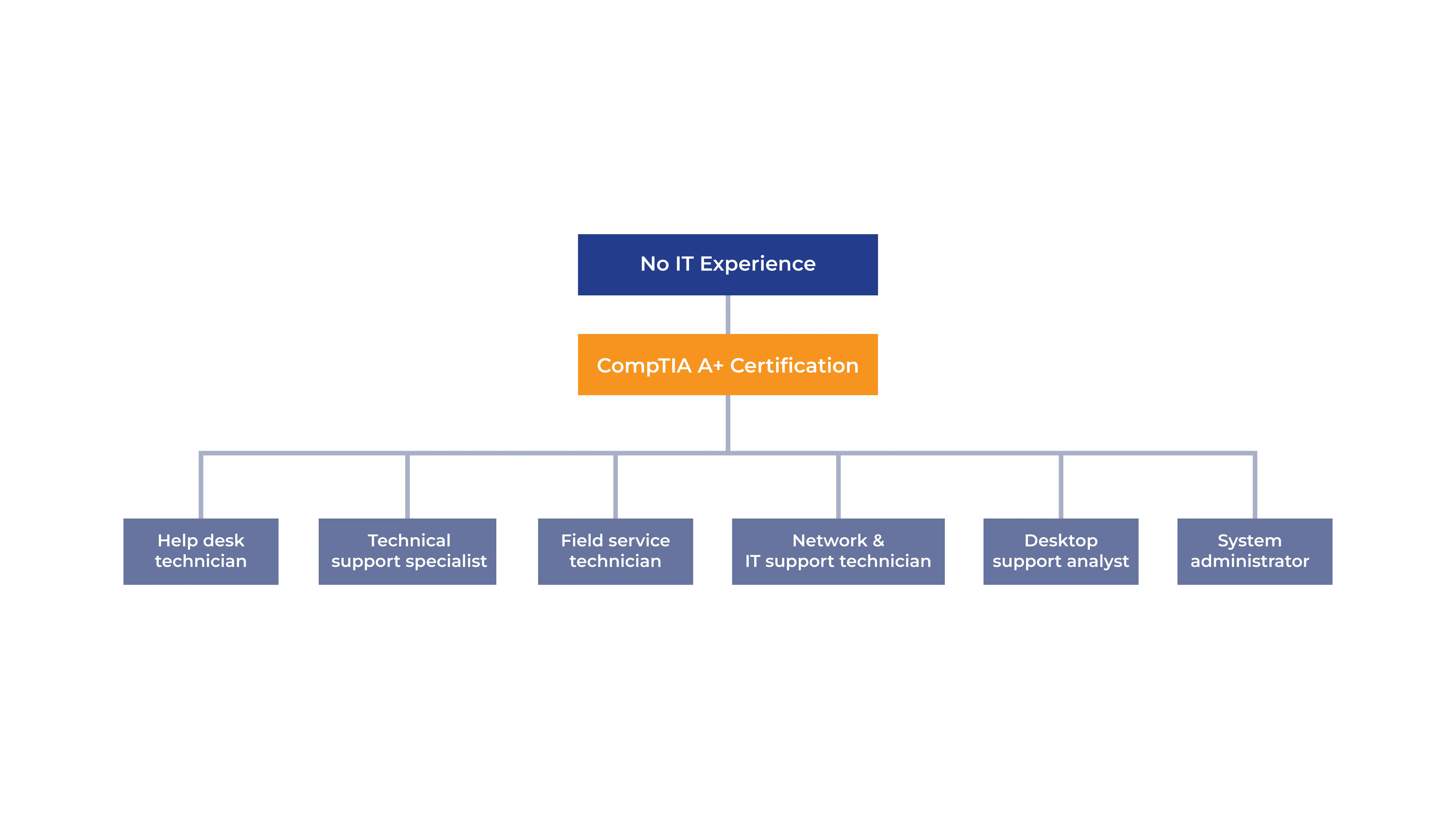
Career Path of CompTIA A+ Certification

CompTIA A+ Certification Exam Details

The CompTIA A+ Certification is earned by successfully passing both required exams: Core 1 (220-1101) and Core 2(220-1102) exams. The test is administered through authorised Pearson VUE testing centers. The exams assess a candidate’s ability to support, configure, and troubleshoot hardware, software, operating systems, networking, and security issues in real-world IT environments. Key exam details include;

Exam Criteria Details
Exam Code Core 1 (220-1101) and Core 2 (220-1102)
Exam Duration 90 minutes per exam
Number of Questions 90 questions per exam
Question Types
Multiple-choice, drag-and-drop, performance-based
Passing Score Core 1: 675/900, Core 2: 700/900
Exam Fees USD 253 + Taxes per exam
Certification Validity 3 years
Exam Administration Pearson VUE (online with proctoring or in-person)
To know more about our CompTIA A+ Course fee in Kuwait (depends on requirements) and syllabus contact our team at Edoxi.

Features of the CompTIA A+ Training in Kuwait

Complete PC Assembling Training

Experience hands-on hardware training by building and troubleshooting complete computer systems using professional diagnostic tools and BIOS utilities.

Operating System Installation Labs

Practice step-by-step installation and configuration of Windows operating systems, with basic coverage of Linux and macOS environments.

Network Configuration Exercises

Configure and test network settings using essential tools like ipconfig, while learning proper implementation of routers, switches, and firewalls.

Professional IT Support Scenarios

Apply systematic troubleshooting methodologies through real-world scenarios, covering hardware, software, and network issues as outlined in Core 1 Domain 5.

Security Implementation Practice

Learn to implement and configure essential security tools, including antivirus software, firewalls, and encryption protocols.

Comprehensive Study Resources

Access detailed PDF study materials covering all exam objectives for both Core 1 (220-1101) and Core 2 (220-1102) certifications.

Who Can Join Our CompTIA A+ Course in Kuwait?

IT Career Aspirants

Individuals looking to start their career in IT support and administration. No prior IT experience is required, making it an ideal entry point into the technology industry.

Fresh Graduates

Recent graduates seeking to build a foundation in IT infrastructure and support. Basic computer literacy provides sufficient groundwork to begin the certification journey.

Career Transitioners

Professionals from various backgrounds wanting to move into IT roles. The course structure accommodates those with basic computer operation knowledge.

Technical Support Professionals

Current helpdesk technicians and support specialists aiming to validate their skills and advance their careers through industry-recognised certification.

IT Enthusiasts

Individuals with a passion for technology and basic computer literacy looking to gain comprehensive knowledge in hardware, software, and networking.

CompTIA Certification Aspirants

Those planning to pursue advanced CompTIA certifications like Network+ or Security+, using A+ as their foundational stepping stone.

CompTIA A+ Course Modules


EXAM NUMBER: CORE 1 (220-1101)

Module 1: Mobile Devices (Domain 1.0)
  • Chapter 1.1: Laptop Hardware and Components

    • Lesson 1.1.1: Hardware/device replacement: Battery, Keyboard/keys, RAM, HDD/SSD migration, HDD/SSD replacement, Wireless cards.
    • Lesson 1.1.2: Physical privacy and security components: Biometrics, Near-field scanner features.
  • Chapter 1.2: Display Components of Mobile Devices

    • Lesson 1.2.1: Types of displays: LCD (IPS, TN, VA), OLED.
    • Lesson 1.2.2: Mobile display components: WiFi antenna connector/placement, Camera/webcam, Microphone, Touch screen/digitizer, Inverter.
  • Chapter 1.3: Accessories and Ports of Mobile Devices

    • Lesson 1.3.1: Connection methods: USB/USB-C/microUSB/miniUSB, Lightning, Serial interfaces, NFC, Bluetooth, Hotspot.
    • Lesson 1.3.2: Accessories: Touch pens, Headsets, Speakers, Webcam, Docking station, Port replicator, Trackpad/drawing pad.
  • Chapter 1.4: Mobile-Device Network Connectivity and Application Support

    • Lesson 1.4.1: Wireless/cellular data network: 2G/3G/4G/5G, Hotspot, GSM vs. CDMA, PRL updates.
    • Lesson 1.4.2: Bluetooth: Enable Bluetooth, Enable pairing, Find a device, Enter PIN, Test connectivity.
    • Lesson 1.4.3: Location services: GPS services, Cellular location services.
    • Lesson 1.4.4: Mobile device management (MDM), mobile application management (MAM): Corporate email configuration, Two-factor authentication, and Corporate applications.
    • Lesson 1.4.5: Mobile device synchronization: Account setup (Microsoft 365, Google Workspace, iCloud), Data to synchronize (Mail, Photos, Calendar, Contacts), Recognizing data caps.
Module 2: Networking (Domain 2.0)
  • Chapter 2.1: Ports, Protocols, and Their Purposes

    • Lesson 2.1.1: Ports and protocols: FTP (20/21), SSH (22), Telnet (23), SMTP (25), DNS (53), DHCP (67/68), HTTP (80), POP3 (110), NetBIOS/NetBT (137/139), IMAP (143), SNMP (161/162), LDAP (389), HTTPS (443), SMB/CIFS (445), RDP (3389).
    • Lesson 2.1.2: TCP vs. UDP: Connectionless (DHCP, TFTP), Connection-oriented (HTTPS, SSH).
  • Chapter 2.2: Networking Hardware

    • Lesson 2.2.1: Hardware types: Routers, Managed/Unmanaged switches, Access points, Patch panels, Firewalls, PoE injectors/switches (PoE standards), Hubs, Cable modems, DSL, Optical network terminals (ONT), NICs, SDN.
  • Chapter 2.3: Wireless Networking Protocols

    • Lesson 2.3.1: Frequencies: 2.4GHz, 5GHz.
    • Lesson 2.3.2: Channels: Regulations, 2.4GHz vs. 5GHz.
    • Lesson 2.3.3: Protocols: 802.11a/b/g/n/ac (WiFi 5)/ax (WiFi 6), Long-range fixed wireless (Licensed/Unlicensed).
    • Lesson 2.3.4: Technologies: NFC, RFID.
  • Chapter 2.4: Networked Hosts and Services

    • Lesson 2.4.1: Server roles: DNS, DHCP, File share, Print servers, Mail servers, Syslog, Web servers, AAA.
    • Lesson 2.4.2: Internet appliances: Spam gateways, UTM, Load balancers, Proxy servers.
    • Lesson 2.4.3: Legacy/embedded systems: SCADA, IoT devices.
  • Chapter 2.5: Wired/Wireless SOHO Networks

    • Lesson 2.5.1: IP addressing: IPv4 (Private/Public), IPv6, APIPA, Static, Dynamic, Gateway.
    • Lesson 2.5.2: SOHO configuration: Internet access, Device connections, Wired/Wireless components.
  • Chapter 2.6: Common Network Configuration Concepts

    • Lesson 2.6.1: DNS: A, AAAA, MX, TXT (DKIM, SPF, DMARC).
    • Lesson 2.6.2: DHCP: Leases, Reservations, Scope.
    • Lesson 2.6.3: VLANs and VPNs.
  • Chapter 2.7: Internet Connection Types and Network Types

    • Lesson 2.7.1: Internet connections: Satellite, Fiber, Cable, DSL, Cellular, WISP.
    • Lesson 2.7.2: Network types: LAN, WAN, PAN, MAN, SAN, WLAN.
  • Chapter 2.8: Networking Tools

    • Lesson 2.8.11: Tools: Crimper, Cable stripper, WiFi analyzer, Toner probe, Punchdown tool, Cable tester, Loopback plug, Network tap.
Module 3: Hardware (Domain 3.0)
  • Chapter 3.1: Cable Types and Their Features

    • Lesson 3.1.1: Network cables: Copper (Cat 5, Cat 5e, Cat 6, Cat 6a, Coaxial, Shielded/Unshielded twisted pair), Plenum-rated cables, Fiber optic.
    • Lesson 3.1.2: Peripheral cables: USB 2.0, USB 3.0, Serial, Thunderbolt.
    • Lesson 3.1.3: Video cables: HDMI, DisplayPort, DVI, VGA.
    • Lesson 3.1.4: Hard drive cables: SATA, SCSI, eSATA, IDE.
    • Lesson 3.1.5: Adapters and connector types: RJ11, RJ45, F-type, ST, SC, LC, punch-down block, microUSB, miniUSB, USB-C, Molex, Lightning, DB9.
  • Chapter 3.2: RAM Installation and Configuration

    • Lesson 3.2.1: RAM types: Virtual RAM, SODIMM, DDR3, DDR4, DDR5, ECC RAM.
    • Lesson 3.2.2: Channels: Single, Dual, Triple, Quad.
  • Chapter 3.3: Storage Devices and Configurations

    • Lesson 3.3.1: Hard drives: Speeds (5400rpm, 7200rpm, 10000rpm, 15000rpm), Form factors (2.5, 3.5).
    • Lesson 3.3.2: SSDs: Interfaces (NVMe, SATA, PCIe), Form factors (M.2, mSATA).
    • Lesson 3.3.3: Drive configurations: RAID 0, 1, 5, 10.
    • Lesson 3.3.4: Removable storage: Flash drives, Memory cards, Optical drives.
  • Chapter 3.4: Motherboards, CPUs, and Add-on Cards

    • Lesson 3.4.1: Motherboard form factors: ATX, ITX.
    • Lesson 3.4.2: Motherboard connectors: PCI, PCIe, SATA, eSATA, M.2, Headers, Power connectors.
    • Lesson 3.4.3: CPU architecture: x64/x86, ARM, Single-core, Multicore, Multithreading, Virtualization support.
    • Lesson 3.4.4.: Expansion cards: Sound card, Video card, Capture card, NIC.
    • Lesson 3.4.5: Cooling methods: Fans, Heat sinks, Thermal paste, Liquid cooling.
  • Chapter 3.5: Power Supply Installation

    • Lesson 3.5.1: Input/output voltages: 110-120 VAC vs. 220-240 VAC, 3.3V vs. 5V vs. 12V.
    • Lesson 3.5.2: Types: Redundant power supply, Modular power supply, Wattage ratings.
  • Chapter 3.6: Printers and Multifunction Devices

    • Lesson 3.6.1: Printer setup: Drivers, Connectivity (USB, Ethernet, Wireless), Configuration settings (duplex, tray, quality).
    • Lesson 3.6.2: Security: User authentication, Badging, Audit logs, secured prints.
    • Lesson 3.6.3: Consumables: Laser (imaging drum, toner), Inkjet (ink cartridge, print head), Thermal (heating element, paper), Impact (ribbon, tractor feed), 3D printer components (filament, resin).
Module 4: Virtualization and Cloud Computing (Domain 4.0)
  • Chapter 4.1: Cloud-Computing Concepts

    • Lesson 4.1.1: Common cloud models: Private cloud, Public cloud, Hybrid cloud, Community cloud.
    • Lesson 4.1.2: Cloud service models: Infrastructure as a Service (IaaS), Software as a Service (SaaS), Platform as a Service (PaaS).
    • Lesson 4.1.3: Cloud characteristics: Shared resources, Metered utilization, Rapid elasticity, High availability, File synchronization.
    • Lesson 4.1.4: Desktop virtualization: Virtual Desktop Infrastructure (VDI) on-premises, VDI in the cloud.
  • Chapter 4.2: Client-Side Virtualization

    • Lesson 4.2.1: Purpose of virtual machines: Sandbox, Test development, Application virtualization (legacy software/OS, cross-platform).
    • Lesson 4.2.2: Resource requirements: CPU, RAM, Storage, Network.
    • Lesson 4.2.3: Security requirements: Isolation, Encryption, Backup and Restore.
Module 5: Hardware and Network Troubleshooting (Domain 5.0)
  • Chapter 5.1: Best Practice Methodology for Problem Resolution

    • Lesson 5.1.1: Steps to resolve problems: Identify the problem, establish a theory, test the theory, establish a plan of action, verify full system functionality, Document findings.
  • Chapter 5.1.2: Motherboard, RAM, CPU, and Power Issues

    • Lesson 5.1.3: Common symptoms: POST beeps, Blue screen of death (BSOD), Black screen, No power, Sluggish performance, Overheating, Burning smell, Capacitor swelling, Inaccurate system date/time.
  • Chapter 5.2: Storage and RAID Issues

    • Lesson 5.2.1: Common symptoms: Grinding noises, Clicking sounds, Bootable device not found, RAID failure, S.M.A.R.T. failure, Extended read/write times.
  • Chapter 5.3. : Video, Projector, and Display Issues

    • Lesson 5.3.1: Common symptoms: Incorrect data source, Burned-out bulb, Display burn-in, Dead pixels, Flashing screen, Dim image, Intermittent shutdown.
  • Chapter 5.4: Mobile Device Issues

    • Lesson 5.4.1: Common symptoms: Poor battery health, Broken screen, Improper charging, Liquid damage, Overheating, Malware, Digitizer issues, physically damaged ports.
  • Chapter 5.5: Printer Issues

    • Lesson 5.5.1: Common symptoms: Paper jams, Faded print, Incorrect paper size, Toner not fusing to paper, Garbled print, Lines on printed pages, Double/echo images, Staple jams.
  • Chapter 5.6: Wired and Wireless Network Issues

    • Lesson 5.6.1: Common symptoms: Intermittent connectivity, Slow network speeds, Limited connectivity, Jitter, Poor VoIP quality.

EXAM NUMBER: CORE 2 (220-1102)

Module 1: Operating Systems (Domain 1.0)
  • Chapter 1.1: Features of Microsoft Windows Editions

    • Lesson 1.1: Windows 10 editions: Home, Pro, Pro for Workstations, Enterprise.
    • Lesson 1.2: Feature differences: Domain access vs. workgroup, Desktop styles, RDP availability, RAM support limits, BitLocker, gpedit.msc.
    • Lesson 1.3: Upgrade paths: In-place upgrade.
  • Chapter 1.2: Microsoft Command-Line Tools

    • Lesson 1.2.1: Navigation commands: cd, dir, md, rmdir, drive navigation inputs (C:, D:).
    • Lesson 1.2.2: Network and system tools: ipconfig, ping, hostname, netstat, nslookup, tracert, pathping.
    • Lesson 1.2.3: Disk and file tools: chkdsk, format, xcopy, copy, robocopy.
    • Lesson 1.2.4: Configuration tools: gpupdate, gpresult, shutdown, diskpart, winver.
  • Chapter 1.3: Windows Control Panel Utilities

    • Lesson 1.3.1: Utilities: Internet Options, Devices and Printers, Programs and Features, Network and Sharing Center, System, Windows Defender Firewall, User Accounts, Device Manager.
    • Lesson 1.3.2: File Explorer Options: Show hidden files, Hide extensions.
    • Lesson 1.3.3: Power Options: Hibernate, Power plans, Sleep/suspend, Turn on fast startup.
  • Chapter 1.4: Features and Tools of Microsoft Windows OS

    • Lesson 1.4.1: Task Manager: Services, Startup, Performance, Processes, Users.
    • Lesson 1.4.2: MMC snap-ins: Event Viewer, Disk Management, Task Scheduler, Device Manager, Performance Monitor, Group Policy Editor.
    • Lesson 1.4.3: Additional tools: System Information, Resource Monitor, System Configuration, Disk Cleanup, Disk Defragment, Registry Editor.
  • Chapter 1.5: Windows Networking Features

    • Lesson 1.5.1: Workgroup vs. domain setup: Shared resources, Printers, File servers, Mapped drives.
    • Lesson 1.5.2: Client network configuration: IP addressing, DNS settings, Subnet mask, Gateway, Static vs. dynamic.
    • Lesson 1.5.3: Establishing network connections: VPN, Wireless, Wired.
  • Chapter 1.6: Application Installation and Configuration

    • Lesson 1.6.1: System requirements: 32-bit vs. 64-bit applications, VRAM, RAM, CPU.
    • Lesson 1.6.2: Distribution methods: Physical media, Downloadable, ISO mountable.
    • Lesson 1.6.3: Other considerations: Network and business impact, Application compatibility.
  • Chapter 1.7: OS Types and Installation Methods

    • Lesson 1.7.1: OS types: Windows, Linux, macOS, Chrome OS, iPadOS, iOS, Android.
    • Lesson 1.7.2: Filesystem types: NTFS, FAT32, ext3, ext4, APFS, exFAT.
    • Lesson 1.7.3: Installation methods: USB, Optical media, Network, SSD, Internet-based.
    • Lesson 1.7.4: Partitioning and drive formatting: GPT, MBR, Clean install, Image deployment, Recovery partitions.
  • Chapter 1.8: Features of macOS and Linux OS

    • Lesson 1.8.1: macOS features: Multiple desktops, Spotlight, Keychain, iCloud, Finder, Disk Utility, FileVault.
    • Lesson 1.8.2: Linux commands: ls, pwd, mv, cp, rm, chmod, chown, apt-get, yum, grep, ps, top, nano, cat.
Module 2: Security (Domain 2.0)
  • Chapter 2.1: Security Measures and Purposes

    • Lesson 2.1.1: Physical security: Access control vestibule, Badge reader, Video surveillance, Motion sensors, Door locks, Equipment locks, Guards, Bollards, and Fences.
    • Lesson 2.1.2: Logical security: Principle of least privilege, Access control lists (ACLs), Multifactor authentication (MFA), Mobile device management (MDM), Active Directory.
  • Chapter 2.2: Wireless Security Protocols and Authentication Methods

    • Lesson 2.2.1: Wireless security protocols: WPA2, WPA3, TKIP, AES.
    • Lesson 2.2.2: Authentication methods: RADIUS, TACACS+, Kerberos, Multifactor authentication.
  • Chapter 2.3: Malware Detection, Removal, and Prevention

    • Lesson 2.3.1: Malware types: Trojan, Rootkit, Virus, Spyware, Ransomware, Keylogger, Boot sector virus, Cryptominers.
    • Lesson 2.3.2: Tools and methods: Recovery mode, Antivirus, Anti-malware, Firewalls, Anti-phishing training, User education, OS reinstallation.
  • Chapter 2.4: Social Engineering Attacks and Threats

    • Lesson 2.4.1: Social engineering attacks: Phishing, Vishing, Shoulder surfing, Whaling, Tailgating, Impersonation, Dumpster diving, Evil twin.
    • Lesson 2.4.2: Threats: DDoS, Zero-day attacks, Spoofing, On-path attacks, Brute-force attacks, SQL injection, and Cross-site scripting (XSS).
  • Chapter 2.5: Workstation Security Best Practices

    • Lesson 2.5.1: Security measures: Data-at-rest encryption, Password complexity, failed attempts lockout, Timeout/screen lock.
    • Lesson 2.5.2: Account management: Restrict permissions, Disable guest accounts, Change default admin credentials, Disable AutoRun and AutoPlay.
  • Chapter 2.6: Securing Mobile and Embedded Devices

    • Lesson 2.6.1: Security features: Screen locks (PIN, fingerprint, facial recognition), Remote wipe, Locator applications, OS updates, Device encryption, and Antivirus/anti-malware.
    • Lesson 2.6.2: IoT security: BYOD vs. corporate-owned policies, Profile security requirements.
  • Chapter 2.7: Data Destruction and Disposal Methods

    • Lesson 2.7.1: Physical destruction: Drilling, Shredding, Degaussing, Incinerating.
    • Lesson 2.7.2: Recycling or repurposing: Erasing/wiping, Low-level formatting, Certification of destruction.
  • Chapter 2.8: SOHO Network Security Settings

    • Lesson 2.8.1: Router security: Change default passwords, IP filtering, Firmware updates, Content filtering, and Physical placement.
    • Lesson 2.8.2: Wireless security: SSID settings, Encryption, Disabling guest access, Channel adjustments.
    • Lesson 2.8.3: Firewall configurations: Disable unused ports, Port forwarding/mapping.
  • Chapter 2.9: Browser Security Settings

    • Lesson 2.9.1: Secure installation: Trusted sources, Hashing verification.
    • Lesson 2.9.2: Browser security features: Pop-up blocker, clearing cache, Password managers, Ad blockers, Private-browsing mode.
Module 3: Software Troubleshooting (Domain 3.0)
  • Chapter 3.1: Troubleshooting Windows OS Problems

    • Lesson 3.1.1: Common symptoms: Blue screen of death (BSOD), Sluggish performance, Boot problems, Frequent shutdowns, Services not starting, Applications crashing, Low memory warnings, System instability, no OS found.
    • Lesson 3.1.2: Troubleshooting steps: Reboot, Restart services, Uninstall/reinstall applications, Verify requirements, System file check, Repair Windows, Restore/reimage, Rollback updates.
  • Chapter 3.2: Troubleshooting PC Security Issues

    • Lesson 3.2.1: Common symptoms: Unable to access the network, Altered system files, Unwanted notifications, OS update failures.
    • Lesson 3.2.2: Browser-related symptoms: Frequent pop-ups, Certificate warnings, Redirection.
  • Chapter 3.3: Malware Removal Best Practices

    • Lesson 3.3.1: Malware removal steps: Investigate and verify symptoms, Quarantine the system, Disable System Restore, Update anti-malware, Perform scans in safe mode, Schedule regular scans, Re-enable System Restore, Educate the user.
  • Chapter 3.4: Troubleshooting Mobile OS and Application Issues

    • Lesson 3.4.1: Common symptoms: Applications failing to launch, Crashing, Slow response, OS failing to update, Battery life issues, Random reboots, and Connectivity issues (Bluetooth, WiFi, NFC).
    • Lesson 3.4.2: Hardware-related issues: Screen not auto-rotating, Physical damage to components.
  • Chapter 3.5: Troubleshooting Mobile OS Security Issues

    • Lesson 3.5.1: Security concerns: APK source issues, Jailbreaking/root access, Bootleg or malicious applications.
    • Lesson 3.5.2: Common symptoms: High network traffic, Sluggish performance, Unexpected behavior, Leaked personal data, Fake security warnings.
Module 4: Operational Procedures (Domain 4.0)
  • Chapter 4.1: Documentation and Support Systems

    • Lesson 4.1.1: Ticketing systems: User and device information, Problem descriptions, Categories, Severity, Escalation levels, and Clear communication.
    • Lesson 4.1.2: Asset management: Inventory lists, Asset tags and IDs, Procurement life cycle, Warranty tracking.
    • Lesson 4.1.3: Documentation types: Acceptable Use Policies (AUP), Network topology diagrams, Incident reports, Standard operating procedures (SOPs).
  • Chapter 4.2: Change Management

    • Lesson 4.2.1: Change management steps: Request forms, Purpose and scope of change, Risk analysis, Rollback plans, Sandbox testing, Change board approvals, User acceptance.
  • Chapter 4.3: Backup and Recovery Methods

    • Lesson 4.3.1: Backup types: Full, Incremental, Differential, Synthetic.
    • Lesson 4.3.2: Backup rotation schemes: On-site vs. off-site, Grandfather-father-son (GFS), 3-2-1 rule.
    • Lesson 4.3.3: Recovery and testing: Frequency, Backup verification.
  • Chapter 4.4: Safety Procedures

    • Lesson 4.4.1: ESD protection: Straps, Mats, Antistatic bags, Grounding equipment.
    • Lesson 4.4.2: Personal safety: Power disconnection, Lifting techniques, Electrical fire safety, Safety goggles, Air filtration masks.
    • Lesson 4.4.3: Power and equipment safety: Proper handling, Battery disposal, Surge suppressors.
  • Chapter 4.5: Environmental Impacts and Controls

    • Lesson 4.5.1: Disposal methods: Proper battery, toner, and device disposal.
    • Lesson 4.5.2: Environmental controls: Ventilation, Dust cleanup, Temperature/humidity awareness.
    • Lesson 4.5.3: Power events: Power surges, Undervoltage, Battery backup solutions.
  • Chapter 4.6: Privacy, Licensing, and Policies

    • Lesson 4.6.1: Incident response: Chain of custody, Management/law enforcement reporting, Drive cloning for data integrity.
    • Lesson 4.6.2: Licensing: Valid and non-expired licenses, Open-source licensing, EULA compliance.
    • Lesson 4.6.3: Regulated data: PII, Healthcare data, Credit card transactions, Data retention requirements.
  • Chapter 4.7: Communication and Professionalism

    • Lesson 4.7.1: Professional techniques: Proper attire, Positive attitude, Active listening, Clear communication, Cultural sensitivity, Timely updates.
    • Lesson 4.7.2: Dealing with difficult customers: Avoid arguing, Clarify statements, Provide updates and resolution options.
    • Lesson 4.7.3: Confidentiality: Protecting private and sensitive materials during service.
  • Chapter 4.8: Basics of Scripting

    • Lesson 4.8.1: Script types: .bat, .ps1, .vbs, .sh, .js, .py.
    • Lesson 4.8.2: Use cases: Automation, Network drive mapping, Application installation, Backup scheduling, and Information gathering.
    • Lesson 4.8.3: Risks: Malware introduction, System instability, Resource mishandling.
  • Chapter 4.9: Remote Access Technologies

    • Lesson 4.9.1: Tools and methods: RDP, VPN, VNC, SSH, Remote monitoring and management (RMM), Third-party tools (screen sharing, desktop management).

Download CompTIA A+ Course Brochure

Lab Activities and Practical Sessions in CompTIA A+ Training Kuwait

At Edoxi, we emphasise practical learning for our CompTIA A+ training program. Our hands-on labs focus on complete PC assembling training, where students physically build and troubleshoot computer systems. Activities include;

PC Building Project:

Build and configure a fully functional computer system from individual components. Apply proper assembly techniques, cable management, and hardware testing procedures.

Small Office Network Implementation:

Design and set up a small office network environment. Configure routers and switches, set up Wi-Fi networks.

Operating System Deployment:

Perform complete operating system installations and customisations. Configure drivers, security settings, and optimise the system for specific use cases.

CompTIA A+ Course Outcomes and Career Opportunities in Kuwait

The CompTIA A+ certification opens doors to diverse IT career opportunities across Kuwait’s technology sector. It provides a proven foundation for progression from entry-level positions to specialised technical roles, with opportunities spanning multiple industries and organisational types. Outcomes include;

Course Outcome Image
Perform in-depth hardware diagnostics and troubleshooting to accurately identify and resolve common system issues.
Install, configure, and maintain Windows and Linux operating systems using structured, best-practice approaches.
Implement core networking concepts through hands-on labs, including IP addressing, subnetting, and device connectivity.
Build the technical expertise and practical confidence required to operate effectively in modern IT support and service desk roles.
Deliver professional IT support by following industry-standard troubleshooting methodologies, documentation practices, and customer service protocols.
Gain a CompTIA A+ Certification Edoxi, recognised by potential employers in Kuwait.

Job Roles To Pursue After the CompTIA A+ Course in Kuwait

  • IT Support Technician
  • Help Desk Technician
  • Desktop Support Technician
  • Junior IT Support Specialist
  • Computer Repair Technician
  • System Administrator
  • Network Support Specialist
  • IT Operations Specialist
  • Technical Support Analyst
  • Field Service Technician
  • Senior System Administrator
  • Network Administrator

Companies Hiring CompTIA A+ Professionals in Kuwait

  • Burhan Technology Computer Co. W.L.L.
  • American International University (AIU)
  • Pegasus
  • Dar Al Shifa Hospital
  • Rayan Gate
  • Alghanim Industries
  • EMCO
  • Core for Infrastructure Works Co. W.L.L
  • V2X
  • Axiom Technologies

CompTIA A+ Training Options

Classroom Training

  • 40-hour instructor-led program at our Kuwait facility.

  • Direct interaction with experienced trainers.

  • Hands-on hardware labs with practical demonstrations.

  • Step-by-step hardware configurations and troubleshooting exercises.

Live Online Training

  • 40-hour curriculum delivered via our virtual learning platform.

  • Flexibility to join sessions from any location.

  • Real-time instructor guidance and interactive virtual labs.

  • Structured learning modules with practical exercises and discussions.

Corporate Training

  • Tailored program delivered over 5 intensive days.

  • Customised to match your team’s technical needs and business objectives.

  • Includes training logistics management and multiple venue options (hotels, Edoxi premises, or client premises).

  • “Fly Me a Trainer” option available globally.

  • Food and refreshments are provided during training sessions.

Do You Want a Customised Training for CompTIA A+?

Get expert assistance in getting your CompTIA A+ Course customised!

How to get CompTIA A+ Certification in Kuwait

Here’s a four-step guide to becoming a certified CompTIA A+ professional.

Do You Want to be a Certified Professional in CompTIA A+?

Why Choose Edoxi for CompTIA A+ Training in Kuwait?

Edoxi is one of the leading CompTIA A+ training institutes in Kuwait. Here are a few reasons why you should choose Edoxi for CompTIA A+ training in Kuwait. Here are a few reasons why you should choose Edoxi for the CompTIA A+ Course in Kuwait;

Official CompTIA Delivery Partner

Authorised training partner with certification-aligned curriculum mapped to the latest Core 1 (220-1101) and Core 2 (220-1102) objectives.

Industry-Focused Learning Environment

Hands-on experience in hardware labs, including PC assembly, network configuration, and real-world troubleshooting.

Professional Development Support

Structured learning path with study materials and resources for beginners and career changers.

Flexible Training Solutions

Flexible training options, including online and corporate formats, with a 40-hour adaptable curriculum.

Experienced Faculty

Certified IT professionals with expertise in hardware troubleshooting, network configuration, and security.

students-image

Edoxi is Recommended by 95% of our Students

Meet Our Mentor

Our mentors are leaders and experts in their fields. They can challenge and guide you on your road to success!

mentor-image

Sid Ahmed

Sid Ahmed is an IT network infrastructure and security trainer with over 12 years of experience at Edoxi Training Institute, Dubai. He is a certified CCNA/CCNP instructor and NSE 4 trainer and possesses advanced expertise in Cisco networking His portfolio includes prestigious Cisco certifications and hands-on knowledge of global security frameworks, making him a leader in delivering industry-relevant training.

Sid’s knowledge also extends to industry standards such as ISO 27001, NIST, SOC2, and PCI DSS, further strengthening his cybersecurity prowess.Sid Ahmed focuses on developing practical skills through hands-on training with enterprise-grade equipment. As an experienced Network and Security Architect, Sid Ahmed's expertise spans WAN/LAN, IP-MPLS, BGP, Wireless, IP Telephony, and Cybersecurity.He is skilled in HLD/LLD design, audits, pentesting, IT risk assessments, and security frameworks His specialisations include SD-WAN, VPN, VLAN, SSL, SIEM, cloud tech, and routing protocols (OSPF, BGP, STP) Sid is also proficient in Python, MySQL, JavaScript, APIs, and tools like SolarWinds, FortiSIEM, and U2000.

Locations Where Edoxi Offers CompTIA A+ Certification Course

Here is the list of other major locations where Edoxi offers CompTIA A+ Certification Course

FAQ

Is it worth getting CompTIA A+ certification in Kuwait?

CompTIA A+ certification holds significant value in the IT industry as a vendor-neutral, globally recognised credential. The certification validates your technical skills and knowledge, enhancing your credibility and opening doors to various IT support roles with potential for career advancement.

Is CompTIA A+ easier than CCNA?

CompTIA A+ certification is generally more accessible than CISCO's CCNA certification. While CCNA focuses specifically on Cisco networking technologies, CompTIA A+ covers broader IT concepts designed for entry-level IT professionals and those starting their technology careers.

Are CompTIA exams difficult?

The difficulty level depends on your background knowledge and preparation. With proper training and hands-on practice, the exams are achievable. The certification requires passing two exams (Core 1 and Core 2), each containing 90 questions, including multiple-choice and performance-based scenarios.

What prior knowledge is required to join the CompTIA A+ course in Kuwait?

No prior IT experience is needed. Basic computer literacy and familiarity with common software applications provide a sufficient foundation to begin the course.

How is the CompTIA A+ course delivered?

The CompTIA A+ course is available in online formats, with a duration of 40 hours. For corporate clients, we offer a concentrated 5-day training program.

What practical skills will I learn during the CompTIA A+ training in Kuwait?

Participants gain hands-on experience in hardware troubleshooting, PC assembly, operating system installations, network configuration, and IT support best practices through our dedicated lab sessions.

What career opportunities can I expect after completing the CompTIA A+ course in Kuwait?

Graduates can pursue roles such as IT Support Technician, Help Desk Technician, Desktop Support Technician, and Computer Repair Technician.

What is the average salary of a CompTIA A+ Professional in Kuwait?

Salaries for CompTIA A+ professionals in Kuwait are around 400 KWD to over 1,000 KWD monthly, depending heavily on experience, employer, and the specific job. Entry-level being lower and experienced roles hitting higher figures like 1,400 KWD for Technical Support Engineers or more for specialised roles