Leave your message to get our quick response
edoxi automated message icon

CompTIA A+ Course in Riyadh

Professional IT technician working on a laptop with a digital network background, representing CompTIA A+ certification and IT support training.
Edoxi’s 40-hour CompTIA A+ Course in Riyadh equips you with practical, industry-focused IT skills. The course covers hardware, operating systems, networking, mobile devices, troubleshooting, and hands-on labs. You gain the confidence and expertise to support IT environments and prepare for Core 1 & Core 2 certification exams. Enrol Now!
Course Duration
40 Hours
Corporate Days
5 Days
Learners Enrolled
50+
Modules
9
star-rating-icon1
star-rating-icon2
star-rating-icon3
Course Rating
4.9
star-rating-4.9
Mode of Delivery
Online
Classroom
Certification by

What Do You Learn from Edoxi's CompTIA A+ Training

Hardware Components and System Architecture
Master PC hardware components, including motherboards, chipsets, memory, and storage, through hands-on assembly and troubleshooting.
Operating System Management and Security
Configure and manage Windows, Linux, and macOS systems while applying essential security practices and system protection measures.
Network Infrastructure and Protocols
Understand TCP/IP networking, IPv4/IPv6 addressing, and wireless technologies to ensure reliable connectivity and effective troubleshooting.
System Maintenance and Troubleshooting
Apply structured troubleshooting techniques using diagnostic tools, command-line utilities, and industry best practices.
Mobile Device and Cloud Technologies
Support mobile devices and implement cloud and virtualisation technologies, including remote access solutions.
Security Best Practices and Compliance
Implement cybersecurity controls, detect threats, configure firewalls, and maintain compliance with industry standards.

About Our CompTIA A+ Course in Riyadh

Edoxi’s 40-hour CompTIA A+ Certification Training in Riyadh prepares you for entry-level IT support and technical roles in today’s technology-driven job market. You gain practical skills in computer hardware, operating systems, networking, and security fundamentals through hands-on labs and guided training. The course clearly outlines the curriculum, practical exercises, and career outcomes to help you build a strong IT foundation. Our training is fully aligned with the latest CompTIA A+ Core 1 (220-1101) and Core 2 (220-1102) exam objectives across industries. 

Edoxi offers CompTIA A+ Corporate Training programs, designed to upskill IT support teams with hands-on labs and role-based learning aligned to organisational technology requirements. Flexible learning options and an affordable CompTIA A+ course fee make the program accessible to all learners. For more details on the training and fee, contact our team. Upon completion, you will be prepared to take the CompTIA A+ certification exams and gain the confidence to perform IT support and administration tasks effectively in the workplace.

Here are the exam details.

Exam Criteria Details  
Exam Code
Core 1 (220-1101) and Core 2 (220-1102)
 
Exam Duration
90 minutes per exam
 
Number of Questions
90 questions per exam
 
Question Types
Multiple-choice, drag-and-drop, performance-based
 
Passing Score
Core 1: 675/900, Core 2: 700/900
 
Exam Fees
USD 253 + Taxes per exam
 
Certification Validity 3 years  
Exam Administration
Pearson VUE (online with proctoring or in-person)
 

This vendor-neutral certification is ideal for aspiring IT professionals, fresh graduates, and career changers. It requires no prior IT experience and is accessible to anyone with basic computer literacy and a passion for technology.
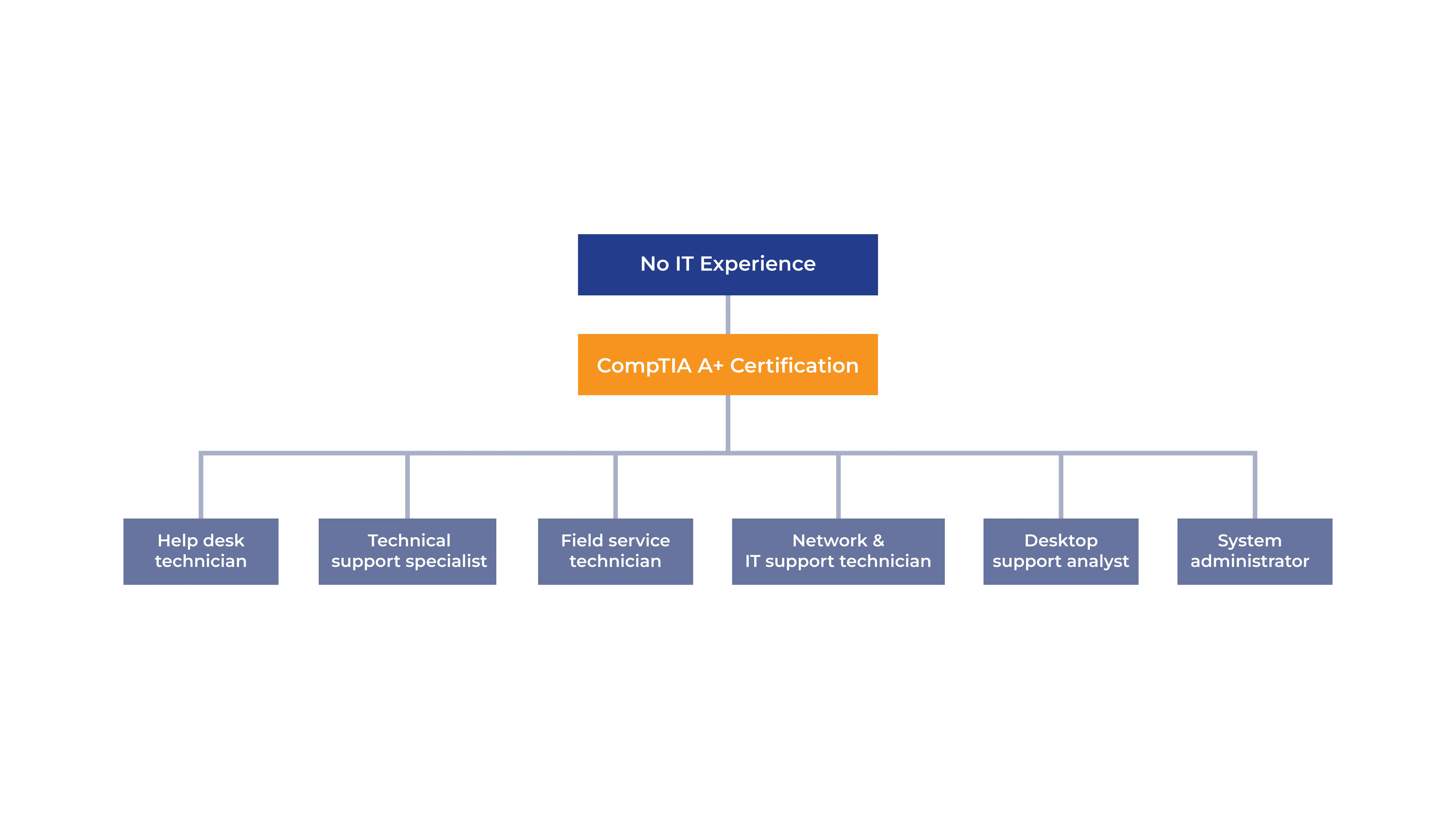
Career Path of CompTIA A+ CertificationThrough this structured training, you develop confidence in IT troubleshooting, networking, and device management. It ensures readiness for both the CompTIA A+ exams and real-world IT support roles in dynamic professional environments.

Key Features of Edoxi's CompTIA A+ Training

Complete PC Assembling Training

Gain hands-on experience by building and troubleshooting full computer systems using professional diagnostic tools and BIOS utilities.

Operating System Installation Labs

Practice step-by-step installation and configuration of Windows operating systems, with basic exposure to Linux and macOS environments.

Network Configuration Exercises

Configure and test network settings using essential tools while implementing routers, switches, and firewall basics.

Professional IT Support Scenarios

Apply structured troubleshooting techniques through real-world hardware, software, and network support scenarios aligned with Core 1 objectives.

Security Implementation Practice

Implement essential security measures, including antivirus tools, firewalls, and encryption techniques.

Comprehensive Study Resources

Access detailed study materials covering all exam objectives for CompTIA A+ Core 1 (220-1101) and Core 2 (220-1102).

Who Can Join Our CompTIA A+ Course in Riyadh?

IT Career Aspirants

Individuals looking to start a career in IT support and administration. No prior IT experience is required, making this an ideal entry point into the technology field.

Fresh Graduates

Recent graduates seeking a strong foundation in IT infrastructure and technical support. Basic computer literacy is sufficient to begin.

Career Transitioners

Professionals from non-IT backgrounds who want to move into IT roles. The course is structured to support learners with basic computer skills.

Technical Support Professionals

Helpdesk technicians and support staff aiming to validate their skills and progress in their IT careers through an industry-recognised certification.

IT Enthusiasts

Technology enthusiasts with basic computer knowledge who want comprehensive exposure to hardware, software, and networking concepts.

CompTIA Certification Aspirants

Learners planning to pursue advanced certifications, such as Network+ or Security+, using CompTIA A+ as a foundational certification.

CompTIA A+ Course Modules

Module 1: Mobile Devices (Core 1 – Domain 1.0)
  • Chapter 1.1: Laptop Hardware & Components

    • Lesson 1.1.1: Laptop hardware replacement (battery, keyboard, RAM)
    • Lesson 1.1.2: Storage migration and replacement (HDD to SSD, SSD upgrades)
    • Lesson 1.1.3: Wireless card installation and replacement
    • Lesson 1.1.4: Physical security components (biometrics, near-field scanner features)
  • Chapter 1.2: Mobile Display Components

    • Lesson 1.2.1: Display technologies (LCD – IPS, TN, VA; OLED)
    • Lesson 1.2.2: Internal display-related components (Wi-Fi antennas, camera/webcam, microphone)
    • Lesson 1.2.3: Touchscreen, digitiser, and inverter components
  • Chapter 1.3: Mobile Accessories & Ports

    • Lesson 1.3.1: Mobile connectivity interfaces (USB, USB-C, microUSB, Lightning, serial)
    • Lesson 1.3.2: Wireless technologies (NFC, Bluetooth, hotspot)
    • Lesson 1.3.3: Mobile accessories (stylus, headsets, speakers, webcams, docking stations, port replicators, drawing pads)
  • Chapter 1.4: Mobile Connectivity & Application Support

    • Lesson 1.4.1: Cellular network standards (2G–5G, GSM vs CDMA, PRL updates)
    • Lesson 1.4.2: Bluetooth pairing and troubleshooting
    • Lesson 1.4.3: Location services (GPS and cellular-based services)
    • Lesson 1.4.4: Mobile device and application management (MDM/MAM, corporate email, MFA, enterprise apps)
    • Lesson 1.4.5: Mobile synchronisation (Microsoft 365, Google Workspace, iCloud)
    • Lesson 1.4.6: Data caps and mobile data usage awareness
Module 2: Networking (Core 1 – Domain 2.0)
  • Chapter 2.1: Ports & Protocols

    • Lesson 2.1.1: Common ports and services (FTP, SSH, SMTP, DNS, DHCP, HTTP/S, SMB, RDP)
    • Lesson 2.1.2: TCP vs UDP (connection-oriented vs connectionless communication)
  • Chapter 2.2: Networking Hardware

    • Lesson 2.2.1: Network devices (routers, managed/unmanaged switches, access points)
    • Lesson 2.2.2: Security and infrastructure components (firewalls, patch panels, PoE devices)
    • Lesson 2.2.3: Internet and network interfaces (modems, ONT, NICs, SDN)
  • Chapter 2.3: Wireless Networking

    • Lesson 2.3.1: Wireless frequencies and channels (2.4GHz and 5GHz)
    • Lesson 2.3.2: Wi-Fi standards (802.11 a/b/g/n/ac/ax)
    • Lesson 2.3.3: Short-range wireless technologies (NFC and RFID)
  • Chapter 2.4: Network Services & Hosts

    • Lesson 2.4.1: Server roles (DNS, DHCP, file, print, mail, web, AAA)
    • Lesson 2.4.2: Internet appliances (proxy servers, UTM, load balancers)
    • Lesson 2.4.3: Embedded systems and IoT devices
  • Chapter 2.5: SOHO Networking

    • Lesson 2.5.1: IP addressing concepts (IPv4, IPv6, static vs dynamic)
    • Lesson 2.5.2: Wired and wireless SOHO network configuration
  • Chapter 2.6: Network Configuration Concepts

    • Lesson 2.6.1: DNS record types (A, AAAA, MX, TXT)
    • Lesson 2.6.2: DHCP configuration (scopes, leases, reservations)
    • Lesson 2.6.3: VLANs and VPNs
  • Chapter 2.7: Internet & Network Types

    • Lesson 2.7.1: Internet connection types (fibre, DSL, cable, satellite, cellular, WISP)
    • Lesson 2.7.2: Network models (LAN, WAN, MAN, PAN, SAN, WLAN)
  • Chapter 2.8: Networking Tools

    • Lesson 2.8.1: Cable and termination tools (crimpers, testers, punchdown tools)
    • Lesson 2.8.2: Diagnostic tools (toner probes, Wi-Fi analysers, loopback plugs)
Module 3: Hardware (Core 1 – Domain 3.0)
  • Chapter 3.1: Cable Types & Connectors

    • Lesson 3.1.1: Network, peripheral, video, and storage cables
    • Lesson 3.1.2: Connector standards and adapters
  • Chapter 3.2: Memory (RAM)

    • Lesson 3.2.1: RAM types (DDR3–DDR5, ECC, SODIMM)
    • Lesson 3.2.2: Memory channel configurations
  • Chapter 3.3: Storage Solutions

    • Lesson 3.3.1: HDD and SSD technologies (interfaces and form factors)
    • Lesson 3.3.2: RAID configurations (0, 1, 5, 10)
    • Lesson 3.3.3: Removable and optical storage
  • Chapter 3.4: Motherboards & CPUs

    • Lesson 3.4.1: Motherboard form factors and connectors
    • Lesson 3.4.2: CPU architectures and virtualisation support
    • Lesson 3.4.3: Expansion cards and cooling solutions
  • Chapter 3.5: Power Supplies

    • Lesson 3.5.1: Voltage standards and power requirements
    • Lesson 3.5.2: Modular and redundant power supplies
  • Chapter 3.6: Printers & Multifunction Devices

    • Lesson 3.6.1: Printer setup, configuration, and security
    • Lesson 3.6.2: Printer technologies and consumables
    • Lesson 3.6.3: 3D printer components
Module 4: Virtualisation & Cloud Computing (Core 1 – Domain 4.0)
  • Chapter 4.1: Cloud Concepts

    • Lesson 4.1.1: Cloud deployment models (public, private, hybrid, community)
    • Lesson 4.1.2: Cloud service models (IaaS, PaaS, SaaS)
    • Lesson 4.1.3: Cloud characteristics and Virtual Desktop Infrastructure (VDI)
  • Chapter 4.2: Client-Side Virtualisation

    • Lesson 4.2.1: Virtualisation use cases and benefits
    • Lesson 4.2.2: Resource allocation for virtual machines
    • Lesson 4.2.3: Virtualisation security considerations
Module 5: Hardware & Network Troubleshooting (Core 1 – Domain 5.0)
  • Chapter 5.1: Troubleshooting Methodology

    • Lesson 5.1.1: Structured troubleshooting process and best practices
  • Chapter 5.2: Common Hardware & Network Issues

    • Lesson 5.2.1: Hardware, storage, and display issues
    • Lesson 5.2.2: Mobile device and printer issues
    • Lesson 5.2.3: Wired and wireless network problems
Module 6: Operating Systems (Core 2 – Domain 1.0)
  • Chapter 6.1: Windows Operating Systems

    • Lesson 6.1.1: Windows editions and features
    • Lesson 6.1.2: Command-line tools and administrative utilities
    • Lesson 6.1.3: Windows networking and application installation
  • Chapter 6.2: OS Types & Installation

    • Lesson 6.2.1: OS types and file systems
    • Lesson 6.2.2: OS installation and upgrade methods
    • Lesson 6.2.3: macOS and Linux fundamentals
Module 7: Security (Core 2 – Domain 2.0)
  • Chapter 7.1: Security Fundamentals

    • Lesson 7.1.1: Physical and logical security controls
    • Lesson 7.1.2: Wireless security and authentication methods
  • Chapter 7.2: Threats & Protection

    • Lesson 7.2.1: Malware types, prevention, and removal
    • Lesson 7.2.2: Social engineering and network-based threats
  • Chapter 7.3: Mobile, IoT & SOHO Security

    • Lesson 7.3.1: Mobile and IoT security practices
    • Lesson 7.3.2: Data destruction and secure disposal
Module 8: Software Troubleshooting (Core 2 – Domain 3.0)
  • Chapter 8.1: Operating System Troubleshooting

    • Lesson 8.1.1: Windows OS and application issues
    • Lesson 8.1.2: Malware removal best practices
  • Chapter 8.2: Mobile & Security Issues

    • Lesson 8.2.1: Mobile OS and application troubleshooting
    • Lesson 8.2.2: Security-related software issues
Module 9: Operational Procedures (Core 2 – Domain 4.0)
  • Chapter 9.1: IT Operations & Documentation

    • Lesson 9.1.1: Documentation standards and ticketing systems
    • Lesson 9.1.2: Change management processes
  • Chapter 9.2: Backup, Safety & Compliance

    • Lesson 9.2.1: Backup and recovery strategies
    • Lesson 9.2.2: Safety and environmental controls
    • Lesson 9.2.3: Privacy, licensing, and regulatory compliance
  • Chapter 9.3: Professional Practices

    • Lesson 9.3.1: Professional communication and customer interaction
    • Lesson 9.3.2: Scripting fundamentals
    • Lesson 9.3.3: Remote access technologies

Download CompTIA A+ Course Brochure

Real - World Projects & Exercises in Our CompTIA A+ Course in Riyadh

Edoxi’s CompTIA A+ training provides hands-on IT support and system implementation practice through real-world projects with expert trainer guidance. The Key Projects include:

Projects

  • PC Building Project

    Assemble and configure complete computer systems. Learn hardware installation, BIOS configuration, and component troubleshooting.

  • Small Office Network Implementation

    Set up and configure a basic office network. Implement routers, switches, IP addressing, and connectivity testing.

  • Operating System Deployment

    Install and configure operating systems with proper drivers and updates. Practise system setup and optimisation.

  • IT Support Troubleshooting Project

    Diagnose and resolve common hardware, software, and network issues using structured troubleshooting methods.

CompTIA A+ Course Outcome and Career Opportunities in Riyadh

Our CompTIA A+ Certification Course in Riyadh prepares you for entry-level IT support and technical roles by building strong foundations in hardware, software, networking, and security. By completing this course, participants will learn to:

Course Outcome Image
Assemble, configure, and troubleshoot computer hardware and peripheral devices.
Install, manage, and secure operating systems, including Windows, with basic exposure to Linux and macOS.
Configure and support wired and wireless networks while resolving common connectivity issues.
Apply structured troubleshooting methodologies for hardware, software, and network problems.
Build skills aligned with CompTIA A+ Core 1 (220-1101) and Core 2 (220-1102) exam objectives.
Enhance employability by preparing for globally recognised CompTIA A+ certification and IT support roles.

Career Opportunities After Our CompTIA A+ Course in Riyadh

  • IT Support Technician
  • Helpdesk Analyst
  • Desktop Support Engineer
  • Technical Support Specialist
  • Service Desk Technician
  • Junior System Administrator
  • Network Support Technician
  • IT Operations Support Executive
  • Field Support Engineer
  • IT Customer Support Representative

Top Companies Hiring CompTIA A+ Professionals in Riyadh

  • Six Flags Qiddiya City and Aquarabia
  • Lucidya
  • Gafco
  • Alfaisal University
  • voco® Riyadh
  • Tamkeen Technologies
  • Fortinet
  • Qiddiya Investment Company
  • Smart Technology Solutions
  • Blueforce Inc

CompTIA A+ Training Options

Classroom Training

  • 40 hours of live interactive sessions

  • Comprehensive 40-hour instructor-led program

  • Direct interaction with experienced trainers.

  • Hands-on hardware labs with practical demonstrations.

  • Step-by-step hardware configurations and troubleshooting exercises.

Live Online Training

  • 40-hour virtual learning sessions.

  • Flexibility to join sessions from any location.

  • Real-time instructor guidance and interactive virtual labs.

  • Structured learning modules with practical exercises and discussions.

Corporate Training

  • Tailored program delivered over 5 intensive days.

  • Customised to match your team’s technical needs and business objectives.

  • Includes training logistics management and multiple venue options (hotels, Edoxi premises, or client premises).

  • “Fly Me a Trainer” option available globally.

  • Food and refreshments are provided during training sessions.

Do You Want a Customised Training for CompTIA A+?

Get expert assistance in getting your CompTIA A+ Course customised!

How To Get a CompTIA A+ Course Certification in Riyadh?

Here’s a four-step guide to becoming a certified CompTIA A+ professional.

Do You Want to be a Certified Professional in CompTIA A+?

Join Edoxi’s CompTIA Network+ Course

Why Choose Edoxi For CompTIA A+ Course in Riyadh?

Edoxi’s CompTIA A+ Certification Training equips learners with hands-on IT support experience and industry-relevant technical skills. Here’s why you should choose us:

Official CompTIA Delivery Partner

As the best CompTIA A+ training provider, Edoxi has a structured curriculum aligned with the latest Core 1 (220-1101) and Core 2 (220-1102) certification objectives.

Expert Training Faculty

Edoxi features certified IT instructors with extensive experience in hardware troubleshooting, network configuration, and IT security.

Hands-On, Industry-Focused Learning Approach

Our CompTIA A+ training emphasises practical learning through hardware labs, including PC assembly, operating system installation, and real-world troubleshooting.

One-on-One Personalised Training Support

We provide personalised guidance during each training session to help learners strengthen concepts and achieve certification success.

Flexible Training Solutions

Choose from classroom, online, or corporate training formats with a 40-hour curriculum designed to adapt to individual and organisational needs.

Structured Learning Pathway

Edoxi follows a structured, certification-focused learning pathway supported by study materials and resources suitable for beginners and career changers.

students-image

Edoxi is Recommended by 95% of our Students

Meet Our Mentor

Our mentors are leaders and experts in their fields. They can challenge and guide you on your road to success!

mentor-image

Sid Ahmed

Sid Ahmed is an IT network infrastructure and security trainer with over 12 years of experience at Edoxi Training Institute, Dubai. He is a certified CCNA/CCNP instructor and NSE 4 trainer and possesses advanced expertise in Cisco networking His portfolio includes prestigious Cisco certifications and hands-on knowledge of global security frameworks, making him a leader in delivering industry-relevant training.

Sid’s knowledge also extends to industry standards such as ISO 27001, NIST, SOC2, and PCI DSS, further strengthening his cybersecurity prowess.Sid Ahmed focuses on developing practical skills through hands-on training with enterprise-grade equipment. As an experienced Network and Security Architect, Sid Ahmed's expertise spans WAN/LAN, IP-MPLS, BGP, Wireless, IP Telephony, and Cybersecurity.He is skilled in HLD/LLD design, audits, pentesting, IT risk assessments, and security frameworks His specialisations include SD-WAN, VPN, VLAN, SSL, SIEM, cloud tech, and routing protocols (OSPF, BGP, STP) Sid is also proficient in Python, MySQL, JavaScript, APIs, and tools like SolarWinds, FortiSIEM, and U2000.

Locations Where Edoxi Offers CompTIA A+ Certification Course

Here is the list of other major locations where Edoxi offers CompTIA A+ Certification Course

FAQ

What are the prerequisites for Edoxi’s CompTIA A+ course in Riyadh?

The CompTIA A+ course is designed for beginners, so no prior IT experience is required. Basic computer literacy and familiarity with common software applications provide a sufficient foundation to start the training.

What is CompTIA A+ certification, and why should I pursue it?

CompTIA A+ certification is a globally recognised, vendor-neutral credential that validates your technical knowledge in IT support, hardware, networking, and security. Completing the CompTIA A+ course in Riyadh enhances your credibility and opens doors to entry-level IT roles.

How is Edoxi’s CompTIA A+ training delivered?

CompTIA A+ training in Riyadh is offered in flexible formats, including classroom-based and online live sessions. The program typically spans 40 hours, with a concentrated 5-day corporate option for organisations.

What prior knowledge is required for CompTIA A+ training?

No advanced IT skills are needed for CompTIA A+ training. A basic understanding of computers and common applications is enough to begin, making it ideal for fresh graduates and career changers.

Is CompTIA A+ easier than other IT certifications like CCNA?

CompTIA A+ certification is generally more accessible than Cisco CCNA, as it covers broad IT fundamentals suitable for entry-level professionals, whereas CCNA focuses specifically on Cisco networking technologies.

Are CompTIA A+ exams difficult?
The difficulty of the CompTIA A+ certification exams depends on your preparation. With proper CompTIA A+ training in Riyadh and hands-on lab practice, the exams—Core 1 (220-1101) and Core 2 (220-1102)—are achievable, consisting of multiple-choice and performance-based questions.
What practical skills will I gain from the CompTIA A+ course?

During CompTIA A+ training, you gain hands-on experience in hardware troubleshooting, PC assembly, operating system installations, network configuration, and other IT support best practices through lab-based exercises.

What is the student-to-trainer ratio for CompTIA A+ training in Riyadh?
We maintain a small class size for CompTIA A+ training, with a student-to-trainer ratio of 2 to 4, ensuring personalised attention and optimal learning outcomes.
What career opportunities are available after CompTIA A+ certification?

After completing the CompTIA A+ course in Riyadh, you can pursue roles such as IT Support Technician, Help Desk Technician, Desktop Support Technician, and Computer Repair Technician. These positions provide a strong foundation for further IT certifications and career growth.

What is the expected salary after Completing Edoxi’s CompTIA A+ certification?

Professionals with CompTIA A+ certification can expect entry-level salaries ranging from SAR 3,000 to SAR 6,000 in Riyadh, with opportunities to grow as you gain experience and additional certifications.