Leave your message to get our quick response
edoxi automated message icon

CHFI Course in Kuwait

CHFI Computer Hacking Forensic Investigator certification training
Edoxi’s 30-Hour CHFI Course in Kuwait offers complete training for beginners and cybersecurity professionals. Learn ethical hacking, digital forensics, and cybercrime investigation through hands-on practice. Work on real-world case scenarios and analyse digital evidence step by step. Enhance your professional profile with a globally recognised CHFI certification and practical skills. Enrol now!
Course Duration
35 Days
Corporate Days
5 Days
Level
All Levels
Modules
15
star-rating-icon1
star-rating-icon2
star-rating-icon3
Course Rating
5
star-rating-5
Mode of Delivery
Online
Classroom
Certification by

What Do You Learn from Edoxi's CHFI Course in Kuwait?

Computer Forensics Methodologies and Tools
Apply standard forensic investigation procedures, collect digital evidence, and use professional forensic tools as you conduct structured cyber investigations.
Digital Evidence Handling and Preservation
Collect, document, and preserve digital evidence while following proper chain of custody procedures, as you ensure legal validity.
Incident Response and Cybercrime Investigation
Manage cybersecurity incidents, identify attack vectors, and investigate cybercrimes using recognised forensic techniques as you respond effectively to threats.
Malware and Network Forensics
Analyse malware behaviour, network traffic, and system logs as you trace cyberattacks and identify malicious activities.
Cloud, Mobile, and IoT Forensics
Investigate digital evidence across cloud environments, mobile devices, and IoT systems as you apply modern forensic approaches.
Anti-forensics Detection and Countermeasures
Identify anti-forensic techniques, detect evidence tampering, and apply countermeasures as you ensure accurate forensic analysis.

About Our CHFI Training in Kuwait

Edoxi’s 35-hour Computer Hacking Forensic Investigator (CHFI) Certification Course is designed for cybersecurity professionals, IT specialists, and law enforcement officers seeking advanced expertise in digital forensics and cybercrime investigation. Delivered by the best training institute for CHFI training in Kuwait, Edoxi provides in-depth knowledge of computer forensics methodologies, digital evidence handling, and incident response aligned with global investigation standards.

Our CHFI training in Kuwait combines instructor-led sessions with hands-on lab exercises using professional forensic tools such as Autopsy, FTK Imager, and Redline. You practice real-world scenarios on Windows, Linux, and Mac systems, developing expertise in data recovery, forensic imaging, malware analysis, and evidence preservation. These exercises ensure skills are directly applicable to practical investigations and legal proceedings.

The image below outlines the CHFI certification course, featuring a curriculum focused on malware, cloud, and mobile forensics, alongside an infographic detailing the six-stage Forensic Investigation Process: from crime scene documentation and evidence preservation to data examination and final reporting.
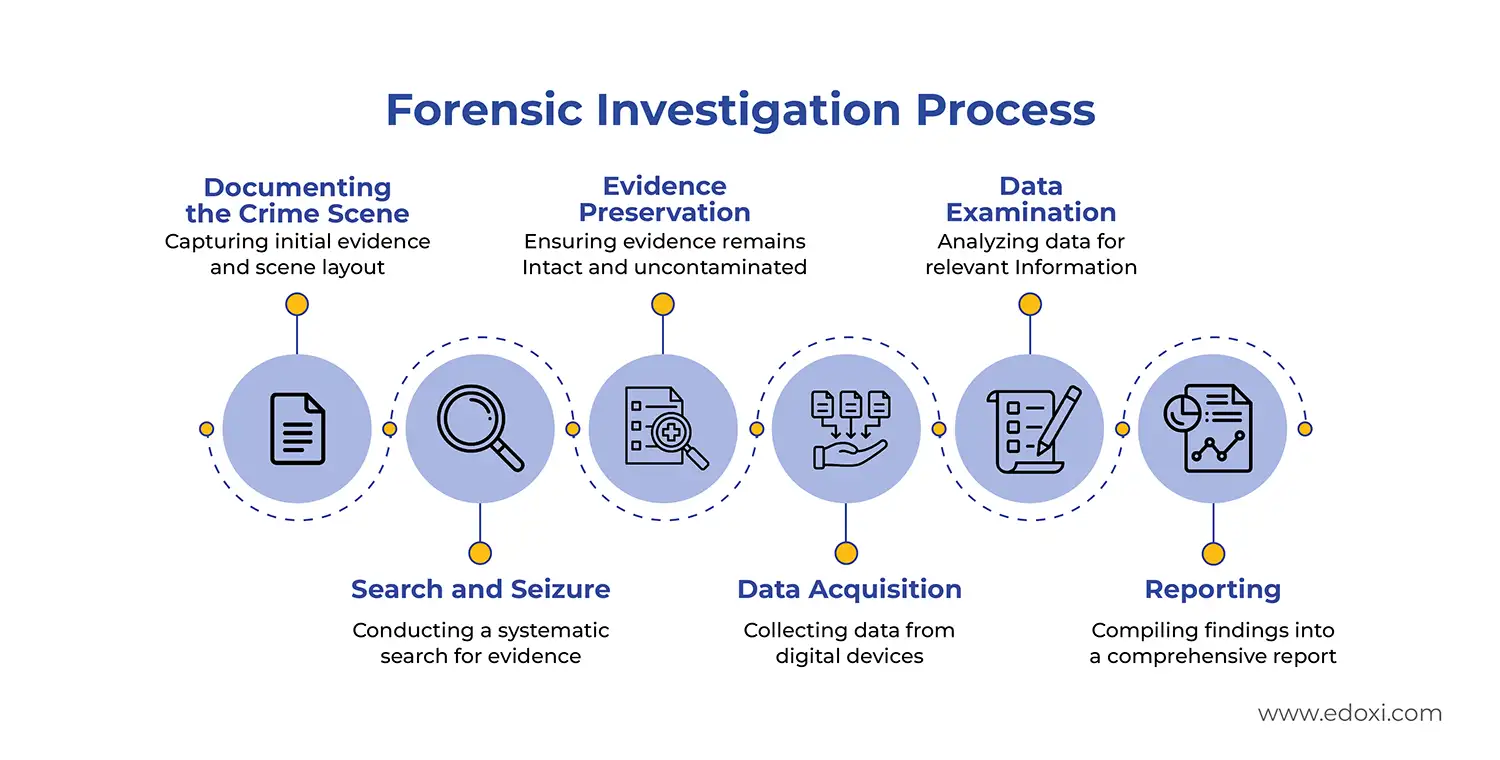
Forensic investigation processes

The program also includes preparation for the EC-Council Computer Hacking Forensic Investigator (CHFI) exam, including a mock test to assess readiness and strengthen performance. Here are the key exam details of the  CHFI Course:

Upon successful completion of CHFI classes, you are fully equipped to conduct forensic examinations. Exam Details

Exam Criteria Details
Exam Code 312-49
Exam Name Computer Hacking Forensic Investigator
Duration 4 hours
Passing Score 60%
Certification Validity 3 years
Recertification Retake the exam before expiration
Exam Administration Authority EC-Council


This certification helps you analyse digital evidence, prepare court-admissible reports, and provide expert testimony. 

Our course enables professionals to apply digital forensic techniques across multiple industries to investigate incidents, strengthen security, support legal processes, and manage cyber risks effectively.

Computer Hacking Forensic Investigator Course Applications Across Industries

Domains Practical Applications
Cybersecurity Analyse cyber threats using forensic techniques, and strengthen security incident response frameworks
Law Enforcement Conduct cybercrime investigations, preserve and analyse digital evidence for legal cases
Legal Compliance Ensure adherence to data protection laws (GDPR, CCPA), and investigate regulatory non-compliance issues
Digital Forensics Recover and analyse forensic evidence from compromised systems, detect and neutralise malware threats
IT Security Investigate internal and external security breaches, and strengthen IT security policies with forensic insights
Corporate Risk Management Identify cybersecurity risks affecting corporate operations, and implement forensic-based risk mitigation strategies

 Edoxi also offers corporate training for organisations, with customised delivery models designed to meet the specific requirements of enterprises and governments in cybersecurity. The CHFI course fee is competitively structured, offering excellent value through expert-led instruction, hands-on labs, and an internationally recognised certification.

Key Features of Edoxi's CHFI Traning

Professional Forensic Tool Training

Gain hands-on experience with industry-standard forensic tools such as Autopsy, FTK Imager, and Redline, helping you conduct professional digital investigations with confidence.

Multi-Platform Forensic Analysis

Perform forensic examinations across Windows, Linux, and macOS operating systems, allowing you to broaden your investigation capabilities.

Data Recovery and Analysis Labs

Build practical skills in recovering deleted data, analysing file systems, and extracting critical digital evidence, enabling you to handle real investigation scenarios.

Hex Analysis and Data Conversion

Develop expertise in hex editing with the HxD tool and carry out binary, decimal, and hexadecimal data conversions to support your in-depth data examination.

Evidence Documentation Training

Learn accurate documentation methods, maintain proper chain of custody, and prepare court-admissible forensic reports that strengthen your professional credibility.

CHFI Mock Test

Assess your exam readiness through a CHFI mock test and approach the certification exam with greater confidence.

Who Can Join Our CHFI Course in Kuwait?

Cybersecurity Professionals

IT security specialists and analysts who want to expand their skills into digital forensics and evidence collection.

Law Enforcement Personnel

Police officers, detectives, and investigators involved in handling digital evidence and investigating cybercrimes.

IT Security Analysts

Network and security professionals aiming to strengthen incident response through forensic investigation skills.

Legal Professionals

Lawyers, legal consultants, and paralegals who work on cybercrime cases and need knowledge of digital evidence procedures.

IT Auditors and Compliance Officers

Professionals responsible for regulatory compliance and internal security breach investigations.

Corporate Security Teams

Enterprise security professionals looking to develop in-house capabilities for incident response and cyber investigations.

CHFI Course Modules

Module 1: Computer Forensics in Today’s World
  • Chapter 1.1: Introduction to Computer Forensics

    • Lesson 1.1.1: Fundamentals of Computer Forensics
    • Lesson 1.1.2: Scope of Computer Forensics
    • Lesson 1.1.3: Role of Various Processes and Technologies in Computer Forensics
  • Chapter 1.2: Cybercrimes and Investigation Procedures

    • Lesson 1.2.1: Types of Cybercrimes
    • Lesson 1.2.2: Cybercrime Investigation
    • Lesson 1.2.3: Cyber Attribution
  • Chapter 1.3: Digital Evidence and eDiscovery

    • Lesson 1.3.1: Types and Role of Digital Evidence
    • Lesson 1.3.2: Sources of Potential Evidence
    • Lesson 1.3.3: Federal Rules of Evidence (United States)
  • Chapter 1.4: Forensic Readiness and Incident Response

    • Lesson 1.4.1: Forensic Readiness and Business Continuity
    • Lesson 1.4.2: Incident Response Process Flow
  • Chapter 1.5: Challenges and Responsibilities in Computer Forensics

    • Lesson 1.5.1: Roles and Responsibilities of a Forensic Investigator
    • Lesson 1.5.2: Challenges Faced in Investigating Cybercrimes
    • Lesson 1.5.3: Code of Ethics in Computer Forensics
  • Chapter 1.6: Standards and Legal Compliance in Computer Forensics

    • Lesson 1.6.1: Standards and Best Practices Related to Computer Forensics
    • Lesson 1.6.2: ISO Standards in Computer Forensics
    • Lesson 1.6.3: Computer Forensics and Legal Compliance
  • Chapter 1.7: Emerging Trends in Computer Forensics

    • Lesson 1.7.1: Role of Artificial Intelligence in Computer Forensics
    • Lesson 1.7.2: Forensics Automation and Orchestration
Module 2: Computer Forensics Investigation Process
  • Chapter 2.1: Overview of the Forensic Investigation Process

    • Lesson 2.1.1: Importance of the Forensic Investigation Process
    • Lesson 2.1.2: Phases Involved in the Computer Forensics Investigation Process
  • Chapter 2.2: First Response in Computer Forensics

    • Lesson 2.2.1: First Response and Its Significance
    • Lesson 2.2.2: Roles of a First Responder
    • Lesson 2.2.3: First Response in Different Situations
  • Chapter 2.3: Pre-Investigation Phase

    • Lesson 2.3.1: Setting Up a Computer Forensics Lab
    • Lesson 2.3.2: Understanding Hardware and Software Requirements of a Forensics Lab
    • Lesson 2.3.3: Building Security Content for Forensic Investigations
  • Chapter 2.4: Investigation Phase

    • Lesson 2.4.1: Documenting the Electronic Crime Scene
    • Lesson 2.4.2: Search and Seizure Procedures
    • Lesson 2.4.3: Evidence Preservation and Data Acquisition
    • Lesson 2.4.4: Case Analysis and Forensic Examination
  • Chapter 2.5: Post-Investigation Phase

    • Lesson 2.5.1: Reporting Findings and Documentation
    • Lesson 2.5.2: Testifying as an Expert Witness
Module 3: Understanding Hard Disks and File Systems
  • Chapter 3.1: Fundamentals of Storage Devices

    • Lesson 3.1.1: Hard Disk Drive (HDD) and Solid-State Drive (SSD)
    • Lesson 3.1.2: Disk Interfaces and Their Characteristics
  • Chapter 3.2: Disk Structures and Boot Process

    • Lesson 3.2.1: Logical Structure of Disks
    • Lesson 3.2.2: Windows Boot Process
    • Lesson 3.2.3: macOS Boot Process
    • Lesson 3.2.4: Linux Boot Process
  • Chapter 3.3: File Systems of Different Operating Systems

    • Lesson 3.3.1: Windows File Systems (FAT, NTFS)
    • Lesson 3.3.2: Linux File Systems (EXT, XFS, Btrfs)
    • Lesson 3.3.3: macOS File Systems (HFS+, APFS)
  • Chapter 3.4: File System Analysis

    • Lesson 3.4.1: File System Timeline Creation and Analysis
    • Lesson 3.4.2: File System Recovery Techniques
  • Chapter 3.5: Storage and Encoding Standards

    • Lesson 3.5.1: RAID Storage Systems
    • Lesson 3.5.2: Differences Between NAS and SAN
    • Lesson 3.5.3: Character Encoding Standards
  • Chapter 3.6: Analysing File Formats

    • Lesson 3.6.1: Introduction to Hex Editors
    • Lesson 3.6.2: PDF File Analysis
    • Lesson 3.6.3: Word File Analysis
    • Lesson 3.6.4: PowerPoint File Analysis
    • Lesson 3.6.5: Excel File Analysis
Module 4: Data Acquisition and Duplication
  • Chapter 4.1: Introduction to Data Acquisition

    • Lesson 4.1.1: Importance of Data Acquisition in Forensics
    • Lesson 4.1.2: Live Acquisition vs. Dead Acquisition
    • Lesson 4.1.3: Data Acquisition Formats
  • Chapter 4.2: eDiscovery and Collection Methodologies

    • Lesson 4.2.1: Overview of eDiscovery
    • Lesson 4.2.2: eDiscovery Collection Methodologies
    • Lesson 4.2.3: eDiscovery Tools
  • Chapter 4.3: Data Acquisition Methodology

    • Lesson 4.3.1: Determining the Data Acquisition Method
    • Lesson 4.3.2: Selecting the Right Data Acquisition Tool
    • Lesson 4.3.3: Sanitising Target Media
  • Chapter 4.4: Data Acquisition Process

    • Lesson 4.4.1: Acquiring Volatile Data
    • Lesson 4.4.2: Enabling Write Protection on Evidence Media
    • Lesson 4.4.3: Acquiring Non-Volatile Data
  • Chapter 4.5: Validating and Preparing Data for Examination

    • Lesson 4.5.1: Planning for Contingencies in Data Acquisition
    • Lesson 4.5.2: Validating Data Acquisition
    • Lesson 4.5.3: Preparing an Image for Examination
  • Chapter 4.6: Digital Forensic Imaging Tools

    • Lesson 4.6.1: Overview of Digital Forensic Imaging Tools
    • Lesson 4.6.2: Best Practices for Data Duplication
Module 5: Defeating Anti-Forensics Techniques
  • Chapter 5.1: Understanding Anti-Forensics

    • Lesson 5.1.1: Challenges to Forensics from Anti-Forensics
    • Lesson 5.1.2: Common Anti-Forensics Techniques
  • Chapter 5.2: Data Deletion and Recovery

    • Lesson 5.2.1: Data/File Deletion Techniques
    • Lesson 5.2.2: Recycle Bin Forensics in Windows
    • Lesson 5.2.3: File Carving Techniques
  • Chapter 5.3: Partition and Password Recovery

    • Lesson 5.3.1: Recovering Deleted Partitions and Their Contents
    • Lesson 5.3.2: Password Cracking Tools and Techniques
    • Lesson 5.3.3: Bypassing Windows User Passwords
  • Chapter 5.4: Hidden Data and Obfuscation Techniques

    • Lesson 5.4.1: Steganography and Hidden Data in File System Structures
    • Lesson 5.4.2: Alternate Data Streams (ADS) and Their Detection
    • Lesson 5.4.3: Trail Obfuscation Techniques
  • Chapter 5.5: Advanced Anti-Forensics Techniques

    • Lesson 5.5.1: Overwriting Data and Metadata
    • Lesson 5.5.2: Encryption and Its Impact on Forensics
    • Lesson 5.5.3: Program Packers and Footprint Minimisation Techniques
Module 6: Windows Forensics
  • Chapter 6.1: Windows Forensics Methodology

    • Lesson 6.1.1: Understanding Windows Forensics
    • Lesson 6.1.2: Windows Artefacts and Evidence Collection
  • Chapter 6.2: Collecting Volatile and Non-Volatile Information

    • Lesson 6.2.1: Collecting Volatile Information from Windows Systems
    • Lesson 6.2.2: Collecting Non-Volatile Information from Windows Systems
    • Lesson 6.2.3: Collecting Windows Domain Information
  • Chapter 6.3: Windows Memory and Registry Analysis

    • Lesson 6.3.1: Windows Memory Analysis Techniques
    • Lesson 6.3.2: Memory Forensics and Its Importance
    • Lesson 6.3.3: Windows Registry Analysis and Artefact Extraction
  • Chapter 6.4: Windows File and Metadata Analysis

    • Lesson 6.4.1: Examining Compressed Files in Windows
    • Lesson 6.4.2: Windows ShellBags and User Activity Tracking
    • Lesson 6.4.3: Analysing LNK Files and Jump Lists
  • Chapter 6.5: Web Browser and Application Forensics

    • Lesson 6.5.1: Web Browser Forensics and Evidence Collection
    • Lesson 6.5.2: Carving SQLite Database Files from Browsers
    • Lesson 6.5.3: Electron Application Forensics
  • Chapter 6.6: Windows Event Logs and Log Analysis

    • Lesson 6.6.1: Windows Event Logs and Their Forensic Importance
    • Lesson 6.6.2: Investigating Windows 11 Event Logs
    • Lesson 6.6.3: Windows Forensics Tools
Module 7: Linux and Mac Forensics
  • Chapter 7.1: Linux Forensics Methodology

    • Lesson 7.1.1: Understanding Linux Forensics
    • Lesson 7.1.2: Collecting Volatile Information in Linux
    • Lesson 7.1.3: Collecting Non-Volatile Information in Linux
  • Chapter 7.2: Linux Memory and File System Forensics

    • Lesson 7.2.1: Linux Memory Forensics Techniques
    • Lesson 7.2.2: Linux File System Analysis
    • Lesson 7.2.3: Investigating Linux Log Files
  • Chapter 7.3: Mac Forensics Methodology

    • Lesson 7.3.1: Understanding Mac Forensics
    • Lesson 7.3.2: Collecting Volatile Information in Mac Systems
    • Lesson 7.3.3: Collecting Non-Volatile Information in Mac Systems
  • Chapter 7.4: Mac Memory and File System Forensics

    • Lesson 7.4.1: Mac Memory Forensics and Artefact Extraction
    • Lesson 7.4.2: Mac File System Analysis (HFS+, APFS)
    • Lesson 7.4.3: Parsing Metadata on Spotlight
  • Chapter 7.5: Mac Forensic Tools and Log Analysis

    • Lesson 7.5.1: Investigating Mac Log Files
    • Lesson 7.5.2: Mac Directory Structures and Data Recovery
    • Lesson 7.5.3: Mac Forensics Tools
Module 8: Network Forensics
  • Chapter 8.1: Fundamentals of Network Forensics

    • Lesson 8.1.1: Understanding Network Forensics
    • Lesson 8.1.2: Types of Network-Based Evidence
    • Lesson 8.1.3: Postmortem and Real-Time Network Analysis
  • Chapter 8.2: Event Correlation and Indicators of Compromise (IoCs)

    • Lesson 8.2.1: Event Correlation Techniques
    • Lesson 8.2.2: Types of Event Correlation
    • Lesson 8.2.3: Identifying Indicators of Compromise (IoCs) from Network Logs
  • Chapter 8.3: Investigating Network Traffic

    • Lesson 8.3.1: Network Traffic Analysis Methods
    • Lesson 8.3.2: Tools for Investigating Network Traffic
    • Lesson 8.3.3: Security Information and Event Management (SIEM) Solutions
  • Chapter 8.4: Log Analysis for Network Forensics

    • Lesson 8.4.1: Analysing Firewall Logs
    • Lesson 8.4.2: Analysing IDS/IPS Logs and Honeypot Data
    • Lesson 8.4.3: Analysing Router, DHCP, VPN, and DNS Server Logs
  • Chapter 8.5: Wireless Network Forensics

    • Lesson 8.5.1: Types of Wireless Evidence
    • Lesson 8.5.2: Wireless Network Forensics Process
    • Lesson 8.5.3: Detecting Rogue Access Points and Wi-Fi Attacks
  • Chapter 8.6: Investigating Network Attacks

    • Lesson 8.6.1: Identifying and Investigating Network Attacks
    • Lesson 8.6.2: Analysing Wireless Packet Captures
    • Lesson 8.6.3: Tools for Investigating Wireless Network Traffic
Module 9: Malware Forensics
  • Chapter 9.1: Understanding Malware and Its Impact

    • Lesson 9.1.1: Introduction to Malware and Its Threats
    • Lesson 9.1.2: Different Ways Malware Enters a System
    • Lesson 9.1.3: Components of Malware
  • Chapter 9.2: Malware Forensic Analysis

    • Lesson 9.2.1: Malware Forensic Artefacts and Evidence Collection
    • Lesson 9.2.2: Setting Up a Controlled Malware Analysis Lab
    • Lesson 9.2.3: Malware Analysis Tools
  • Chapter 9.3: Static Malware Analysis

    • Lesson 9.3.1: Understanding Static Malware Analysis
    • Lesson 9.3.2: Analysing Suspicious Documents (PDF, Microsoft Office)
    • Lesson 9.3.3: Extracting and Examining Malware Code
  • Chapter 9.4: Behavioural Malware Analysis

    • Lesson 9.4.1: System Behaviour Analysis of Malware
    • Lesson 9.4.2: Network Behaviour Analysis of Malware
    • Lesson 9.4.3: Investigating Malware Persistence Mechanisms
  • Chapter 9.5: Ransomware Analysis

    • Lesson 9.5.1: Introduction to Ransomware Forensics
    • Lesson 9.5.2: Analysing BlackCat (ALPHV) Ransomware
    • Lesson 9.5.3: Ransomware Attack Mitigation and Recovery
Module 10: Investigating Web Attacks
  • Chapter 10.1: Introduction to Web Application Forensics

    • Lesson 10.1.1: Understanding Web Application Forensics
    • Lesson 10.1.2: Indicators of a Web Attack
    • Lesson 10.1.3: OWASP Top 10 Application Security Risks – 2021
  • Chapter 10.2: Web Server Log Analysis

    • Lesson 10.2.1: IIS Web Server Architecture and Log Analysis
    • Lesson 10.2.2: Apache Web Server Logs and Their Importance
    • Lesson 10.2.3: Tools for Analysing IIS and Apache Logs
  • Chapter 10.3: Investigating Web-Based Attacks

    • Lesson 10.3.1: Investigating Cross-Site Scripting (XSS) Attacks
    • Lesson 10.3.2: Investigating SQL Injection Attacks
    • Lesson 10.3.3: Investigating Path/Directory Traversal Attacks
  • Chapter 10.4: Advanced Web Attack Investigations

    • Lesson 10.4.1: Investigating Command Injection Attacks
    • Lesson 10.4.2: Investigating XML External Entity (XXE) Attacks
    • Lesson 10.4.3: Investigating Brute-Force Attacks
Module 11: Dark Web Forensics
  • Chapter 11.1: Introduction to the Dark Web

    • Lesson 11.1.1: Understanding the Dark Web and Its Structure
    • Lesson 11.1.2: Differences Between the Surface Web, Deep Web, and Dark Web
    • Lesson 11.1.3: Challenges in Investigating Dark Web Activities
  • Chapter 11.2: Tor Browser and Anonymity

    • Lesson 11.2.1: Working with the Tor Browser
    • Lesson 11.2.2: Identifying Traces of Tor Browser Usage
    • Lesson 11.2.3: Investigating Tor Network Traffic
  • Chapter 11.3: Dark Web Forensic Techniques

    • Lesson 11.3.1: Identifying Dark Web Artefacts in Digital Evidence
    • Lesson 11.3.2: Analysing Dark Web-Related Memory Dumps
    • Lesson 11.3.3: Forensic Analysis of Memory Dumps to Examine Email Artefacts
Module 12: Cloud Forensics
  • Chapter 12.1: Introduction to Cloud Computing and Forensics

    • Lesson 12.1.1: Understanding Cloud Computing and Its Security Challenges
    • Lesson 12.1.2: Uses and Importance of Cloud Forensics
    • Lesson 12.1.3: Separation of Responsibilities in the Cloud
  • Chapter 12.2: Cloud Security and Compliance

    • Lesson 12.2.1: OWASP Top 10 Cloud Security Risks
    • Lesson 12.2.2: Cloud Forensics Challenges and Legal Considerations
    • Lesson 12.2.3: Cloud Data Storage and Encryption Methods
  • Chapter 12.3: Amazon Web Services (AWS) Forensics

    • Lesson 12.3.1: AWS Fundamentals and Data Storage
    • Lesson 12.3.2: Logs in AWS and Their Forensic Importance
    • Lesson 12.3.3: Forensic Acquisition of Amazon EC2 Instances
  • Chapter 12.4: Microsoft Azure Forensics

    • Lesson 12.4.1: Microsoft Azure Fundamentals
    • Lesson 12.4.2: Logs and Data Storage in Azure
    • Lesson 12.4.3: Forensic Acquisition of VMs in Azure
  • Chapter 12.5: Google Cloud Platform (GCP) Forensics

    • Lesson 12.5.1: Google Cloud Fundamentals
    • Lesson 12.5.2: Logs and Data Storage in Google Cloud
    • Lesson 12.5.3: Forensic Acquisition of Persistent Disk Volumes in GCP
  • Chapter 12.6: Investigating Cloud Security Incidents

    • Lesson 12.6.1: Investigating Google Cloud Security Incidents
    • Lesson 12.6.2: Investigating Google Cloud Container Security Incidents
    • Lesson 12.6.3: Investigating Google Cloud VM-Based Security Incidents
Module 13: Email and Social Media Forensics
  • Chapter 13.1: Introduction to Email Forensics

    • Lesson 13.1.1: Understanding Email Communication and Its Components
    • Lesson 13.1.2: Parts of an Email Message and Their Forensic Relevance
    • Lesson 13.1.3: Common Email-Based Threats and Crimes
  • Chapter 13.2: Investigating Email Crimes

    • Lesson 13.2.1: Steps to Investigate Email Crimes
    • Lesson 13.2.2: Analysing Email Headers for Forensic Evidence
    • Lesson 13.2.3: Tracing Email Senders and Identifying Spoofing
  • Chapter 13.3: Legal Aspects of Email Crimes

    • Lesson 13.3.1: U.S. Laws Against Email Crime
    • Lesson 13.3.2: International Email Crime Regulations
    • Lesson 13.3.3: Compliance Standards for Email Investigations
  • Chapter 13.4: Social Media Forensics

    • Lesson 13.4.1: Understanding Social Media Crimes and Digital Footprints
    • Lesson 13.4.2: Extracting and Analysing Social Media Artefacts
    • Lesson 13.4.3: Tracking Social Media User Activities
  • Chapter 13.5: Social Network Analysis and Investigation Tools

    • Lesson 13.5.1: Constructing and Analysing Social Network Graphs
    • Lesson 13.5.2: Identifying Suspicious Activities on Social Media Platforms
    • Lesson 13.5.3: Social Media Forensics Tools
Module 14: Mobile Forensics
  • Chapter 14.1: Introduction to Mobile Forensics

    • Lesson 14.1.1: Understanding Mobile Device Forensics
    • Lesson 14.1.2: OWASP Top 10 Mobile Security Risks
    • Lesson 14.1.3: Challenges in Mobile Forensic Investigations
  • Chapter 14.2: Mobile Device Architecture and Boot Process

    • Lesson 14.2.1: Android OS Architecture and Boot Process
    • Lesson 14.2.2: iOS Architecture and Boot Process
    • Lesson 14.2.3: Mobile File System Structure
  • Chapter 14.3: Mobile Forensics Process

    • Lesson 14.3.1: Mobile Device Acquisition Techniques
    • Lesson 14.3.2: Investigating Cellular Network Data
    • Lesson 14.3.3: Phone Locks, Rooting, and Jailbreaking of Mobile Devices
  • Chapter 14.4: Data Acquisition Techniques

    • Lesson 14.4.1: Logical Acquisition on Mobile Devices
    • Lesson 14.4.2: Physical Acquisition of Mobile Devices
    • Lesson 14.4.3: Cloud Data Acquisition on Android and iOS
  • Chapter 14.5: Android and iOS Forensic Analysis

    • Lesson 14.5.1: Android Forensics and Data Recovery
    • Lesson 14.5.2: iOS Forensics and Analysing iOS Keychains
    • Lesson 14.5.3: Collecting and Analysing WhatsApp and Safari Artefacts
  • Chapter 14.6: Advanced Mobile Forensics Techniques

    • Lesson 14.6.1: JTAG Forensics and Flasher Boxes
    • Lesson 14.6.2: Static and Dynamic Analysis of APK Files
    • Lesson 14.6.3: Mobile Forensics Tools and Best Practices
Module 15: IoT Forensics
  • Chapter 15.1: Introduction to IoT Forensics

    • Lesson 15.1.1: Understanding IoT and Its Architecture
    • Lesson 15.1.2: Security Challenges in IoT Devices
    • Lesson 15.1.3: OWASP Top 10 IoT Security Threats
  • Chapter 15.2: IoT Forensics Process

    • Lesson 15.2.1: IoT Evidence Collection and Preservation
    • Lesson 15.2.2: Challenges in IoT Forensics
    • Lesson 15.2.3: IoT Data Acquisition Techniques
  • Chapter 15.3: Investigating IoT Devices

    • Lesson 15.3.1: Wearable IoT Device Forensics (Smartwatches)
    • Lesson 15.3.2: IoT Device Forensics: Smart Speakers (Amazon Echo)
    • Lesson 15.3.3: Extracting and Analysing Data from Drones/UAVs
  • Chapter 15.4: Hardware-Level IoT Forensics

    • Lesson 15.4.1: JTAG and Chip-Off Forensics Techniques
    • Lesson 15.4.2: Memory Dump Analysis of IoT Devices
    • Lesson 15.4.3: Reverse Engineering IoT Firmware
  • Chapter 15.5: IoT Forensic Tools and Best Practices

    • Lesson 15.5.1: Tools for Investigating IoT Devices
    • Lesson 15.5.2: IoT Forensics Frameworks and Methodologies
    • Lesson 15.5.3: Legal and Compliance Issues in IoT Investigations

Download CHFI Course Brochure

Lab Activities and Practical Sessions in the CHFI Course in Kuwait

Our CHFI course in Kuwait offers hands-on learning in a fully equipped lab, letting you investigate cybercrimes, collect digital evidence, and analyse data on Windows, Linux, and Mac systems. Here are the lab activities:

Windows, Linux, and Mac Forensic Analysis

In this activity, you perform forensic investigations on Windows, Linux, and Mac systems. Learn techniques to extract, preserve, and analyse digital evidence from each environment.

Data Formatting in Hex

During this activity, you use HxD and other forensic tools to edit hexadecimal data. Develop skills for recovering deleted or corrupted files through low-level analysis.

Conversions: Binary, Decimal, and Hex

In this activity, you convert binary, decimal, and hexadecimal values accurately. Gain expertise in interpreting raw data for forensic investigations.

Forensic Imaging and Data Recovery

During this activity, you create forensic disk images and recover data from compromised storage devices. Learn to maintain data integrity while performing analysis for investigative purposes.

CHFI Course Outcome and Career Opportunities in Kuwait

Completing Edoxi’s AutoCAD MEP Training Course in Kuwait equips you with job-ready skills for designing, coordinating, and managing MEP systems in modern construction projects. Here are the major learning outcomes you can expect from the course:

Course Outcome Image
Design and model complete electrical systems, allowing you to develop accurate power plans, lighting layouts, and efficient circuit management strategies.
Develop HVAC systems with detailed duct routing, equipment placement, and system connections, enabling you to create coordinated and functional designs.
Create comprehensive plumbing layouts with fixture placement, piping networks, and correct connection types, helping you deliver code-compliant plumbing designs.
Use advanced drafting and annotation tools to build detailed blocks, attributes, and tags, giving you the ability to generate clear and professional MEP reports.
Implement effective layer management and view configurations, ensuring you can present and document MEP drawings to industry standards.
Collaborate efficiently across electrical, HVAC, and plumbing disciplines, helping you improve project coordination and overall workflow efficiency.

Career Opportunities After Our CHFI Course in Kuwait

  • Digital Forensic Analyst
  • Cybercrime Investigator
  • Incident Response Specialist
  • SOC (Security Operations Center) Analyst
  • Cybersecurity Analyst
  • Malware Analyst
  • Network Forensics Specialist
  • IT Security Auditor
  • Cybersecurity Consultant
  • Forensic Consultant / Expert Witness

Top Companies Hiring CHFI Professionals in Kuwait

  • ZainTech Cybersecurity
  • Factosecure
  • KNET
  • DigitalX
  • Trend Micro Kuwait
  • Help AG (Kuwait Operations)
  • BTAT Security
  • Fortinet Kuwait
  • National Bank of Kuwait (NBK)
  • Ooredoo Kuwait

CHFI Training Options

Classroom Training

  • 35-hours of live classroom training

  • Instructor-led CHFI training

  • EC-Council iLab hands-on practice

  • Small batches (3–5 participants)

  • Core digital forensics coverage

  • Real-time trainer support

Live Online Training

  • 35-hours of Live virtual CHFI sessions

  • Cloud-based lab access

  • Interactive tool demonstrations

  • Flexible schedules

  • Session recordings

Corporate Training

  • 5-day customised CHFI programme

  • On-site/online/hybrid delivery

  • Fly Me A Trainer option

  • End-to-end logistics support

  • Food and refreshments included

Do You Want a Customised Training for CHFI?

Get expert assistance in getting your CHFI Course customised!

How to Get CHFI Certified in Kuwait?

Here’s a four-step guide to becoming a certified CHFI professional.

Do You Want to be a Certified Professional in CHFI?

Join Edoxi’s CHFI Course

Why Choose Edoxi for CHFI Training in Kuwait

Among many available options, Edoxi stands out as a top choice. The following are the reasons why Edoxi’s CHFI classes in Kuwait are an ideal option for you:

Award-Winning EC-Council Training Center

Recognised as EC-Council ATC of the Year for 2023 and 2024, showcasing our excellence in cybersecurity and digital forensics education.

Top Corporate Portfolio in Cybersecurity Training

We have delivered CHFI and cybersecurity training to government entities and leading companies in the MENA region, including UAE Federal Government, Saudi Aramco, Reserve Bank of Zimbabwe, and more.

Substantial Exam Cost Savings

Benefit from discounted CHFI exam vouchers and special rates for the practical certification exam.

Cloud-Based Learning Infrastructure

Practice in advanced cloud labs featuring real-world scenarios, vulnerabilities, and pre-configured forensic and security tools.

Comprehensive Learning Support

Follow EC-Council’s official curriculum, hands-on exercises, and expert instruction to build practical skills.

Proven Track Record

Over 10,000 professionals trained with consistent success in certification achievements and career advancement.

students-image

Edoxi is Recommended by 95% of our Students

Meet Our Mentor

Our mentors are leaders and experts in their fields. They can challenge and guide you on your road to success!

mentor-image

Satendra K

Satendra Singh Khari is a renowned cybersecurity expert and the Chief Technology Officer at Edoxi, where he leads the CEH v13 AI program. With over 12 years of experience, he has trained more than 10,000 professionals and earned recognition in the Circle of Excellence for 2023 and 2024. Mr. Khari holds multiple industry certifications, including CISSP, CISM, CEH, CPENT, and CREST, which showcase his expertise in vulnerability assessment, penetration testing, and incident handling.

His practical insights, gained during his tenure as Head of Information Security in Malaysia, enhance the learning experience by providing students with essential technical skills and a clear path to career advancement. Recognized as a leader in his field, he has received the Internet 2.0 Outstanding Leadership Award for three consecutive years (2022-2024), reflecting his dedication to empowering the next generation of cybersecurity professionals.

Locations Where Edoxi Offers CHFI Course

Here is the list of other major locations where Edoxi offers CHFI Course

FAQ

What are the prerequisites for the CHFI Course in Kuwait?
Basic knowledge of computer networks, operating systems, and cybersecurity fundamentals is recommended. Prior experience in IT or security roles can be helpful but is not mandatory for attending CHFI training in Kuwait.
How long is the CHFI Course in Kuwait?
The CHFI course typically spans 5–10 days, depending on the delivery format (classroom, online, or corporate training) and includes hands-on lab exercises.
How is the CHFI course different from other cybersecurity courses?
The CHFI course focuses specifically on digital forensic investigation techniques rather than general security. You will gain skills in evidence collection, preservation, and analysis that are directly applicable to cybercrime investigations and legal proceedings.
What job opportunities will a CHFI certification open for me in Kuwait?
Completing CHFI classes qualifies you for roles such as Digital Forensics Analyst, Computer Crime Investigator, IT Security Forensic Specialist, and Forensic Consultant.
What salary can I expect after obtaining CHFI certification in Kuwait?
  • Entry-level digital forensics roles: ~600–700 KWD/month
  • Mid-level professionals with experience: ~850–1,300 KWD/month
  • Senior forensic specialists and managers: ~1,500–2,500 KWD/month
  • Salaries vary depending on experience, organisation, and role.
Is the CHFI Course suitable for law enforcement professionals?
Yes. CHFI training is ideal for law enforcement officers, detectives, and investigators who handle digital evidence and need standardised procedures for forensically sound examinations.
Can we arrange corporate CHFI training for our security team?
Yes. Edoxi offers customised corporate CHFI training in Kuwait, with flexible schedules. Options include on-site training using our “Fly Me a Trainer” service or live online sessions for distributed teams.
What types of investigations will I be prepared to handle after CHFI certification?
You will be equipped to handle data breaches, malware attacks, insider threats, and other cybercrimes. The course covers forensic examination of computer systems, networks, mobile devices, and cloud environments.
How does Edoxi’s CHFI certification enhance my career prospects?
Edoxi’s CHFI certification is one of the best recognised digital forensics credentials in Kuwait, validating your practical expertise in cyber investigations. It helps professionals in Kuwait secure higher-paying roles and advance into positions such as Forensics SME, Digital Forensics Consultant, or IT Security Manager.
Are practical labs included in CHFI training in Kuwait?
Yes. CHFI classes include hands-on exercises in EC-Council’s iLab environment, allowing you to practice real-world forensic investigation scenarios and strengthen practical skills.
How long is the CHFI certification valid?
The CHFI certification is valid for three years. You can renew it by completing EC-Council’s continuing education activities or by recertifying through an exam.
Is CHFI recognised by industry and employers?
Absolutely. CHFI training and certification is recognised globally by governments, law enforcement, and top IT security organisations, making it a credible credential for cybersecurity and forensic roles.